
Customer tags in a product quiz: Klaviyo + Shopify orders
Customer tags activate quiz answers in Klaviyo (3x revenue per send) and on Shopify orders. The full Shopify + Klaviyo playbook with a haircare example.
A product recommendation quiz captures the customer’s stated preferences (zero-party data) on a scale a popup never can: 5 to 10 structured signals per completion, every one of them declared by the customer with consent. But the data is dormant until it’s activated, and the activation key is customer tags. Each chosen answer’s tag flows simultaneously into Klaviyo as a profile property (where it powers segmented email and SMS flows earning 3x the revenue per recipient of generic sends, Klaviyo benchmark) and onto every Shopify order and customer record (where the CS team, fulfilment team and Shopify Flow automations can read them). This article walks through why the three layers (quiz → customer tags → Klaviyo + Shopify orders) work as a system, and exactly how to wire each layer up.
The worked example below is a haircare store, but the same architecture applies to skincare, supplements, cosmetics, pets, food and any catalogue deep enough to justify personalised recommendations.
Quick answer
Customer tags transform raw quiz answers into structured labels that activate downstream. On every completion, each chosen answer's tag flows into Klaviyo as a profile property AND onto the Shopify order Notes plus customer record at the same time.
The Klaviyo side powers segmented email and SMS flows that earn 3x the revenue per recipient of generic sends. The Shopify side gives the CS team, fulfilment team and Shopify Flow automations context they couldn't get any other way. A typical quiz generates 5 to 10 tags per completion, enough granularity that no two customers receive the same generic email again.
What you'll learn
- 01Why customer tags are the activation key that turns one quiz completion into months of compounding revenue.
- 02How to create and link tags in the RevenueHunt Quiz Builder (Built for Shopify + Legacy/multi-platform paths).
- 03How to route customer tags and quiz answers to Shopify Orders and the Customers list (BFS automatic + Legacy Connect tab).
- 04How to connect Klaviyo and build tag-driven segments that turn the data into 3x revenue per recipient.
- 05The full haircare playbook: tags → Shopify orders → Klaviyo segments → tailored campaigns.
- 06A quarterly review workflow to keep tags accurate and segments performing over time.
For the broader strategy of why this segmentation is the highest-leverage thing your quiz does, see how Klaviyo segmentation unlocks once zero-party data lands in profiles. For the foundations of the quiz itself, see how to build a successful product recommendation quiz.
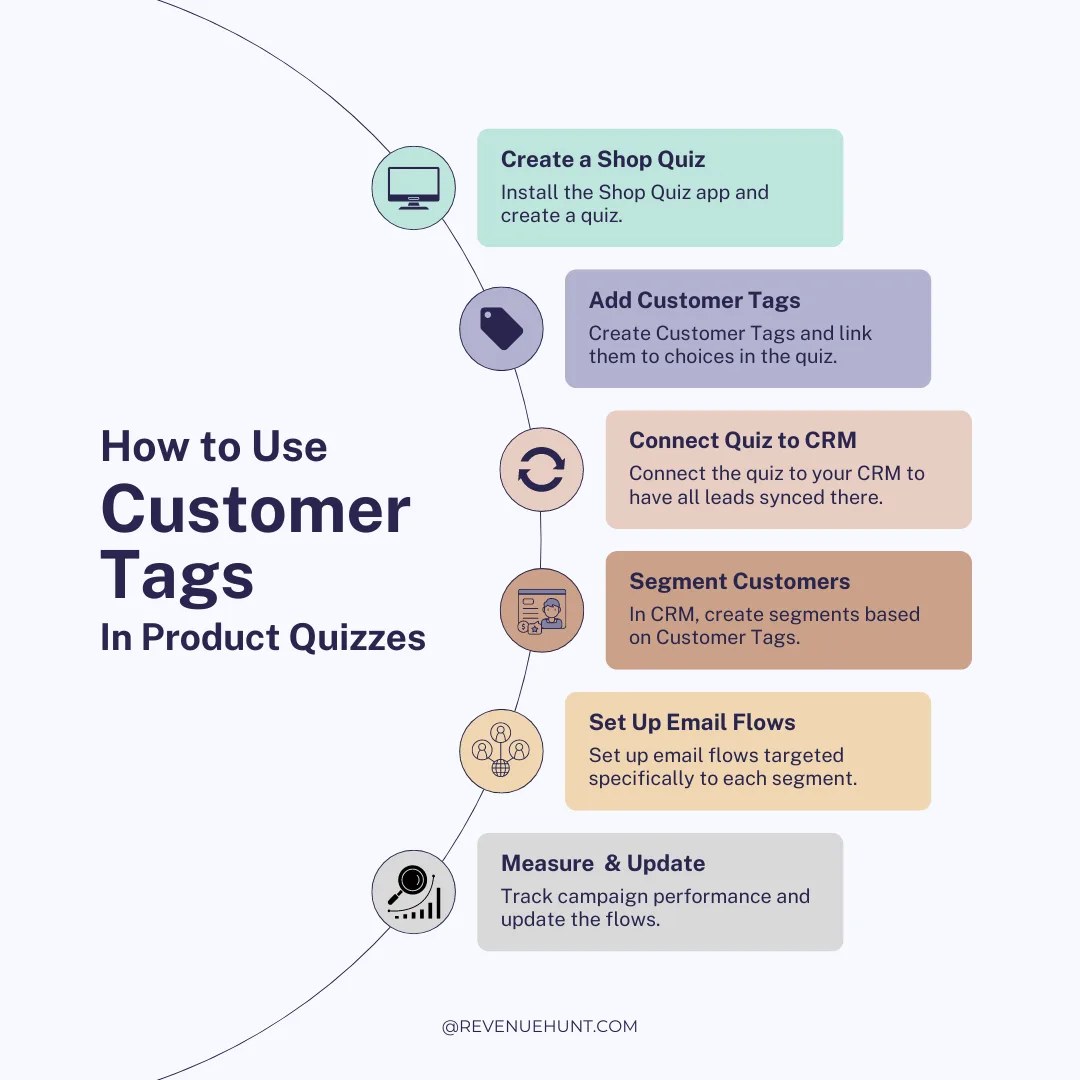
Fig. 01 How customer tags compound: every quiz answer becomes a tag, every tag flows to two destinations at once (Klaviyo profile + Shopify order/customer), every destination unlocks a different downstream revenue mechanic. Five answers in the quiz produce a profile a generic email-marketing list cannot build.
Table of contents:
- Why customer tags are the activation key
- Step 1: Create customer tags in the Quiz Builder
- Step 2: Route customer tags to Shopify Orders and Customers
- Step 3: Connect Klaviyo and build tag-driven segments
- The haircare playbook: end to end
- A quarterly review process for tags and segments
- Frequently asked questions
- Where this fits
Why customer tags are the activation key
A product recommendation quiz captures something a popup, a behavioural tracker or a paid-ads pixel cannot: the customer’s declared preferences. Hair type, skin concern, budget tier, gift-or-self, ingredient sensitivities, fitness goal. Five to ten structured signals per completion, every one stated explicitly with consent. This is zero-party data, and it survives every privacy update because the customer told you directly.
But the data sits dormant until it’s activated. The raw record “this person answered Curly Hair, Dry Hair and Anti-Frizz” doesn’t drive revenue by itself. It only drives revenue when it lands somewhere downstream that can act on it. Three destinations matter, and customer tags are how the data reaches all three at once.
Klaviyo (segmented email and SMS). Once a customer’s quiz tags become Klaviyo profile properties, every flow and campaign you build can reference them. The welcome series for the Curly Hair + Dry Hair + Anti-Frizz segment is a completely different email from the welcome series for the Straight Hair + Damage + Repair segment, even when the brand and the products are identical. The numbers behind this aren’t marginal. Segmented Klaviyo campaigns earn over 3x the revenue per recipient of generic sends (Klaviyo segmentation benchmark), and across the RevenueHunt platform 1 in 5 quiz-attributed orders lands more than 30 days after the quiz (2026 benchmark report). That long tail is what the segmentation captures.
Shopify order Notes (the CS and fulfilment teams). When a quiz-attributed order arrives in Shopify, the full quiz answer set attaches as Notes on the order. The CS team responding to a post-purchase question has the customer’s stated preferences in front of them; the fulfilment team can see the routine the order represents; post-purchase email flows can reference the original quiz answers explicitly. The same Notes also power Shopify Flow triggers that fire on order tag combinations.
Shopify customer record (downstream Shopify apps). Every quiz answer’s customer tag also lands on the Shopify customer profile, separately from the order. The tag is then available across Shopify Flow, Shopify Email, third-party loyalty apps, Shopify Markets logic, and any app that reads the Shopify tag system. One quiz completion writes one piece of structured data into every downstream tool in your stack.
Why this stack compounds (RevenueHunt + Klaviyo benchmarks)
3x
revenue per recipient on segmented Klaviyo campaigns vs generic sends
1 in 5
quiz-attributed orders land more than 30 days after the quiz
71%
of top-converting quizzes collect email as part of the flow (75% of those make it required)
The three layers compound. Each one multiplies the value of the one underneath it. The quiz captures the data; the tags structure it; Klaviyo segments it for outbound communication; Shopify orders and customer records expose it to the operational side of the business. Strip any one layer out and the others underperform: a quiz with no tags is unsegmentable; tags without Klaviyo never reach the customer’s inbox; tags without Shopify routing never reach the CS team or the fulfilment team. The system is what produces the lift, not any single component.
This is why the rest of this guide treats customer tags as the central concept and walks through each of the three destinations (Quiz Builder → Shopify orders → Klaviyo) as discrete steps. Build the three layers in order, then run the haircare playbook at the end to see them work together.
Step 1: Create customer tags in the Quiz Builder
What a customer tag is: a structured label you attach to an individual quiz answer choice. When a customer picks a choice that carries a tag, that tag is added to their profile on every downstream destination automatically. A single quiz typically attaches 5 to 10 tags per completion across attributes like hair type, concerns, goals, preferences and budget tier.
The setup flow differs slightly between the Built for Shopify version (per-choice Settings panel) and the Shopify Legacy / WooCommerce / Magento / BigCommerce / Standalone versions (a dedicated Customer Tags section in the Quiz Builder). Both produce the same downstream behaviour; only the UI differs.
On Built for Shopify
- Open the Quiz Builder and go to Questions.
- Select a multiple-choice question, then click the specific answer choice you want to tag.
- Open the Choice Settings panel, find the Customer tags section and click to expand it.
- Click Search or create tags. Either pick an existing tag from the list, or start typing to create a new one.
- Confirm by clicking Create new tag. Linked tags appear as grey labels below the input field.
Repeat for every choice that should carry a tag. Link the same tag to multiple choices when the same audience should receive the same downstream treatment (e.g. both “Frizz” and “Anti-frizz styling” answer choices can share the Anti-Frizz tag). Full reference: Customer Tags docs (Built for Shopify tab).
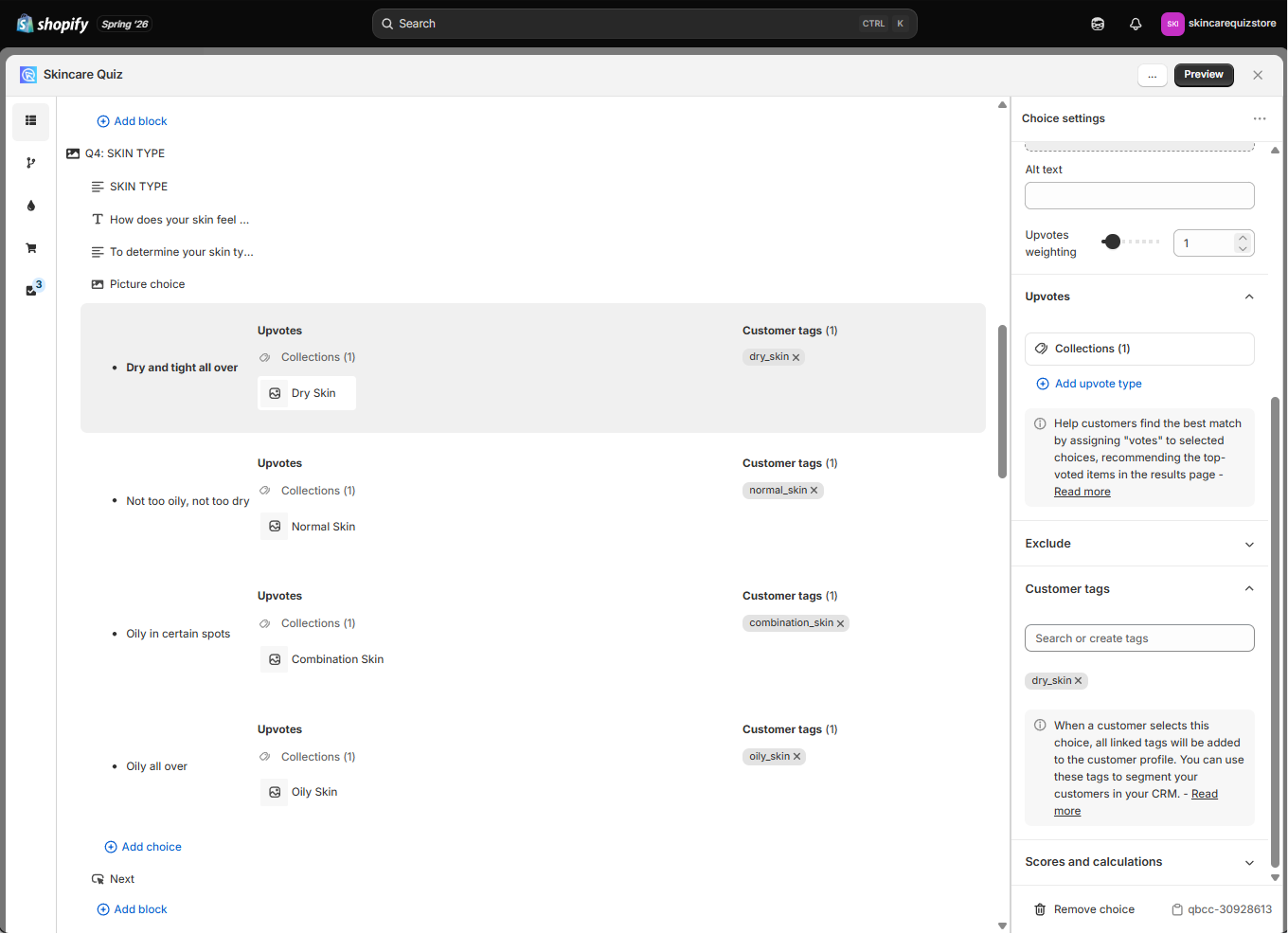
Fig. 02 The Built for Shopify Choice Settings panel. Customer tags are attached inline per answer choice; the grey labels below the input field show every tag currently linked to the selected choice. Editing tags here updates the live quiz immediately.
On Shopify Legacy, WooCommerce, Magento, BigCommerce and Standalone
The older versions use a dedicated Customer Tags section in the Quiz Builder rather than per-choice settings panels.
-
Open the Customer Tags section of the Quiz Builder.
-
Find the quiz choice you want to tag in the list.
-
Type the tag name into the input bar next to the choice and confirm by clicking Add this as a new customer tag.
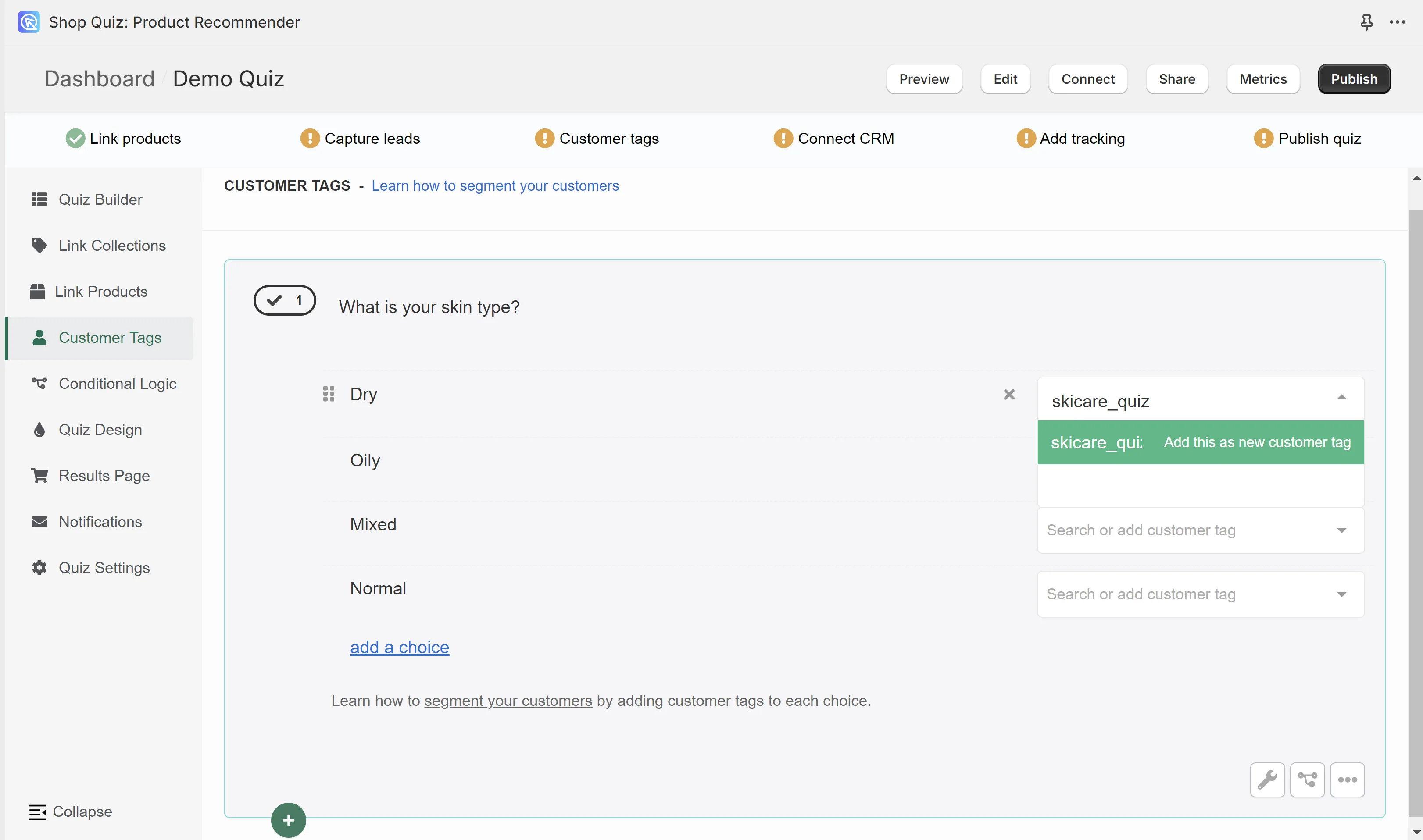
Fig. 03 The Customer Tags section on Shopify Legacy and the multi-platform versions. Tags are added via the input bar next to each quiz choice; once created, a tag becomes selectable for any other choice across the quiz.
-
Once a tag exists, it becomes available as a selectable option for any other choice across the quiz. There’s no limit on tags per choice or choices per tag.
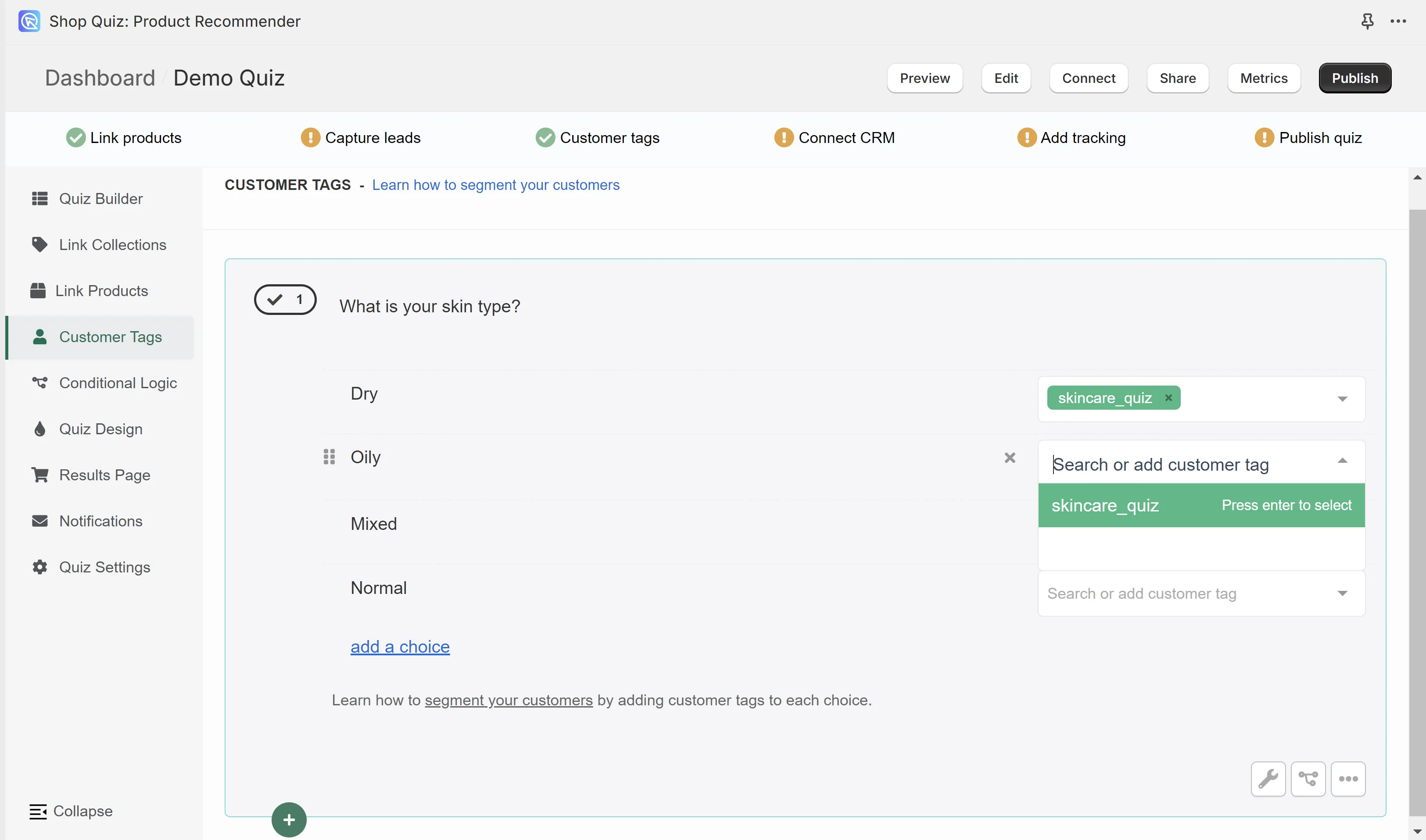
Fig. 04 Tag confirmation state once a customer tag is linked to a quiz choice. The green confirmation is the signal that the tag will flow into Klaviyo on every completion that touches this choice, and onto the Shopify customer record on every captured lead.
Tag-naming conventions worth following
A few practical rules that keep the tag system maintainable as the quiz grows:
- Use human-readable labels (“Curly Hair”, not “ht_curly_01”). The tag will surface in Klaviyo segment editors, on Shopify customer records and in CS tickets. Make it obvious what it means.
- Keep tag names stable across quiz revisions. If you rename a tag, every existing Klaviyo segment filtering on the old name silently breaks.
- Reuse the same tag across equivalent choices. “Curly Hair” might apply to a hair-type question, a hair-goal question and a desired-routine question; one tag covers all three.
- Aim for 8 to 20 distinct tags per quiz. Fewer than 8 isn’t granular enough to drive meaningfully different campaigns; more than 20 produces segments too small to justify their own treatment.
Step 2: Route customer tags to Shopify Orders and Customers
With tags created in Step 1, the next layer is making sure they reach Shopify so the data is usable by the operational side of the business: the CS team handling post-purchase inquiries, the fulfilment team interpreting the order, Shopify Flow triggering on tag combinations, Shopify Email segmenting on quiz preferences, third-party apps reading the customer record.
On the Built for Shopify version of the app, this is automatic. Shopify access is granted on install, every quiz-attributed order is tagged with the customer’s quiz answers natively, the full question/answer set lands on the order as Shopify Notes, and the customer tags from each chosen answer land on the customer profile. Nothing to configure. Skip to Step 3.
On Shopify Legacy, the same two outcomes (tag the order, sync the customer) require a few minutes of manual setup via the Connect tab. Two separate integrations, both useful for different reasons.
Path 1: tag every quiz-attributed Shopify order
The Shopify Orders Tagging integration writes every quiz answer to the order record at the moment of purchase. The customer’s stated preferences become visible inside the Shopify admin alongside the order, which gives the customer-service team context to handle inquiries without re-asking the customer for their preferences, and lets the fulfilment team see the routine they’re shipping. Post-purchase email flows can also reference the original quiz answers explicitly.
In the Quiz Builder, open the Connect tab and enable the Shopify Orders Tagging integration.
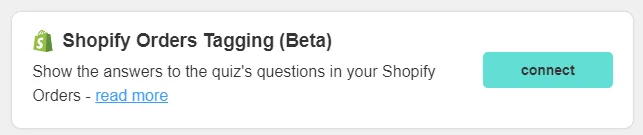
Fig. 05 The Connect tab on Shopify Legacy with the Shopify Orders Tagging integration enabled. After publishing, every quiz-attributed order carries the full quiz question/answer set as Shopify Notes plus the customer tags from each chosen answer.
Publish the change. Every quiz-attributed order from that point arrives with the full question/answer set attached as Shopify Notes, alongside the customer tags from every choice the customer picked.
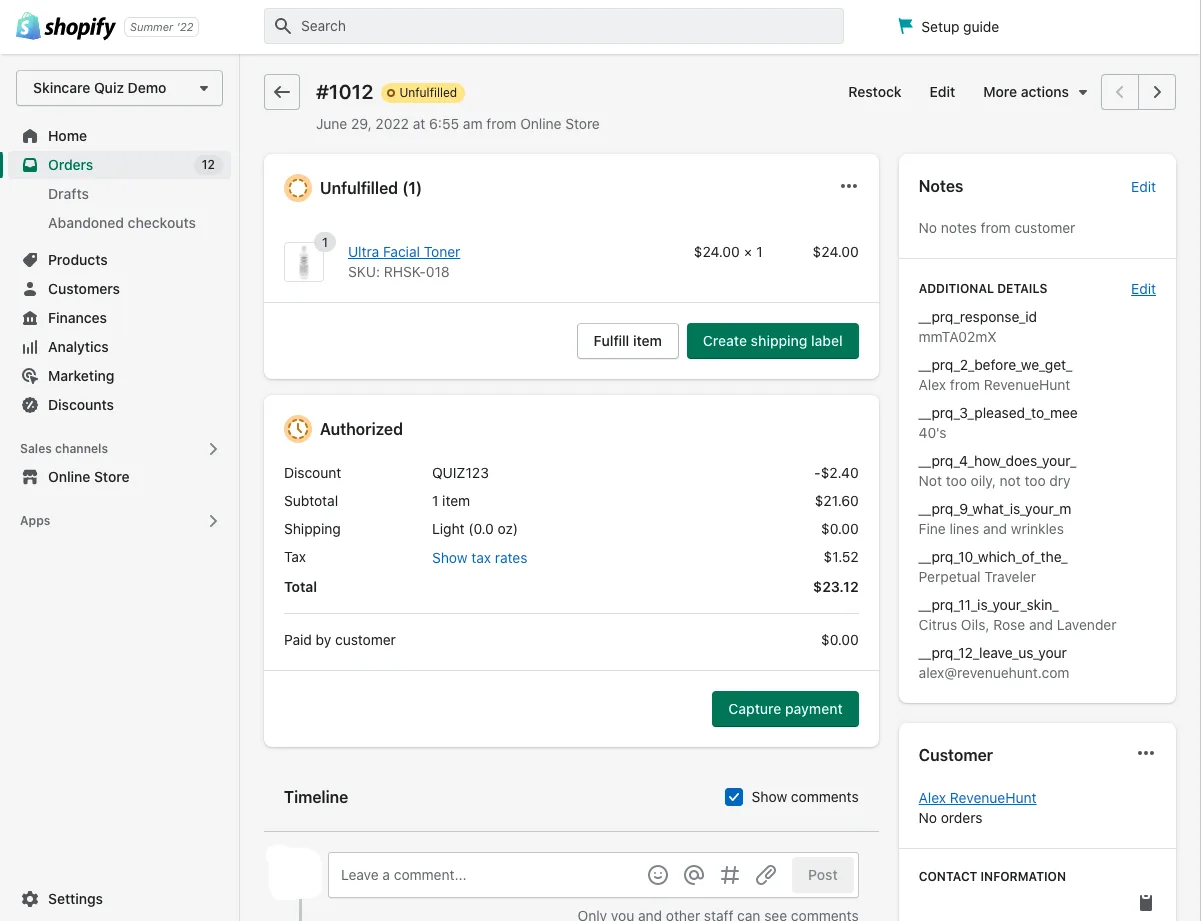
Fig. 06 A Shopify order with the quiz answer set attached as Notes. Useful for the customer-service team responding to post-purchase inquiries without asking the customer to repeat their preferences, and for the fulfilment team to see the routine the order represents.
Path 2: sync new captured leads to the Shopify Customers list
If you want a quiz-taker to enter the Shopify Customers list at the moment they complete the quiz (even if they don’t purchase right then), enable the Shopify Customers integration. New captured leads arrive in the Customers list with their quiz-derived customer tags already applied to the profile, ready for use in Shopify Flow, Shopify Email, third-party loyalty apps, or any app that reads Shopify customer tags.
In the Connect tab, find Shopify Customers and click connect.
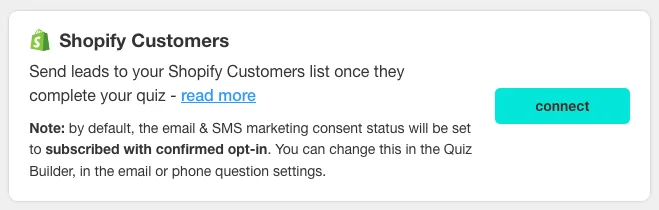
Fig. 07 The Connect tab on Shopify Legacy with the Shopify Customers integration enabled. After publishing, every captured lead lands in the Shopify Customers list with the quiz-derived tags already on the profile.
Captured leads now arrive in the Shopify Customers list with the tags from each answer they selected.
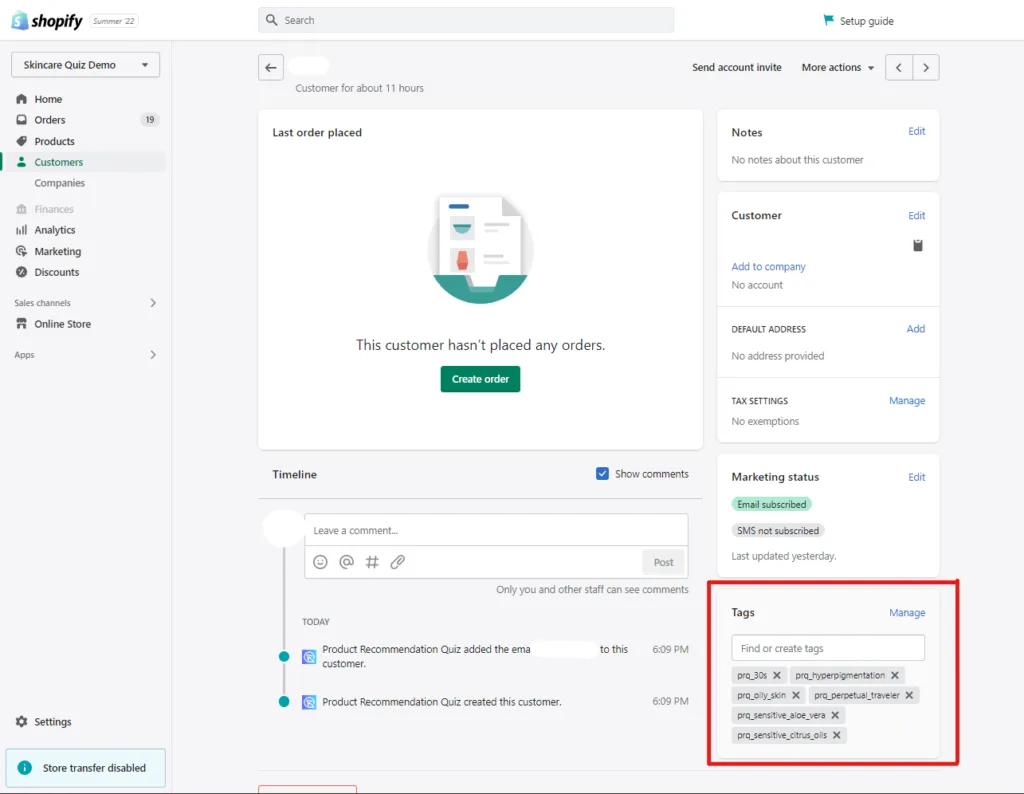
Fig. 08 A Shopify Customer record with quiz-derived customer tags applied. The tags become available across Shopify Flow, Shopify Email, third-party loyalty apps and any other app that reads the Shopify tag system. They sit alongside the Klaviyo segmentation that Step 3 will set up, not as a substitute for it.
The Shopify side and the Klaviyo side are complementary, not redundant: the Shopify customer record drives store-level automation (Flow, Email, loyalty, geolocation logic), while Klaviyo drives outbound email and SMS at scale. The same tag does work on both sides.
Step 3: Connect Klaviyo and build tag-driven segments
This is the layer that turns the captured data into revenue. The architecture is CRM-agnostic — customer tags and full quiz answers can land in any email, SMS or marketing platform you run. RevenueHunt has native integrations with Klaviyo, Mailchimp, HubSpot, ActiveCampaign, Omnisend and Sendlane, and for any tool without a native integration, quiz completions can be routed via the RevenueHunt webhook or piped through Zapier to reach anywhere else with an API.
The walkthrough below uses Klaviyo because it’s the most common pairing across the RevenueHunt platform and because Klaviyo’s segment-as-filter engine reads profile properties directly, so every tag created in Step 1 becomes a filterable segment within seconds of completion. The same flow concepts (sync tags → build segments → design tag-referenced campaigns) apply to whatever CRM you actually use; only the field-mapping syntax changes. The non-Klaviyo equivalents are listed at the end of this section.
3a. Connect the quiz to Klaviyo (one-time setup)
- In the Quiz Builder, open the Connect tab (or the Integrations panel on Built for Shopify).
- Find Klaviyo in the integrations list and click Connect.
- Authorise the integration via Klaviyo’s OAuth prompt — Klaviyo will ask for permissions to write contact data and read account metadata.
- Back in the Quiz Builder, configure the field mapping: which quiz questions map to which Klaviyo profile properties. The defaults work for most cases (each question becomes a custom property with the question text as the property name, and the chosen answer + its associated customer tags become the values).
- Save and publish the change. Every quiz completion that captures email from this point forward will sync to Klaviyo within seconds.
For the step-by-step walkthrough with Klaviyo screenshots, see the Klaviyo integration tutorial in the docs.
3b. Verify tags arrive as Klaviyo profile properties
Before you build a single segment, confirm the data plumbing works. Run yourself through the quiz as a test customer (use a real email you own) and pick a known combination of answers. Within 30 seconds of completion, open the Klaviyo dashboard:
- Go to Profiles and search for the email you just used.
- Open the profile and scroll to Properties.
- Confirm every property you expect is there: each quiz question as a property name, each chosen answer as the value, and every customer tag from Step 1 listed under the appropriate property.
If a property is missing, the most common cause is that the question wasn’t mapped during Step 3a (re-check the field-mapping config) or that email capture wasn’t required on the quiz (and the test response didn’t include an email). Fix and retest before moving on; building segments against an incomplete data set wastes a lot of time downstream.
3c. Build tag-driven segments in Klaviyo
This is where the 3x revenue lift becomes operational. A Klaviyo segment is a set of profiles that match a filter condition; campaigns and flows can target a segment with no further config.
To create a segment based on a quiz tag:
- In Klaviyo, navigate to Lists & Segments → Create List/Segment → Create Segment.
- Under Definition, add a condition: Properties about someone → choose the property name that holds the tag (e.g.
Hair Type) → choose the comparison is → enter the tag value (e.g.Curly Hair). - For multi-tag segments, stack additional conditions with AND (intersection) or OR (union). Example:
Hair Type is Curly Hair AND Hair Concern is Dry Hair AND Hair Goal is Anti-Frizzdefines a specific persona that warrants a specific message. - Name the segment descriptively (the segment name will surface in campaign reports later) and save.
- Klaviyo will populate the segment from the existing profile data and continue to add new profiles as quiz completions come in. No further maintenance needed.
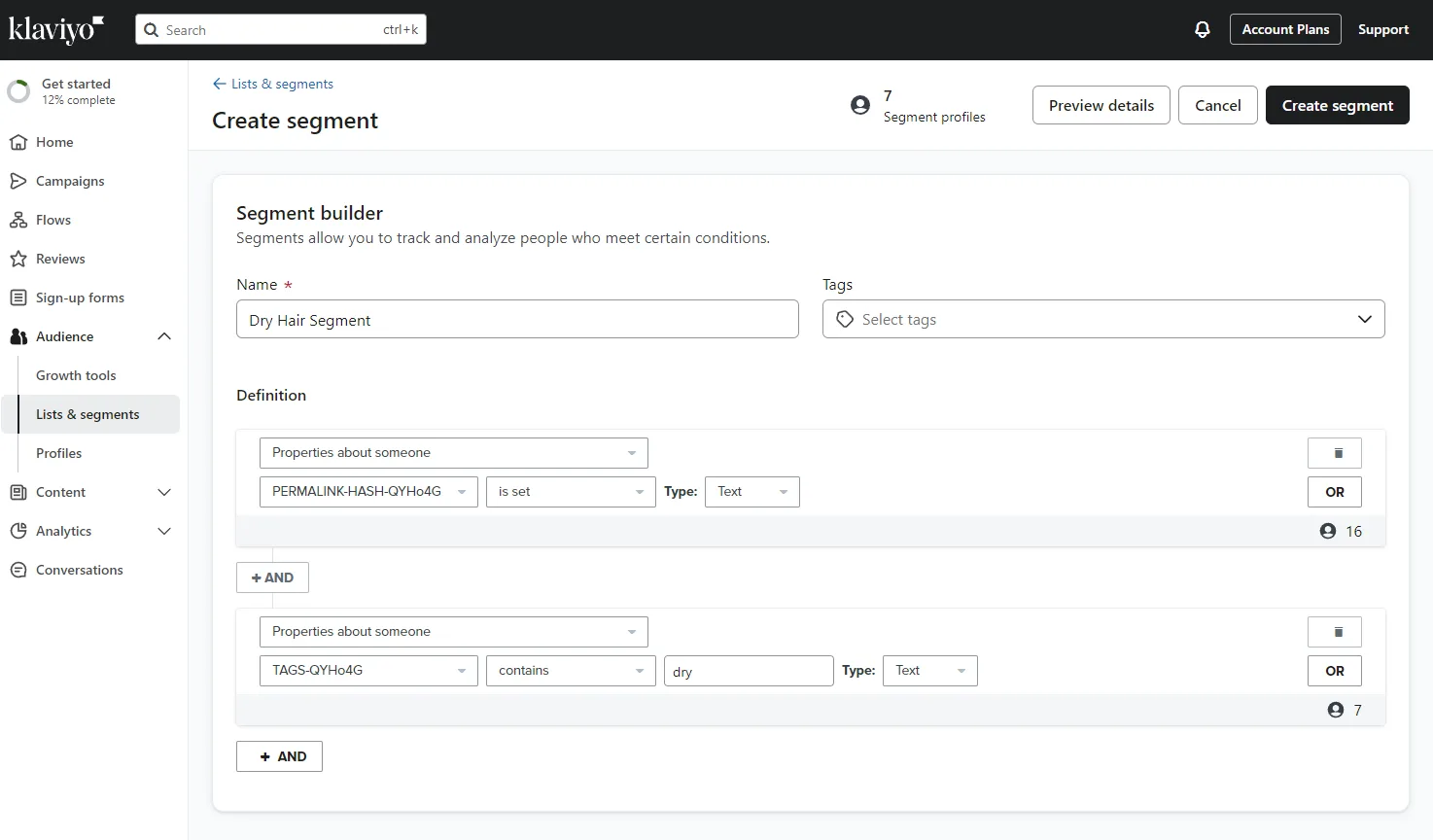
Fig. 09 Klaviyo's segment editor reading the Curly Hair customer tag from the quiz as a profile property. The segment auto-populates as new quiz responses arrive; no manual list curation required.
Tip: the follow-up emails Klaviyo tutorial in the RevenueHunt docs walks through segment creation step by step with screenshots, including more advanced multi-condition examples.
3d. Design tag-referenced campaigns and flows
A Klaviyo segment is only valuable if the campaigns targeting it actually reference what makes the segment distinct. The principle is the same one that makes the quiz convert in the first place: the message references something the customer told you, not something the brand assumed.
For each segment, design email or SMS templates that reference the segment-defining tags directly in the subject line and body. Generic newsletter templates underperform tag-referenced ones on every measurable metric — open rate, click rate, revenue per recipient.
Example treatments for the haircare segments:
- Curly Hair segment. Subject line references the curl type, body recommends curl-enhancing shampoos, conditioners, styling creams. Curl-care routine tips and exclusive offers on curl bundles.
- Dry Hair segment. Moisturising-focused subject line, body recommends hydrating shampoos and deep-conditioning treatments. Hydration tips and discounts on hydrating sets.
- Anti-Frizz segment. Anti-frizz serums and creams as the primary product set, frizz-management advice and bundle deals.
Beyond static campaigns, the same tag data drives automated flows. Trigger a welcome flow on the quiz-completion event, branch on the tag combination, and send each branch a different sequence. A Curly Hair + Dry Hair profile gets a 5-email curl-care welcome; a Straight Hair + Damage + Repair profile gets a 5-email repair-routine welcome. Each branch references the customer’s stated preferences explicitly.
If you’re not on Klaviyo
The mechanics above translate directly to other CRMs. RevenueHunt’s native integrations cover the most common stacks:
- Mailchimp — quiz tags arrive as audience tags and merge fields; build segments using Mailchimp’s audience filtering on those tags.
- HubSpot — quiz tags arrive as contact properties and active lists; build segmented workflows using HubSpot’s list filtering.
- Omnisend — quiz tags arrive as Omnisend tags and custom properties; build segments on tag combinations.
- ActiveCampaign and Sendlane — direct integrations with comparable mechanics (tags as contact properties, segment on tag filters).
For any other CRM (or any tool with an API), use the RevenueHunt webhook that fires on every quiz completion, or pipe the completion event through Zapier to reach anywhere else. The webhook payload carries the email address, the full quiz answer set and every customer tag the response triggered, so whatever downstream tool receives it has the same structured data Klaviyo would.
The “customer tags as segment filters” concept and the “design tag-referenced campaigns” principle apply equally to all of these. Pick the CRM that fits your stack; the customer-tag architecture is the constant.
The haircare playbook: end to end
With the three layers wired up, the system runs the same way on every catalogue. Here’s the haircare worked example, showing how the previous three steps combine in production.
Build the quiz
Create a quiz with questions about hair type (e.g. curly, straight, wavy, coily), hair concerns (e.g. dandruff, dryness, frizz, damage) and hair goals (e.g. volume, shine, repair, anti-frizz). Make sure to add an email-capture question as the final slide or just before the results page, and make it required: platform data shows 71% of top-converting quizzes collect email this way and 75% of those make it mandatory.
Link the haircare tag taxonomy
Following the Step 1 setup, attach a relevant tag to each answer choice. For the haircare example, the tag set typically looks like:
- Hair-type answers tagged with:
Curly Hair,Straight Hair,Wavy Hair,Coily Hair - Concern answers tagged with:
Dry Hair,Frizz,Dandruff,Damage - Goal answers tagged with:
Volume,Shine,Repair,Anti-Frizz
A single customer typically ends up tagged with three or four of these (e.g. Curly Hair + Dry Hair + Anti-Frizz), which is exactly what makes the segmentation precise downstream.
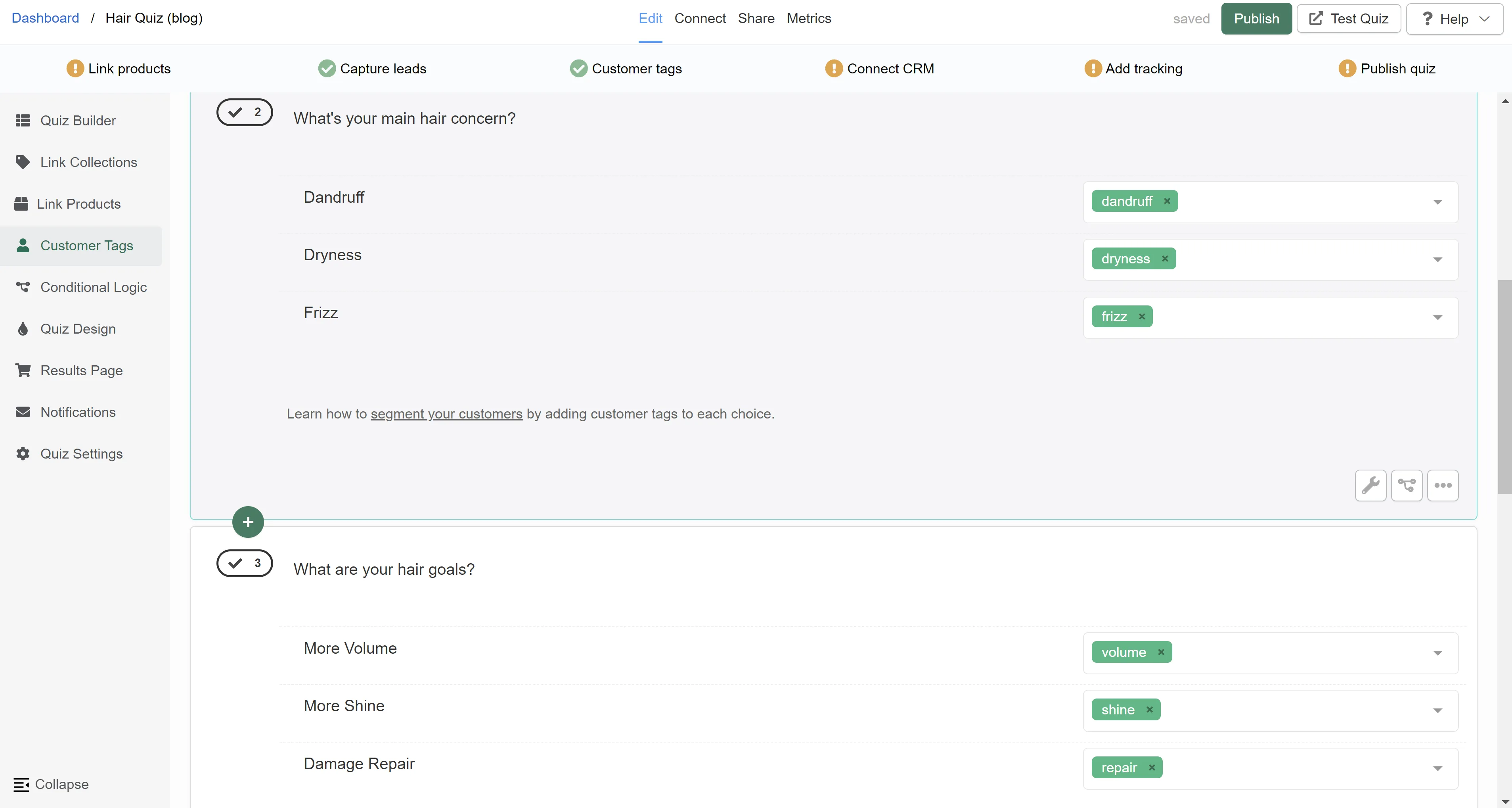
Fig. 10 The Quiz Builder Customer Tags view on a haircare quiz: each answer choice has a descriptive tag attached. These tags flow into Klaviyo as profile properties on every quiz completion, and onto the Shopify customer record + order Notes simultaneously.
Wire the routing layer
On Built for Shopify, this layer is automatic and there’s nothing to configure. On Shopify Legacy, enable both Connect-tab integrations from Step 2 (Shopify Orders Tagging + Shopify Customers). At this point every haircare quiz completion writes data to both Klaviyo and Shopify in parallel.
Build the haircare segments in Klaviyo
Following Step 3c, create segments by filtering on the tag properties:
- Curly Hair segment: profiles where
Hair Type is Curly Hair. - Dry Hair segment: profiles where
Hair Concern is Dry Hair. - Volume Goal segment: profiles where
Hair Goal is Volume. - Anti-Frizz segment: profiles where
Hair Goal is Anti-Frizz. - Repair segment: profiles where
Hair Concern is DamageANDHair Goal is Repair.
You can compound segments (e.g. Curly Hair + Dry Hair) to target specific persona overlaps that warrant a more specific message.
Design the per-segment campaigns
Build email flows or campaigns specifically tailored to each segment. Sample side-by-side comparison of the per-segment treatment:
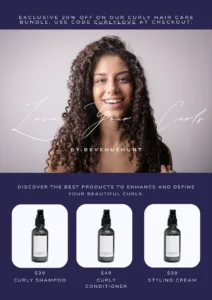
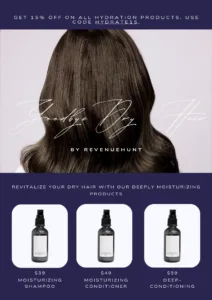
Fig. 11 Two per-segment campaign templates side by side. Same brand, same send window, two different sets of products and supporting copy. The customer-tag layer is what makes each campaign feel like it was written for the recipient.
For the discount layer that compounds on top of these segmented sequences, see product quiz discounts: the conversion playbook.
Monitor per-segment performance
Track the performance of each segmented campaign in Klaviyo. Watch open rates, click-through rates and conversion rates per segment, not just the aggregate, because the whole point of segmentation is that the numbers vary meaningfully between groups. If one segment converts at 12% and another at 3%, that’s the signal to either retire the low-performing campaign or restructure it around what the high-performing one is doing.
For the broader set of quiz metrics worth tracking across all your campaigns, see product quiz metrics: track what converts.
A quarterly review process for tags and segments
Tags and segments need ongoing maintenance, or they accumulate redundancy: duplicate tags with slightly different spellings, segments that no longer represent meaningful customer groups, tags applied to choices that have since been retired from the quiz. A simple quarterly review keeps the segmentation precise.
| Step | What to do |
|---|---|
| 1. Prepare | Set the objective for this quarter (improve tag accuracy, update segments, find new personalisation opportunities). Pull tag-usage and segment-performance data from Klaviyo and the RevenueHunt Metrics panel. |
| 2. Audit | Review every tag for accuracy and relevance. Merge near-duplicates (e.g. "Anti-Frizz" and "AntiFrizz"). Identify tags that haven't been applied in the last 90 days; archive or remove them. Review segment performance against the previous quarter. |
| 3. Implement | Update the tag set: rename, merge or remove as needed. Create new segments for emerging customer groups the data has revealed. A/B test any non-trivial change before rolling out to the full list. |
| 4. Monitor | Deploy updated tags and segments, then watch the metrics that matter (open rate, click rate, revenue per recipient) for two to four weeks. Flag anomalies early. |
| 5. Document | Note what changed and why. Future-you (or the next person on the marketing team) will need the context when a segment behaves unexpectedly six months later. |
Frequently asked questions
What is a customer tag in a product recommendation quiz?
A customer tag is a structured label you attach to an individual quiz answer choice. When a customer picks an answer that carries a tag, that tag is added to their profile on three destinations at once: into Klaviyo as a customer profile property, onto the Shopify order Notes (for quiz-attributed orders) and onto the Shopify customer record. A single quiz typically attaches 5 to 10 tags per completion across attributes like skin type, concerns, goals, preferences and budget tier, which become the filter logic for downstream segmentation.
How are customer tags different from quiz answers stored as Klaviyo properties?
Tags and properties both come from the quiz, but they serve different purposes. Quiz answers stored as Klaviyo properties are the raw response data (e.g. hair_type: curly); tags are higher-level abstractions you control (e.g. Curly Hair, applied across multiple paths through the quiz that should be treated as the same audience). Tags are easier to compose into Klaviyo segment filters and easier to maintain because the tag taxonomy stays stable even when the quiz questions change.
Do I need Klaviyo, or can I use a different CRM?
The same strategy works on any CRM. RevenueHunt has native integrations with Klaviyo, Mailchimp, HubSpot, ActiveCampaign, Omnisend and Sendlane — quiz answers and customer tags sync as profile properties, tags or custom fields automatically. For any tool without a native integration, route quiz completions via the RevenueHunt webhook or through Zapier to reach anywhere else with an API. Klaviyo is the most common pairing because it’s purpose-built for ecommerce email and SMS segmentation and because its segment-as-filter engine reads profile properties directly, but the customer-tag architecture is platform-agnostic; only the field-mapping syntax changes between tools.
How many tags should I create per quiz?
There’s no hard cap, but the practical sweet spot is between 8 and 20 distinct tags for a typical quiz. Fewer than 8 means the segmentation isn’t granular enough to drive meaningfully different campaigns; more than 20 produces segments so small they don’t justify a separate campaign. Start with a small set per question (3 to 5 tags) and add only when a new tag would clearly unlock a campaign you couldn’t build otherwise.
When will I see results from tag-based segmentation?
The Klaviyo flow itself starts converting from the first email the customer receives after completing the quiz. The compounding return on the segmentation effort takes 30 to 90 days to become visible, as you accumulate enough volume per segment to see statistically meaningful differences in open rate, click rate and revenue per recipient. Segmented Klaviyo campaigns earn over 3x the revenue per recipient of generic sends (Klaviyo segmentation benchmark) over comparable periods.
How do customer tags reach Shopify Orders and the Shopify Customers list?
On the Built for Shopify version of the RevenueHunt app, this happens automatically: customer tags from each quiz choice apply to the Shopify customer record, and the full quiz answer set attaches to every quiz-attributed order as Shopify Notes natively. No setup needed. On Shopify Legacy, the same two outcomes require enabling two integrations in the Connect tab: Shopify Orders Tagging (writes quiz answers as order Notes plus customer tags on the order) and Shopify Customers (syncs new captured leads to the Customers list with quiz-derived tags on the profile). The customer tags then become available across Shopify Flow, Shopify Email and any third-party app that reads the Shopify tag system.
Where this fits
Customer tags are the activation layer for everything zero-party data makes possible. The quiz captures the data; the tags structure it; Klaviyo segments operationalise it for outbound email and SMS; Shopify orders and the customer record expose it to the operational side of the business. Each layer compounds the value of the one underneath, which is why the lift on a Klaviyo + Shopify quiz funnel is so consistently larger than any single tactic in isolation.
For the data category underneath this whole architecture, see our zero-party data guide. For concrete examples of zero-party data mechanisms across real brands, see 12 zero-party data examples. For the underlying privacy-data taxonomy, see first-party vs third-party data: what is the difference. For the full segmentation chain end to end, see how Klaviyo segmentation unlocks once zero-party data lands in profiles. For the consent moment that gates the whole system, see marketing consent in a product quiz. For the discount layer that compounds on top, see product quiz discounts. For the broader funnel mechanics, see 11 ecommerce sales funnel examples that convert in 2026. For where this entire stack fits strategically, see the 10 strategies that compound retention.
For more on our integrations, visit our integrations page.
Install RevenueHunt: Recommender Quiz for Shopify and start tagging your first quiz response today. Free plan available.
Free tools & data
Put these benchmarks to work on your own store.
Free tool
Quiz ROI calculator
Estimate the extra revenue and ROI a product recommendation quiz could add to your store. Built on real data, no email required.
Calculate your ROIFree report
Ecommerce quiz benchmark report
How product recommendation quizzes really perform: conversion by category, AOV uplift, and completion, from 45M+ real quiz responses.
Read the report

Most shoppers leave because they can't find the right product