
More speed equals more sales: an ecommerce playbook
Page speed sets the conversion ceiling on Shopify. The Core Web Vitals to hit (LCP, INP, CLS), where stores lose seconds, and three audits that recover them.
Quick answer
Shopify page speed comes down to three Core Web Vitals: LCP under 2.5s, INP under 200ms, CLS under 0.1.
Images and third-party scripts cause most of the loss. PageSpeed Insights gives you the diagnosis; the three audits below (image lazy-load, third-party script audit, font-loading strategy) give you the fixes. INP replaced FID as a Core Web Vital in March 2024, and is the metric most Shopify stores miss in 2026.
Page speed is the foundation everything else sits on. If a customer clicks your ad and never sees the landing page because it’s loading for eternity, they leave before any of your design decisions, copywriting, quiz placements or discount offers have a chance to do their work. Over half of online purchases now come from mobile, where connection quality is unpredictable, which makes the speed of those first few seconds the highest-leverage thing you can fix this week.
This article covers where Shopify stores actually lose those seconds, how to measure it, and the three deeper audits that recover them: image lazy-loading and asset optimisation, third-party script auditing, and font-loading strategy.
For the broader CRO playbook this sits inside, see 10 ecommerce CRO tips that lift Shopify sales 11-15%. For the funnel architecture, see our step-by-step funnel build guide.
Table of contents:
- Why speed is the priority
- How to measure: three tools, three angles
- Where Shopify stores actually lose speed
- Audit 1: image lazy-loading and asset optimisation
- Audit 2: third-party script audit
- Audit 3: font loading strategy
- Where the quiz fits in the speed conversation
- Frequently asked questions
Why speed is the priority that comes before everything else
The single most overlooked truth about ecommerce CRO is that the rest of the funnel doesn’t matter if the page doesn’t load. A 4-second page that converts at 5% beats a 1-second page that converts at 10% only on paper: the 4-second page never gets the chance, because half the traffic has already bounced.
Mobile makes this worse. Mobile shoppers are on flaky networks (commuting, low-coverage areas, congested wifi), and they have substantially less patience for a slow page than desktop users. Industry studies consistently show conversion drops sharply as load time increases past two seconds: mobile bounce rate jumps to 53% past three seconds, and conversion typically drops around 7% for every additional second of load time. Every speed gain compounds because it’s a multiplier on every downstream funnel mechanic you’ve spent time perfecting.
How to measure: three tools, three angles
Each tool measures something slightly different. Use all three, not just one.
Google PageSpeed Insights measures field data (real Chrome users on your live site) and lab data (a synthetic Lighthouse test). Field data is what Google uses for ranking; lab data is what you debug against. Run it on your three highest-traffic URLs: homepage, top product, top collection.
Shopify Online Store Speed report. From the Shopify admin, navigate to Reports and search for “Online store speed”. Shopify runs a weighted-average Lighthouse test against your homepage, top-visited product page, and top-visited collection page. Useful as a single number to track over time, less useful for diagnosing specific issues.
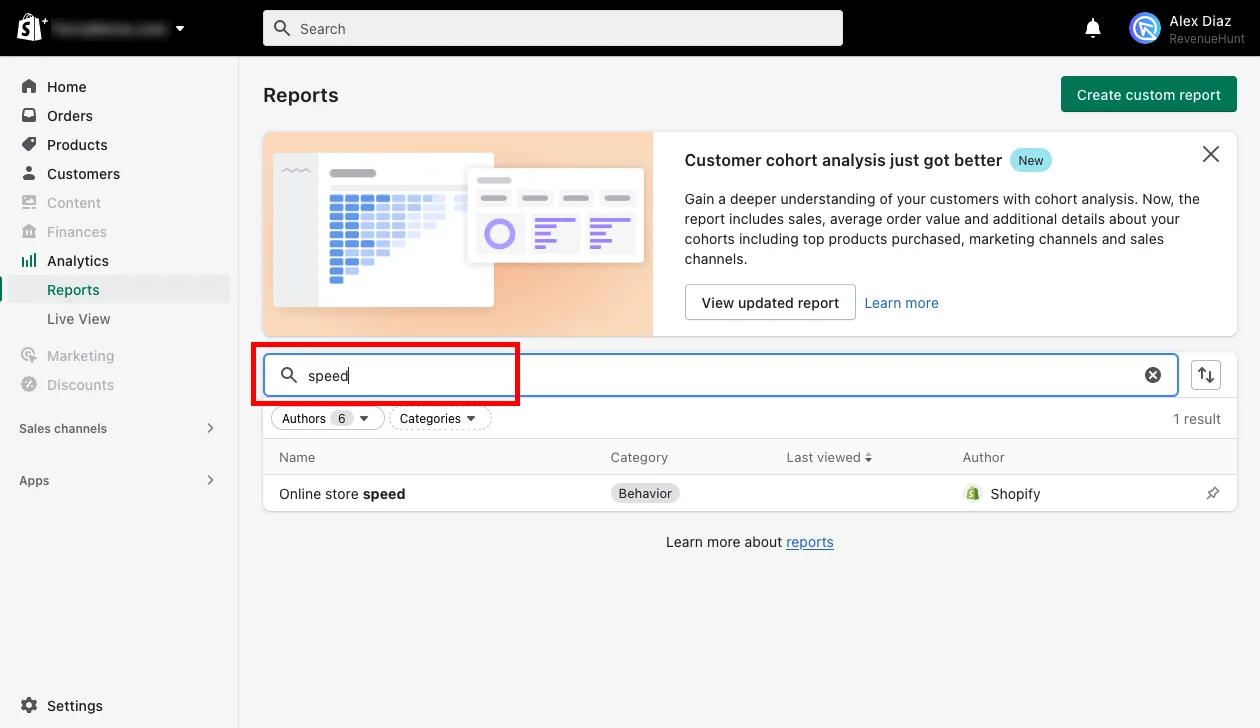
Fig. 01 The Shopify admin Reports section: the Online store speed report runs a Lighthouse test weighted across home, top product and top collection pages. Useful as a single number to track over time; the per-page diagnosis happens in PageSpeed Insights.
Shopify Partners dashboard performance. If you have Partner access (yours or your developer’s), open Stores, find the store, click “More actions” → “View store performance”. Same underlying Lighthouse engine, but cleaner historical tracking and a comparison view across multiple stores you manage.
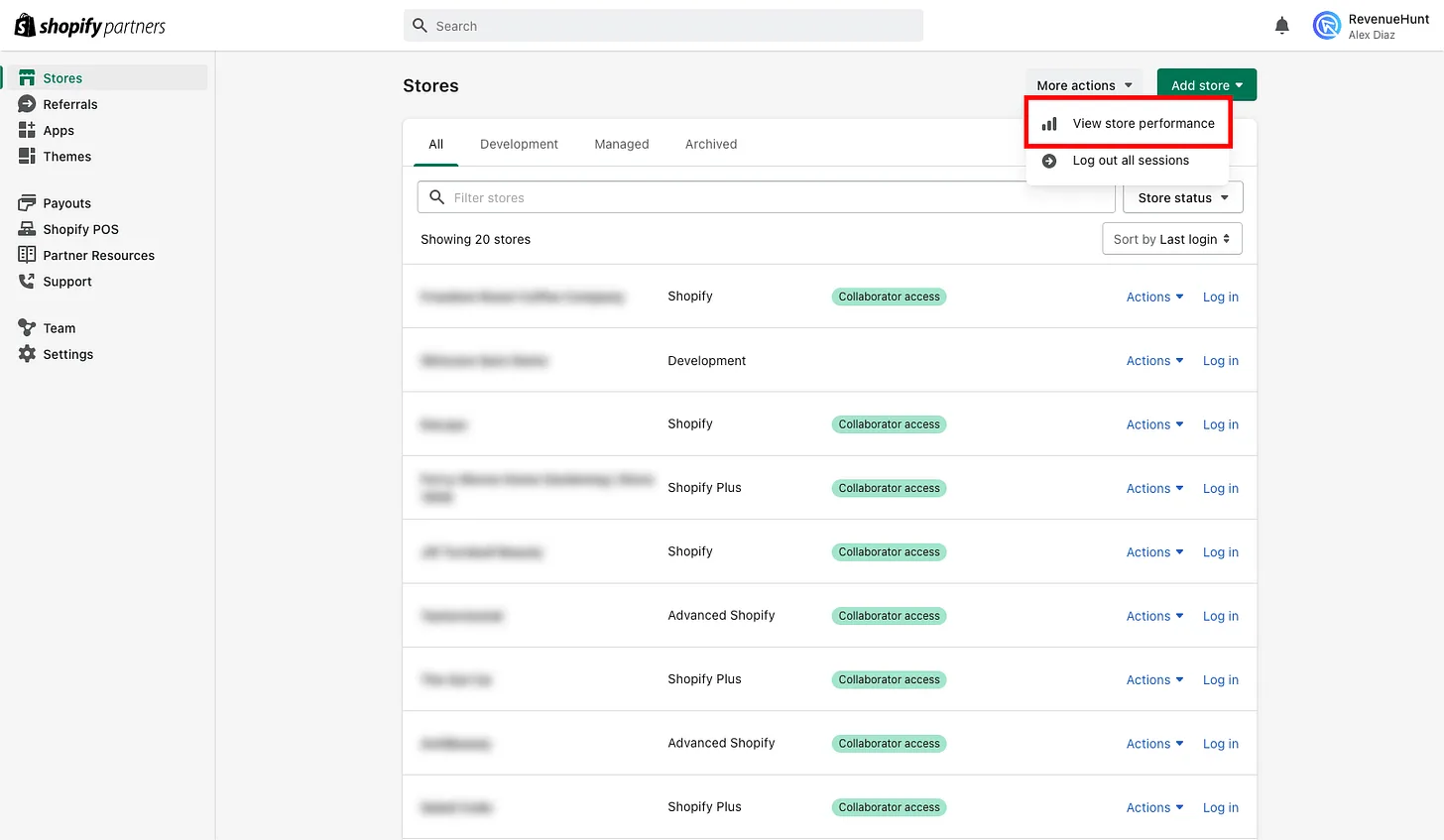
Fig. 02 The Shopify Partners dashboard view: cleaner historical tracking and a comparison view across multiple stores. Useful when you (or your developer) manage several stores at once and want trend lines side-by-side.
The score itself is a weighted average across three pages: the home page, the top-visited product page and the top-visited collection page. It’s a useful trend line, but the diagnosis happens elsewhere.
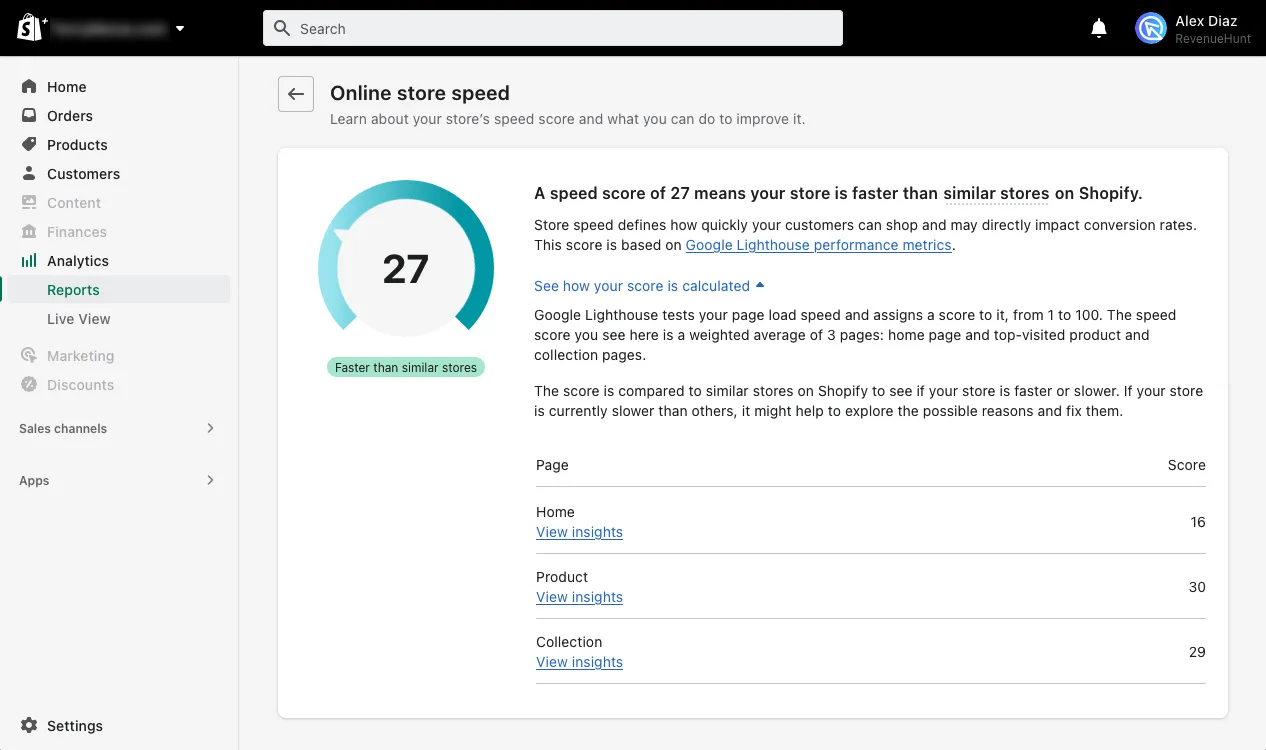
Fig. 03 The speed-score breakdown: a weighted average across three pages, not a single-page snapshot. Useful trend line, but the actual diagnosis lives in PageSpeed Insights and the per-page Core Web Vitals data above.
What actually matters is the Core Web Vitals underneath: Largest Contentful Paint (LCP) under 2.5s, Cumulative Layout Shift (CLS) under 0.1, Interaction to Next Paint (INP) under 200ms. Optimise for those targets, not for the headline score.
Core Web Vitals thresholds (Google, 2026)
| Metric | Good | Needs improvement | Poor |
|---|---|---|---|
| LCP, Largest Contentful Paint | ≤ 2.5s | 2.5 – 4.0s | > 4.0s |
| INP, Interaction to Next Paint (replaced FID, March 2024) | ≤ 200ms | 200 – 500ms | > 500ms |
| CLS, Cumulative Layout Shift | ≤ 0.1 | 0.1 – 0.25 | ≥ 0.25 |
INP is the bottleneck in 2026: only ~65% of Shopify origins pass it (vs ~89% for CLS, ~72% for LCP). Long JavaScript tasks from apps and tracking scripts are the usual culprit.
Where Shopify stores actually lose speed
Shopify’s hosting infrastructure is excellent: CDN-served images, fast theme rendering, native lazy-loading, automatic format optimisation. The store you start with is fast. The store you end up with after twelve months of app installs is the one that’s slow. Five things consistently cause that drift:
- Too many tracking pixels. GA4, Meta, TikTok, Pinterest, Klaviyo, every retargeting platform’s own snippet. Each one loads JavaScript. Stack five of them and your first contentful paint slips half a second.
- Poorly coded or bloated themes. Every additional theme section, animation, and decorative carousel adds CSS and JS that loads on every page. The same look can usually be achieved with half the code.
- Too many apps, even good ones. Most Shopify apps inject their JavaScript globally rather than only where it’s needed. An app that powers a single feature on one product page often loads on your homepage too. Industry estimates put the LCP cost at 150-300ms per installed app; a store running 15-20 apps can carry hundreds of kilobytes of JS that does nothing on the page it’s loading on.
- Large media files. A 4 MB hero image at 2000px width when the device is rendering it at 400px. A 30-second product GIF when a 4-second video would do.
- Poorly coded apps that inject globally. The worst case of #3: an app whose JS bundle is itself bloated and runs on every page, every time.
The fix is rarely “buy a faster theme”. The fix is auditing what you’ve added since launch and pruning what’s not earning its weight.
Audit 1: image lazy-loading and asset optimisation
Shopify lazy-loads images below the fold automatically via the loading="lazy" attribute. That covers most of the work, but three places trip people up:
Hero images shouldn’t be lazy-loaded. Your homepage hero is the Largest Contentful Paint candidate. If it’s lazy-loaded, the browser delays fetching it, which delays LCP, which hurts Core Web Vitals. Override with loading="eager" and ideally fetchpriority="high" on the single most important above-the-fold image per page.
Use Shopify’s image URL filters. Liquid’s image_url filter (and the older img_url) can automatically serve WebP and AVIF formats when supported, and resize images to whatever width you actually need. A hero image embedded at 1200px wide should be served at 1200px wide, not at 4000px and then scaled down by CSS. Audit your theme for raw <img src="…"> tags and convert them to use the filter.
Stop hotlinking from external sources. Substack-hotlinked images, Imgur images, hotlinked stock photos: they bypass Shopify’s CDN and image optimisation entirely. Re-upload to the Shopify CDN or the theme’s asset folder.
One overlooked file: video. A 15-second product video is often 8-10 MB. If you’re showing video on the homepage, either compress it aggressively (H.264 at 1500 kbps for 720p is usually fine) or use the YouTube embed pattern instead of self-hosting, which lets YouTube’s CDN handle delivery. The video quizzes piece covers the upload-vs-embed decision in more depth.
Audit 2: third-party script audit
This is the audit that recovers the most time on most stores. Open Chrome DevTools → Network panel → Reload → sort by Transfer size.
Anything over 100 KB needs a justification. Anything over 250 KB needs to be defended out loud to your future self. Most stores find:
- Two or three review apps loading simultaneously (only one is actually being used).
- A popup app whose JS loads on every page even though the popup only fires on the product page.
- An upsell app that loads on the homepage despite only running in the cart drawer.
- Multiple analytics pixels duplicating each other’s data collection.
- An abandoned A/B testing tool still injecting its bundle months after the experiment ended.
Three rules for cutting:
- One review app, not three. Pick the one whose UI lives on your product pages and uninstall the others completely (not just disable, which often leaves the snippet behind).
- Defer non-critical scripts. Tag-manager tags can usually be set to “Window Loaded” instead of “Page View” without losing any data fidelity.
- Question every “free” app. Free apps frequently monetise via tracking, which means more JS than paid alternatives.
Tracking pixels are necessary but should be consolidated through Google Tag Manager (or a server-side equivalent) rather than each platform getting its own page-load slot. GTM lets you defer, conditionally fire, and prune in one place.
Audit 3: font loading strategy
Custom fonts are pretty but expensive. A typical custom font (one family, four weights) adds 200-400 KB to first load and can block text rendering until it arrives.
Use font-display: swap always. This tells the browser to render text in a fallback font immediately, then swap to the custom font when it loads. Without this, you get a “flash of invisible text” where the page appears blank for half a second. Most themes already do this; some legacy themes don’t.
Preconnect to your font CDN. If you load fonts from Google Fonts, drop this in your <head> ahead of the actual font request:
<link rel="preconnect" href="https://fonts.googleapis.com" crossorigin>
<link rel="preconnect" href="https://fonts.gstatic.com" crossorigin>
This starts the DNS lookup and TLS handshake early so the font request lands faster when it fires.
Subset to what you actually use. Most Latin-only stores don’t need the full Google Fonts character set with Cyrillic, Greek and Vietnamese ranges. Use the &subset=latin parameter or self-host a subset file.
Two weights for body, one for headings, max. Every additional weight is another file download. The store with Regular + Medium + Bold loads faster than the store with Regular + Light + Medium + Semibold + Bold + Black, and the visual difference is rarely worth the seconds lost.
Where the quiz fits in the speed conversation
Speed matters disproportionately at the moments of highest conversion leverage: homepage hero, quiz load, results page, checkout. A quiz that takes three seconds to render (because it’s iframe-embedded and adds an extra HTTP request, plus the visual “flash” as the external frame loads) materially reduces completion rates. Iframe-based quiz tools typically add 200–500ms to LCP via the extra HTTP request and frame paint. This is the structural weakness of many quiz tools and the reason an embed approach matters as much as the engine behind it.
RevenueHunt’s Built for Shopify version embeds the quiz natively into the Shopify theme as a block: no iframes, no extra HTTP request, no visual flash. The quiz loads at theme speed and inherits the brand’s typography and colours automatically, which means it doesn’t even need its own CSS payload. For the full quiz foundations, see how to build a successful product recommendation quiz.
Quick tools and resources
Page speed checks: Google PageSpeed Insights, Shopify Reports → “Online store speed”, Shopify Partners → “View store performance”.
App audit shortcut. Uninstall any unused apps from your store (not just disable: fully uninstall so the snippet is removed). This is the single highest-yield 10-minute task you can run today.
Cart conversion app I rate. Built by ex-Shopify employees I know personally, Flash Cart leverages a customisable side cart to upsell and cross-sell products without adding the heavy global JS of most upsell apps. 14-day free trial.
Inspiration source: Thingstesting for product ideas and design references. The Getting Real book by Basecamp remains the best framing for “build less, ship faster” thinking that applies as much to a store as it does to a software product.
Frequently asked questions
What page speed score should I aim for on Shopify?
The score itself is less important than the underlying Core Web Vitals. Target Largest Contentful Paint (LCP) under 2.5 seconds, Cumulative Layout Shift (CLS) under 0.1, and Interaction to Next Paint (INP) under 200ms. Shopify’s Online Store Speed report and Google PageSpeed Insights both surface these. Most well-optimised Shopify stores land in the 70-90 Lighthouse range; chasing 100 typically costs more engineering hours than the marginal conversion lift is worth.
Are Shopify apps actually slowing my store down that much?
Often yes, but it depends on the app. The audit is straightforward: open Chrome DevTools, go to the Network panel, reload the page, sort by Transfer size and look for entries over 100 KB. Each one needs a justification. Apps that inject their JavaScript globally (loading on every page) cost more than apps scoped to specific templates. The single fastest fix on most Shopify stores is uninstalling apps that are no longer in active use.
Will switching themes solve my speed problem?
Sometimes, but it’s rarely the root cause. The store you start with on any modern Shopify theme is fast; what slows it down is everything added since: apps, tracking pixels, oversized images and theme customisations. Audit those first. Switch themes only if the theme itself is genuinely bloated (some older third-party themes carry significant CSS and JS weight) and a switch is the simpler fix.
Does the RevenueHunt quiz slow down my store?
The Built for Shopify version embeds the quiz natively into your theme as a block, with no iframe and no extra HTTP request for an external widget. It loads at theme speed and inherits your store’s typography and colours, which means it doesn’t ship its own CSS payload. The Shopify Legacy version uses an iframe pattern and has a small load-time overhead by comparison; if speed is a top priority, the Built for Shopify version is the right install.
Should I optimise for the Lighthouse score or for real-user metrics?
Real-user metrics (the “field data” Google shows in PageSpeed Insights and in Search Console’s Core Web Vitals report) are what affect ranking and what your customers actually experience. The Lighthouse synthetic score is a debugging tool: it identifies what to fix and lets you test the impact of a change before it goes live. Use field data to decide what’s worth fixing; use lab data to verify the fix worked.
A founder’s note on the skill stack this requires
Image optimisation, JavaScript auditing and font-loading discipline are three different technical specialties. As a founder running a small team, you can’t realistically be a 100% specialist in any of them, and you don’t have to be. What you do need is reasonable proficiency across all three: an 80% generalist’s grasp of each beats a 100% expert in only one when the problem is store-wide rather than function-specific.
This is the 80/20 rule applied to founder skill development. With the same effort, a specialist becomes 100% proficient in one area while a generalist reaches roughly 80% across five. For a store operator, the second profile compounds harder because every problem touches multiple disciplines at once.
David Epstein’s Range: Why Generalists Triumph in a Specialized World is the best framing of this tradeoff I’ve read. Recommended for any founder weighing depth versus breadth in their own skill stack:
Till Musshoff articulates a related idea: digital literacy as a meta-skill that compounds across all the other digital specialties a modern operator needs. The framing here is directly applicable to ecommerce speed work, where the operator who can read a Network panel, identify a bloated app and edit a Liquid template comfortably will always ship faster than the one who has to outsource each step.
Where this fits
Speed is the discipline that makes everything else possible. It can’t replace a strong product-page hierarchy, a well-built quiz, or a discount strategy that earns its margin sacrifice. But every other tactic in the funnel compounds its return when the foundation underneath is fast.
For the broader CRO playbook, see 10 ecommerce conversion optimisation tips. For the funnel-design architecture this sits inside, see the step-by-step funnel build guide. For the data the quiz captures at speed, see our zero-party data guide. For the Built for Shopify version that loads as a native theme block (not an iframe), see RevenueHunt is Built for Shopify. For headless stores hitting Core Web Vitals targets that templated themes struggle with, see the headless ecommerce product quiz. For why a quiz funnel beats a collection page on speed and conversion, see quiz funnels vs collection pages.
Install RevenueHunt: Recommender Quiz for Shopify and add the only quiz that loads at native theme speed. Free plan available.
Free tools & data
Put these benchmarks to work on your own store.
Free tool
Quiz ROI calculator
Estimate the extra revenue and ROI a product recommendation quiz could add to your store. Built on real data, no email required.
Calculate your ROIFree report
Ecommerce quiz benchmark report
How product recommendation quizzes really perform: conversion by category, AOV uplift, and completion, from 45M+ real quiz responses.
Read the report


Most shoppers leave because they can't find the right product