
Quick tips before you build your first product recommendation quiz
A 5-section checklist drawn from the RevenueHunt support team: content, quiz building, visuals, results, and post-quiz follow-up. Platform-data-backed.
Building your first product recommendation quiz is mostly mechanics: write the questions, tag the answers, map them to products, publish. The mistakes that quietly hurt conversion are almost always made before any of that happens, in the decisions about the quiz’s content, length, results-page structure and follow-up flow. This guide is a 5-section checklist of the most-asked-about decisions our support team handles, with the platform data behind each recommendation where it exists.
What you'll learn
- →Content choices that drive the quiz start rate: compelling title, first-question framing, reward setup.
- →Build-time decisions: the 6-12 question sweet spot (platform data), question order, email capture timing.
- →Visuals and CTA framing: why design polish matters less than you think on the first version.
- →Results page rules (79% of top performers use one page, averaging 10.6% conversion) and after-the-quiz follow-up.
Jump to:
For the full data-backed playbook this checklist references, see how to build a successful product recommendation quiz. For the conversion-leak mistakes to avoid, see quiz creation mistakes that hurt your ecommerce sales.
Content
✓ Start with a compelling hook. Your quiz needs a strong introduction to capture attention immediately. A catchy title and an enticing first question are the two biggest levers on quiz start rate. Some category-specific examples that consistently work:
| Quiz type | Title | First question |
|---|---|---|
| Fitness equipment | Find the perfect workout gear for your fitness goals | What's your primary fitness objective? |
| Haircare | Get your ideal haircare routine in minutes | What's your main hair concern? |
| Supplements | Discover the best supplements for your health goals | What's your primary health goal? |
| Pet care | Find the best products for your pet's needs | What type of pet do you have? |
| Makeup | Find your perfect makeup match | What's your go-to makeup look? |
| Outdoor gear | Gear up for your next adventure | What's your favourite outdoor activity? |
| Skincare | Discover your perfect skincare routine | What's your primary skincare goal? |
✓ Ask questions that feel natural and relevant to the customer’s shopping experience (skin concerns, favourite brands, lifestyle context) rather than overtly asking for personal data upfront.
✓ Show empathy in the language. Acknowledge the customer’s concerns and preferences explicitly. The quiz should read like a consultation, not a form.
Tip
Use Information Recalls to surface the customer's earlier answers in later questions and on the results page. A quiz that references "your dry, sensitivity-prone skin" by question 5 feels personally tailored in a way a generic form never will.
✓ Tease a reward at the start. A line under the homepage CTA (“Take the quiz to get a personalised recommendation and 10% off”) consistently lifts quiz start rate. For the full discount playbook, see product quiz discounts: the conversion playbook.
Quiz building
✓ Aim for 6 to 12 questions, with 9-12 the sweet spot. Platform data across 900+ quizzes shows this band converts at 11.0%, with 6-8 questions at 10.4% and quizzes shorter than 6 questions actually underperforming at 9.8%. Customers don’t drop off because there are too many questions; they drop off when the questions feel irrelevant or repetitive. The “keep it under 5-6 questions” advice from older guides was wrong; relevance matters more than brevity.
✓ Arrange questions in a logical order, starting with general preferences and moving toward specific needs. This creates a natural rhythm and a sense of progressive disclosure.
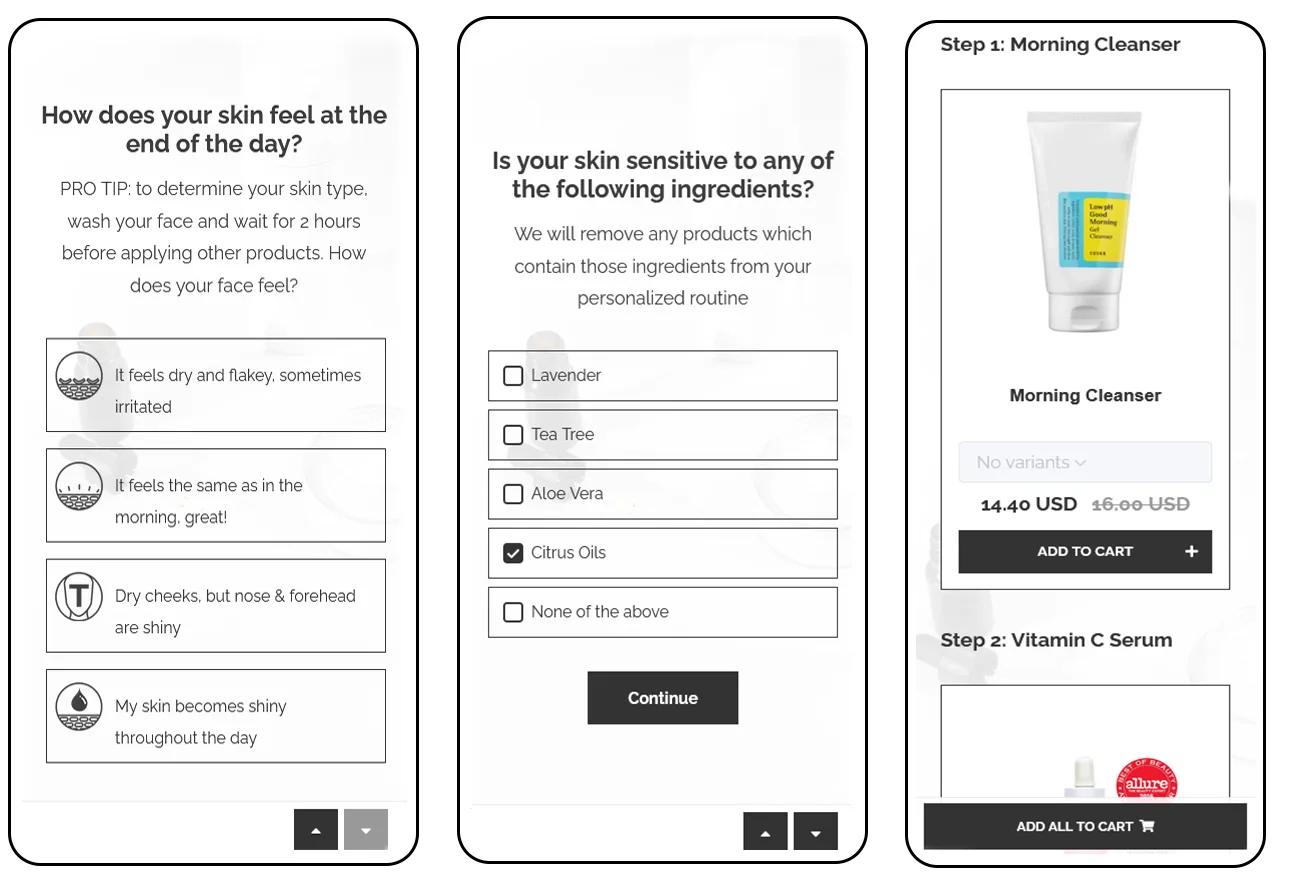
✓ Provide instant feedback on selections where appropriate. A short line of acknowledgment (“Most of our customers with combination skin pick this option too”) makes each answer feel meaningful rather than transactional.
Tip
Use Conditional Logic to branch the quiz based on prior answers, so each customer only sees the questions relevant to their profile. But don't over-engineer the branching on version 1 — linear quizzes typically have higher completion rates because there are fewer technical failure points.
✓ Collect personal data at the right point. Ask for email after the customer has invested in the quiz (typically just before the results page), not at the start. 71% of top-converting quizzes collect email as part of the flow, and 75% of those make it required. For the consent design playbook, see smart ways to ask for marketing consent in a product quiz.
✓ Ensure the quiz is mobile-optimised. Use images sized for mobile, ensure the touch targets are thumb-friendly, and test the cart flow without a keyboard. Most quiz traffic is mobile, so the mobile experience is the experience.
Tip
Every quiz built with the RevenueHunt: Recommender Quiz is automatically optimised for desktop and mobile out of the box. Picture-choice questions, animated transitions and the results page all render correctly across viewports.
Visuals and CTAs
✓ Quiz visual polish is not the most important thing on version 1. Start with a basic template, make sure the quiz recommends the right products, add some picture choices and the right background images, but don’t burn a week on the exact shape of the buttons. Publish a basic quiz first, watch the conversion numbers, then invest in visual polish where the data tells you to.
Tip
Across thousands of merchants on RevenueHunt, plenty of stores achieve consistent double-digit conversion rates with just a basic quiz template. Visual customisation matters at the margin; the foundational decisions (length, results page, email capture, tag-based segmentation) matter at scale.
✓ Incorporate scarcity and urgency where the offer genuinely supports it: a limited-time discount on the results page, low-stock alerts on a recommended product, or a quiz-exclusive bundle. Don’t fake the urgency — customers can tell.
Tip
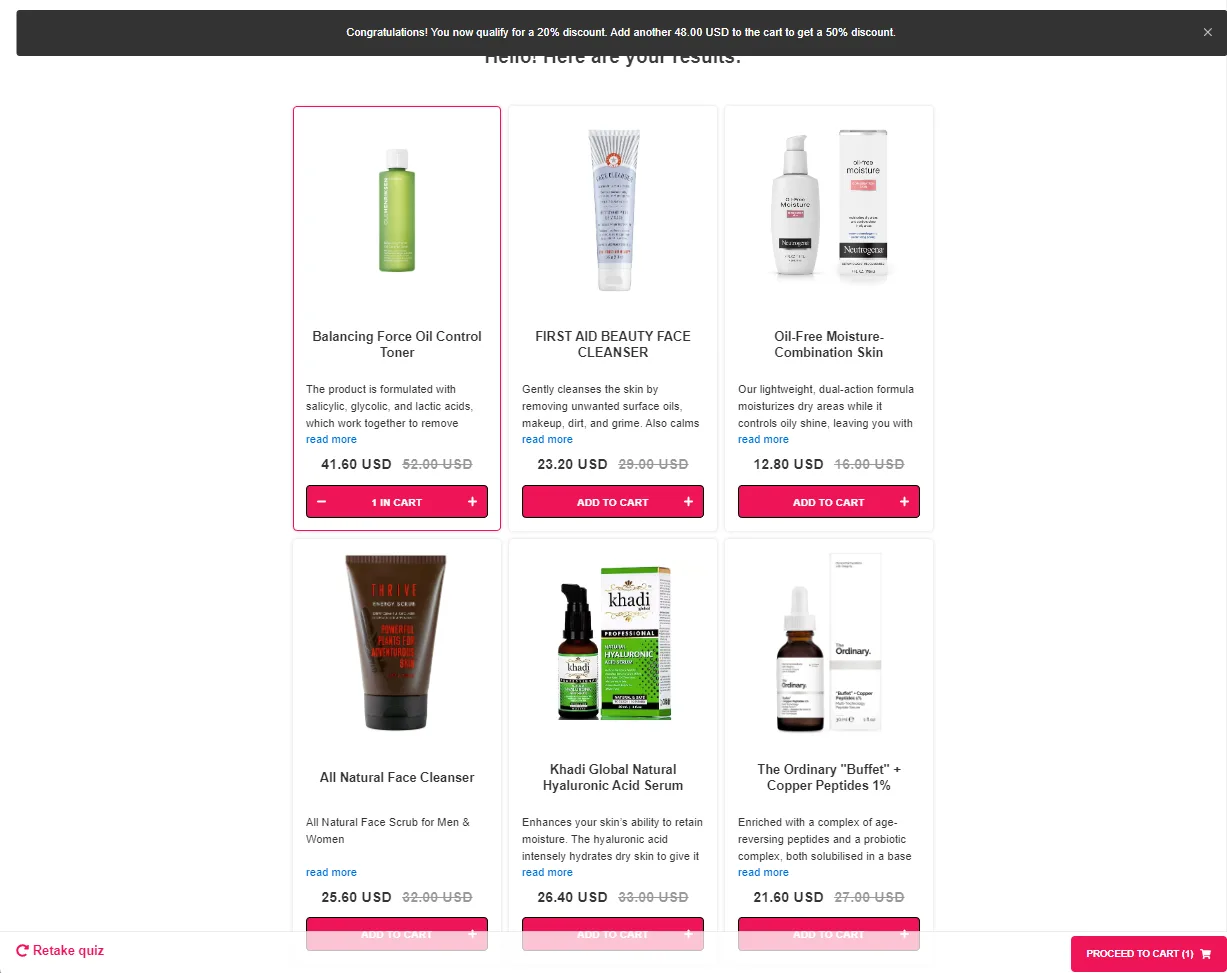
Add tiered or dynamic discounts to the results page to encourage larger basket sizes (Shopify Legacy only). For the full discount placement playbook, see product quiz discounts: the conversion playbook.
✓ Display testimonials, product reviews, or a quiz-completion count on the results page to leverage social proof. A short “Recommended for 2,000+ customers like you” line consistently lifts conversion against a control without it.
✓ Use image-based answers where they help. For shade matching, hair texture identification, or style preference, pictures convey what text alone can’t. For “what’s your primary goal” or “how often do you exercise”, text-only is faster and cleaner. See product quiz question types: the complete reference for the full picker.
✓ Keep visual consistency with your store. Match the typography and colour palette so the quiz feels like part of the storefront, not a third-party widget bolted on. For deeper customisation, see custom CSS and JavaScript for product recommendation quizzes.
Results page
✓ Quality over quantity. 79% of top-converting quizzes use exactly one results page, and that single-results-page configuration averages a 10.6% conversion rate; quizzes with 11+ results pages drop to 7.1%. Show 1-3 confident product recommendations or one product per routine step (cleanser, serum, moisturiser). Recommending too many products triggers the choice paralysis the quiz is supposed to solve.
✓ Tailor the results page with personalised recommendations based on the quiz answers. Reference the customer’s stated profile explicitly: “Based on your dry, sensitivity-prone skin, here’s your routine.”
✓ Make it trivially easy to add to cart. A prominent “Add all to cart” button on routine-style results, and one-click add-to-cart on individual products. The customer has done the work of taking the quiz; don’t make them do more work to buy.
✓ Offer a quiz-completion reward. A discount code, free shipping, or a loyalty-points bump. The full four-placement discount strategy (pre-quiz teaser, results page, follow-up email, tiered) is covered in product quiz discounts.
After the quiz
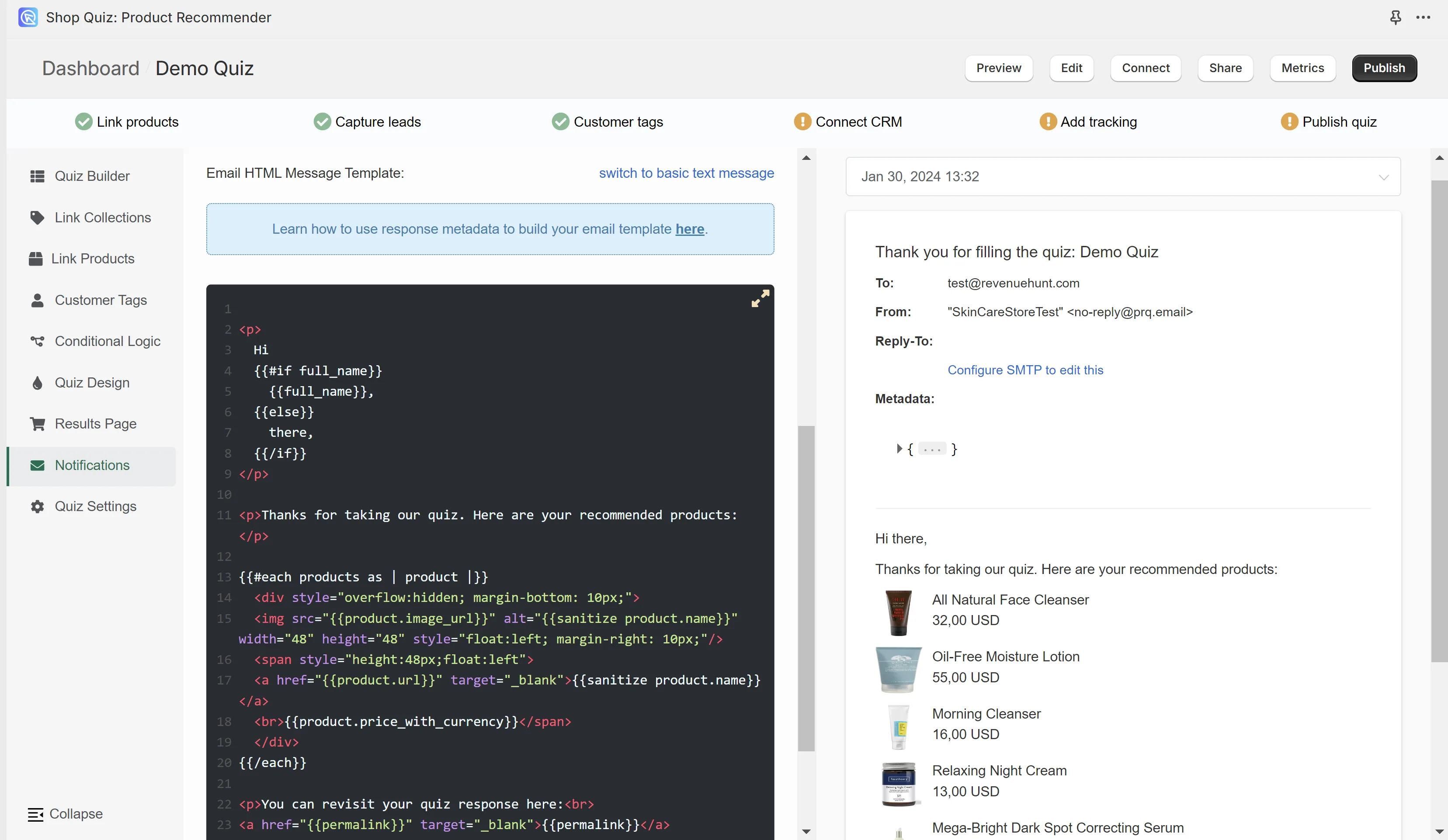
✓ Send a personalised post-quiz email with the customer’s quiz answers, the recommended products, and a reminder of the discount. Klaviyo-integrated quizzes convert 24% better and generate 66% more orders than quizzes without integrated email follow-up. See how Klaviyo segmentation unlocks once zero-party data lands in profiles for the activation chain.
Tip
RevenueHunt has built-in support for sending personalised result emails after quiz completion. For deeper Shopify-native automation, see how to automate post-quiz emails using Shopify Flows.
✓ Use the quiz data to power targeted ads. The customer’s quiz answers become a Facebook / Meta custom audience, a Google Ads remarketing list, or a TikTok audience for highly-targeted retargeting. The structured zero-party data the quiz captures is exactly the audience signal these platforms reward.
Frequently asked questions
How long should my first product recommendation quiz be?
6 to 12 questions, with the 9-12 band typically performing best. Platform data across 900+ quizzes shows 9-12 questions converting at 11.0%, 6-8 at 10.4%, and 1-5 underperforming at 9.8%. The “keep it short” advice from older guides was wrong — relevance is what matters, not brevity.
Should I obsess over the quiz design before launching?
No. Get a basic version live first with the right products mapped to the right answers, then iterate. Thousands of RevenueHunt merchants run double-digit conversion rates on basic templates. The foundational decisions (length, single results page, email capture required, Klaviyo integration) matter much more than the exact shade of the button background.
When should I ask for the customer’s email?
Just before the results page is the highest-converting placement. The customer has invested time in answering the quiz and is highly motivated to receive the result; the email field feels like the natural last step rather than an interruption. 75% of top-converting quizzes make this field required (rather than optional).
How many products should the results page recommend?
1 to 3 products, on a single results page. 79% of top performers configure it this way, and that configuration averages 10.6% conversion versus 7.1% for quizzes with 11+ results pages. The customer just spent 90 seconds telling you their preferences; don’t reward them with another browse problem.
What should I do after the customer completes the quiz?
Send a personalised follow-up email referencing their quiz answers and the recommended products, ideally connected to Klaviyo for segmented downstream flows. Klaviyo-integrated quizzes convert 24% better and generate 66% more orders than quizzes without integrated email follow-up.
Where this fits
This checklist is the lightweight companion to the full data-backed pillar at how to build a successful product recommendation quiz. The pillar goes deep on each of the 11 rules with the platform data; this guide is the version you scan through before sitting down to build. Run through it, then come back to the pillar when you want the longer-form treatment of any specific rule.
For the conversion-leak mistakes to watch out for once your quiz is live, see quiz creation mistakes that hurt your ecommerce sales. For the metrics worth tracking, see product quiz metrics: what to track to convert better.
Now go build. The first version doesn’t need to be perfect; launch, learn, improve. The successful quizzes are the ones that evolve.
Install RevenueHunt: Recommender Quiz for Shopify and ship your first quiz this week. Free plan available.
Most shoppers leave because they can't find the right product