
Discounts in product quizzes: the conversion playbook
Why quiz-end discounts outperform banner discounts, the four placements that lift conversion, and how to set them up on Shopify, WooCommerce and more.
A discount delivered at the end of a product recommendation quiz consistently outperforms the same discount banner-advertised on the homepage. The customer has already invested 90 seconds answering questions, the recommendation has built purchase confidence, and the discount removes the final friction. It’s a lever on both conversion rate optimisation and average order value at the same moment. The result is a single coherent decision moment instead of the cold “should I trust this brand enough to spend?” question shoppers face on a generic landing page.
Quick answer
Quiz discounts outperform banner discounts because they land after the customer has validated fit, not before. The four placements that move the needle: teased at the start (lifts quiz start rate), on the results page (the conversion-moment hook), in the post-quiz follow-up email (catches delayed conversion), and tiered / dynamic on Shopify Legacy (lifts average order value).
Four psychological mechanisms compound: effort justification (the quiz feels earned), reciprocity (recommendation + discount feels like two gifts), anchoring after fit (price is evaluated once need is validated), and a single decision moment (no "is this brand right?" + "is the price right?" stacked at the same time).
This article covers the psychology behind why quiz discounts convert, the four placements that consistently move the needle (one of them at the start of the quiz, not the end), and the exact configuration steps for every platform RevenueHunt runs on.
For the broader quiz design principles, see how to build a successful product recommendation quiz: the discount-on-results-page rule is one of eleven. To estimate the lift on your own store, use our quiz ROI calculator.
In this guide
- Why a quiz discount converts better than a banner discount
- The four placements that work
- Discount strategy: percentage vs fixed amount
- How to add a discount to your quiz, by platform
- Setting up the email-based discount (every platform)
- Running discounts as a habit, not a default
- Frequently asked questions
- Where this fits
Why a quiz discount converts better than a banner discount
Four psychological mechanisms compound when the discount lands inside a quiz funnel rather than on a homepage banner:
Effort justification. A customer who completed a 9-question quiz feels they have invested in the result. A discount on the results page becomes the reward for completing the journey, not a generic promotion. People assign more value to outcomes they worked for, even slightly, which means the same percentage off feels more meaningful at the end of a quiz than on a popup the moment they land.
Reciprocity. The brand has just given the customer a personalised recommendation that costs the customer nothing. When the discount follows, the customer feels they have received two distinct gifts (the consultation, then the offer) rather than a single transactional pitch. Reciprocity loops convert better than flat exchanges.
Anchoring at the right moment. A homepage banner anchors the customer on price before they have any signal that the product is right for them. The quiz discount anchors them on price after they have validated that the recommendation matches their need. The order matters: confidence first, price second.
Single decision moment. Banner discounts force the customer to evaluate two questions simultaneously: “is this brand right for me?” and “is the price right?” The quiz discount separates them. By the time the discount appears, the brand-fit question is already answered, which leaves only the price-versus-value decision on the table.
The four placements that work
Discount teased at the start of the quiz
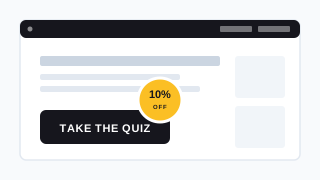
Fig. 01 Homepage with a quiz CTA and a 10% off badge teasing the reward at the awareness stage, before the customer commits to taking the quiz. The most underused placement and the one that lifts quiz start rate hardest.
The most overlooked placement and the one with the strongest impact on quiz start rate. Industry data backs the principle: in Popupsmart’s analysis of 10,000+ ecommerce popup campaigns, popups offering discounts converted 62% better than those without (7.45% vs 4.60%), and ecommerce-specific discount popups land in the 8-15% range when offering 10-20% off. A pre-quiz teaser is the same mechanic with a stronger value exchange attached (the personalised recommendation, not just the discount).
A simple line under the quiz CTA on your homepage (“Take our 60-second quiz to find your routine, and get 10% off your first order”) does three things:
- Increases click-through into the quiz by adding a tangible reward to the value exchange.
- Sets the customer’s expectation, which prevents the discount surprise from feeling like a sales pitch later.
- Provides a reason to complete the quiz rather than abandoning at question 4, because the reward is now contingent on finishing.
This is the placement we see underused most often. Operators tend to think of discounts as a results-page mechanic only, which leaves traffic on the table at the awareness stage. The fix is one line of copy on the homepage and the same code reaffirmed at the end.
Discount on the results page
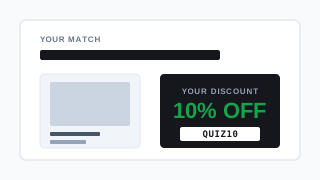
Fig. 02 Quiz results page pairing the recommended product card with a prominent discount code. The conversion-moment hook: fit has been validated by the quiz, and the discount removes the final friction.
The most common placement and the one most operators reach for first. A discount block alongside the recommended products closes the loop: “Based on your answers, here’s your routine, and here’s 10% off to start it today.” Single-results-page quizzes (which already convert 3.5 percentage points better than multi-page configurations) are particularly well-suited to this placement because the entire offer lands in one decision moment.
Discount in the follow-up email
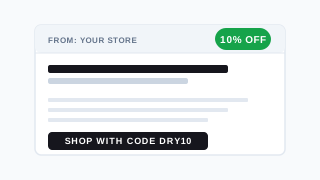
Fig. 03 Personalised post-quiz email referencing the customer's stated preferences ("for your dry, sensitivity-prone skin") with the discount as the call to action. Catches the customers who did not convert on the results page.
The highest ROI placement when the quiz is connected to Klaviyo. The post-quiz email arrives with the recommendation, the customer’s stated preferences referenced explicitly (“for your dry, sensitivity-prone skin”), and the discount as the call to action. Customers who didn’t convert on the results page often convert here, days later, because the email reaches them when they have time to actually buy.
For the full segmentation chain, see how Klaviyo segmentation unlocks once zero-party data lands in profiles. For why follow-up emails are non-negotiable, see the post-quiz follow-up sequence. And before you send any of these emails, make sure marketing consent is captured cleanly inside the quiz flow so the discount campaign is actually compliant.
Tiered / dynamic discounts (Shopify Legacy only)
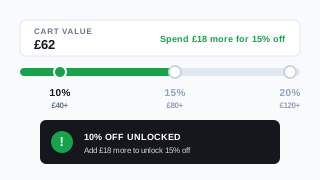
Fig. 04 Three discount tiers (10% over £40, 15% over £80, 20% over £120) with a toast notification nudging the customer toward the next tier. A gamification layer that lifts average order value, currently Shopify Legacy only.
A gamification layer: “10% off orders over £40, 15% off orders over £80, 20% off orders over £120.” The customer sees how close they are to the next tier via a toast notification on the results page, which incentivises larger basket sizes. This works particularly well for routine-based categories (skincare, haircare, supplements) where adding one step naturally lifts AOV without feeling like upselling.
This dynamic-tier mechanic is currently available only on the Shopify Legacy version of the RevenueHunt app. The Built for Shopify version and the multi-platform versions support the other three placements but not the dynamic tiered notification system.
Discount strategy: percentage vs fixed amount
A dollar-amount discount (“£15 off your first order”) often outperforms a percentage (“10% off”) for premium and luxury brands because it feels like a concrete gift. For lower-AOV categories, percentages tend to perform better because the savings feel proportionally larger (“save 20%” reads stronger than “save £6” on a £30 product).
The simplest A/B test: run a £15-off variant against a 10%-off variant for two weeks on a quiz with comparable AOV. The one that produces higher revenue per quiz completion wins, not the one with the higher click-through.
When not to discount: when your brand is positioned on scarcity or exclusivity. A £400 fragrance brand discounting on a quiz signals desperation in a way that erodes brand equity. For most DTC stores that constraint doesn’t apply, but it’s worth naming.
How to add a discount to your quiz, by platform
The configuration depends on which version of the app you’re running. The matrix below summarises support; the per-platform steps follow.
| Platform | Auto-apply at checkout | Tiered / dynamic | In follow-up email |
|---|---|---|---|
| Built for Shopify | Yes | No | Yes |
| Shopify Legacy | Yes | Yes | Yes |
| WooCommerce | Via plugin | No | Yes |
| Magento | Custom JS only | No | Yes |
| BigCommerce | Custom JS only | No | Yes |
| Standalone | Custom JS only | No | Yes |
On Built for Shopify
The cleanest setup. Create your discount code in the Shopify admin (Discounts → Create discount), then paste it into Results Page Settings → Discount Code in the RevenueHunt app. The code is automatically applied to the cart when the customer proceeds to checkout: no copy/paste required from the customer, no manual entry, no friction. The discount itself stays invisible on the results page (it appears as a line item at checkout), which keeps the recommended-products display clean.
If you also want the code visible on the results page as social proof (“Use code QUIZ10 for 10% off”), add a Text block to the results page alongside the auto-apply configuration. Display + auto-apply is the strongest combination because customers see the offer and don’t have to remember it.
On Shopify Legacy
All of the above, plus the tiered / dynamic discount option. Configure tiers in Results Page Settings → Advanced → Multiple Results Pages with Jump Logic statements directing customers to discounted vs. non-discounted results pages based on quiz answers, cart value, or email-capture status. Enable toast notifications to surface the “spend £X more to unlock the next tier” messaging on the results page.
This is also the platform where you can gate the discount behind email capture: customers who provide an email see the discounted results page; customers who don’t see a non-discounted version. The conditional logic is configured via the same Multiple Results Pages mechanism.
On WooCommerce
Native automatic application isn’t built in, but the Advanced Coupons for WooCommerce plugin provides a URL coupon feature that achieves the same outcome. Create a coupon in WooCommerce with the URL Coupons feature enabled, copy the URI portion of the coupon URL, and paste it into Results Page Settings → Checkout Settings → Cart URL in the RevenueHunt app. The discount applies when the customer reaches the cart.
For displayed text-only codes (customer copies and pastes at checkout), add a Text block to the results page with the discount code. Lower conversion than automatic application but zero plugin dependency.
On Magento, BigCommerce and the Standalone version
These platforms don’t currently support automatic discount application from the quiz natively. Two workable approaches:
- Display the code on the results page as text and let customers copy/paste at checkout. Lower conversion than automatic, but zero developer time.
- Custom JavaScript injection using the RevenueHunt
prq.setDiscountCode('CODE')function. The coupon must pre-exist in your store, and a developer is needed for the initial implementation.
For all three platforms, the follow-up email path is unaffected: a discount code in the post-quiz email works identically to Shopify because the email is dispatched by RevenueHunt directly, not via the storefront platform. If you can’t automate the on-site flow, lean harder on the email placement.
Setting up the email-based discount (every platform)
Edit the Notifications → “To Respondent” tab in the RevenueHunt app and insert the discount code into the email body. For a personalised touch, reference the quiz answer that triggered the recommendation: “For your dry skin routine, here’s 10% off your first order with code DRY10.”
This works on every platform RevenueHunt supports because the email is dispatched from RevenueHunt’s infrastructure, not the storefront. Combine it with the Klaviyo zero-party data integration to drop the same code into segmented Klaviyo flows triggered by quiz completion. The customer’s quiz answers become Klaviyo profile properties, which means the email subject line, body and discount can all reference their stated preferences explicitly.
Running discounts as a habit, not a default
Test changes one at a time. The most consistent operator mistake is to launch a discount, get a 2-point lift, and quietly leave it running forever. Discounts are best treated as periodic moves: run for 30 days, measure the conversion lift against the margin sacrifice, decide if it pays. If the lift is durable, run it again next quarter; if not, retire it.
For premium brands, an alternative to a permanent discount is a one-time-only “welcome offer” exclusive to first quiz completions, scoped via a per-customer discount limit in Shopify. The customer feels they’ve earned something one-time and exclusive rather than discovered a perennial coupon. The same per-customer limit can be configured in WooCommerce via Advanced Coupons.
Frequently asked questions
Can I add discounts to my quiz on every platform?
Yes, on every platform RevenueHunt supports (Built for Shopify, Shopify Legacy, WooCommerce, Magento, BigCommerce, Standalone). The configuration differs: Built for Shopify and Shopify Legacy apply discount codes automatically at checkout natively; WooCommerce needs the Advanced Coupons plugin for the same outcome; Magento, BigCommerce and Standalone support discount codes via custom JavaScript or text display on the results page. Follow-up email discounts work identically on every platform because the email is dispatched by RevenueHunt directly.
Do tiered or dynamic discounts work outside Shopify Legacy?
No. The tiered discount mechanic with toast notifications (“spend £18 more to unlock 15% off”) is currently available only on the Shopify Legacy version of the RevenueHunt app. The Built for Shopify version and the multi-platform versions support static discounts on the results page and in follow-up emails but not the dynamic tiered notification system.
Where in the quiz should the discount appear?
Four placements work. In order of typical impact: teased at the start of the quiz to lift quiz start rate, displayed on the results page as the most common conversion-moment placement, included in the post-quiz follow-up email for delayed conversion, and tiered/dynamic on Shopify Legacy to lift AOV. The strongest setups combine the start-of-quiz teaser with the results-page placement, with the follow-up email catching the customers who didn’t convert at the results moment.
Is a percentage discount or a fixed amount better?
For premium and luxury brands, a fixed amount (“£15 off your first order”) often outperforms a percentage because it feels like a concrete gift. For lower-AOV categories, percentages tend to perform better because the savings feel proportionally larger (“save 20%” reads stronger than “save £6” on a £30 product). The simplest decision rule: A/B test both variants for two weeks on a quiz with comparable traffic, and pick the one that produces higher revenue per quiz completion.
Will the discount apply automatically at checkout?
On Built for Shopify and Shopify Legacy, yes. The code is applied to the cart automatically when the customer proceeds to Shopify checkout, with no copy/paste required. On WooCommerce, automatic application requires the Advanced Coupons plugin. On Magento, BigCommerce and the Standalone version, automatic application requires a developer-implemented custom JavaScript injection; the alternative is displaying the code on the results page for the customer to copy and paste.
Where this fits
Discounts are one of eleven elements that make a product recommendation quiz convert, and they sit downstream of the more foundational decisions. If your quiz is too long, the discount can’t rescue it. If your results page recommends 12 products instead of 1-3, the discount won’t compensate for the choice paralysis. Get the foundations right first, then layer the discount on top.
For the full foundation, see how to build a successful product recommendation quiz. For the mistakes that erode quiz conversion, see product quiz mistakes ranked by industry data. For real DTC funnels using discounts as part of an integrated flow, see 11 ecommerce sales funnel examples that convert in 2026.
Install RevenueHunt: Recommender Quiz for Shopify and start testing your first quiz-driven discount today. Free plan available.
Free tools & data
Put these benchmarks to work on your own store.
Free tool
Quiz ROI calculator
Estimate the extra revenue and ROI a product recommendation quiz could add to your store. Built on real data, no email required.
Calculate your ROIFree report
Ecommerce quiz benchmark report
How product recommendation quizzes really perform: conversion by category, AOV uplift, and completion, from 45M+ real quiz responses.
Read the report
Most shoppers leave because they can't find the right product