
Automate post-quiz emails with Shopify Flow
Connect your quiz to Shopify Customers, tag responses, and trigger Shopify Flow automations for personalised post-quiz email campaigns. Setup, by platform.
Shopify Flow turns every quiz completion into an automation trigger inside a quiz funnel: when a customer finishes the RevenueHunt: Recommender Quiz, their email, name, phone number and quiz-derived tags sync to the Shopify Customers list, and Shopify Flow can fire a personalised follow-up email based on any combination of those tags. This guide walks through the full setup end to end, including the platform-specific differences between Built for Shopify and Shopify Legacy (the integration is Shopify-only; WooCommerce, Magento, BigCommerce and Standalone use the Klaviyo path instead).
What you'll learn
- 01The 5-step setup: build the quiz, tag the choices, connect to Shopify Customers, create the Shopify Flow, monitor performance.
- 02Platform-specific connect paths: Built for Shopify (App Settings or Connect tab, no prefix) vs Shopify Legacy (Connect tab, automatic
prq_prefix on tags). - 03The exact Flow condition syntax for each platform (the
prq_prefix question matters). - 04Why marketing-consent state differs between Built for Shopify (default subscribed) and Shopify Legacy (configurable opt-in level).
For the broader Klaviyo-based equivalent that works on every platform, see how Klaviyo segmentation unlocks once zero-party data lands in profiles. For the customer-tag design that powers the segmentation, see how to use customer tags in product quizzes.
Table of contents:
- How the integration works
- Setting up the post-quiz Shopify Flow automation
- What about WooCommerce, Magento, BigCommerce and Standalone?
- Frequently asked questions
- Where this fits
How the integration works
Two products, working together. The RevenueHunt: Recommender Quiz captures customer email, name, phone number and structured tags from quiz responses. Shopify Flow is Shopify’s native automation engine: trigger an action when a specific event happens (in this case, when a new customer profile lands in Shopify Customers with a specific tag combination).
The integration syncs every quiz completion to Shopify Customers, and Shopify Flow watches that list for new customers matching your tag conditions. When the conditions match, Flow fires the action you configured (typically a personalised marketing email, but it can also add segments, route to teams, or stack multiple actions).
Why this matters for revenue: a customer who completed the quiz has just told you (via tags) what they care about. Segmented post-quiz email campaigns earn over 3x the revenue per recipient of generic sends (Klaviyo segmentation benchmark), and across the platform 1 in 5 quiz-attributed orders lands more than 30 days after the quiz (benchmark report). The Shopify Flow path captures the same lift on Shopify-native stacks.
Why set up post-quiz email automation:
- Personalised follow-up. Tailored emails based on stated quiz preferences (“for your dry, sensitivity-prone skin”) consistently outperform generic newsletters on open rate, click rate and revenue per recipient.
- Higher conversion. Targeted product recommendations from tag data turn quiz-completers who didn’t buy on the results page into buyers via the email channel.
- Better customer insights. Quiz tags accumulate over time into a structured customer profile that your marketing team can segment, your support team can reference, and your buying team can use for assortment decisions.
- Workflow automation. The whole sequence runs without manual touch once configured. Set it up once, monitor the metrics, refine the templates quarterly.
Platform capability matrix
| Capability | Built for Shopify | Shopify Legacy | WooCommerce | Magento | BigCommerce | Standalone |
|---|---|---|---|---|---|---|
| Sync leads to Shopify Customers | Yes | Yes | No | No | No | No |
| Shopify Flow trigger available | Yes | Yes | No | No | No | No |
| Customer-tag prefix on sync | None | prq_ automatic | n/a | n/a | n/a | n/a |
| Configurable consent state | Subscribed by default | Yes (per question) | n/a | n/a | n/a | n/a |
| Klaviyo alternative path | Yes | Yes | Yes | Yes | Yes | Yes |
| Mailchimp alternative path | No | Yes | Yes | Yes | Yes | Yes |
| Omnisend alternative path | No | Yes | Yes | Yes | Yes | Yes |
Setting up the post-quiz Shopify Flow automation
Create a product quiz with the RevenueHunt app
Using RevenueHunt: Recommender Quiz for Shopify app, design an interactive quiz to gather customer preferences. Make sure to ask relevant questions that will help lead the customer towards the products that meet all their criteria.
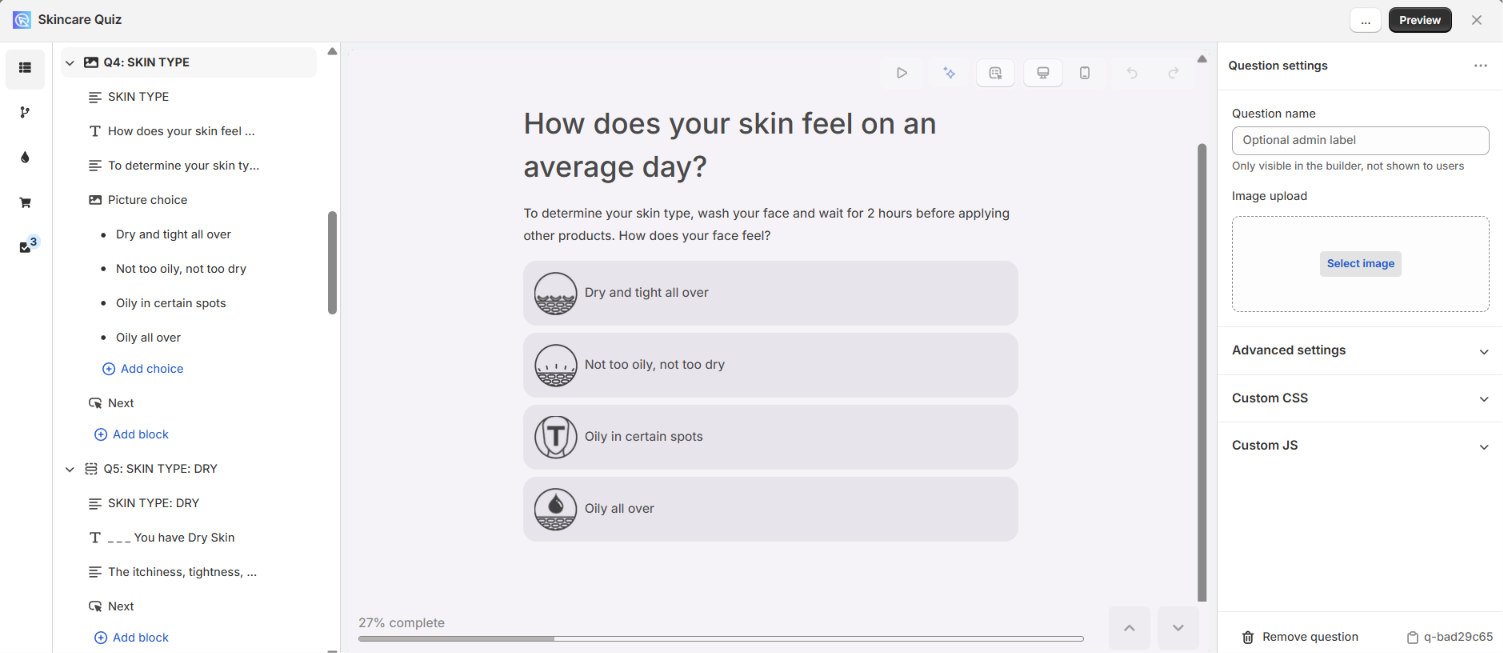
Fig. 01 The Quiz Builder on Built for Shopify after creating a product recommendation quiz. The question flow drives every downstream tag, segment and Shopify Flow trigger.
Tip
Check out this video guide on how to create your first Product Recommendation Quiz using the RevenueHunt: Recommender Quiz for Shopify app.
Add customer tags to choices
Assign customer tags to each quiz answer choice. Tags are the structured filter logic Shopify Flow will use later: a customer who selects “oily skin” gets the oily_skin tag, a customer who selects “dry skin” gets dry_skin, and so on. Each customer typically ends up with 5 to 10 tags by the end of the quiz, which gives Flow plenty of precision to target each segment.
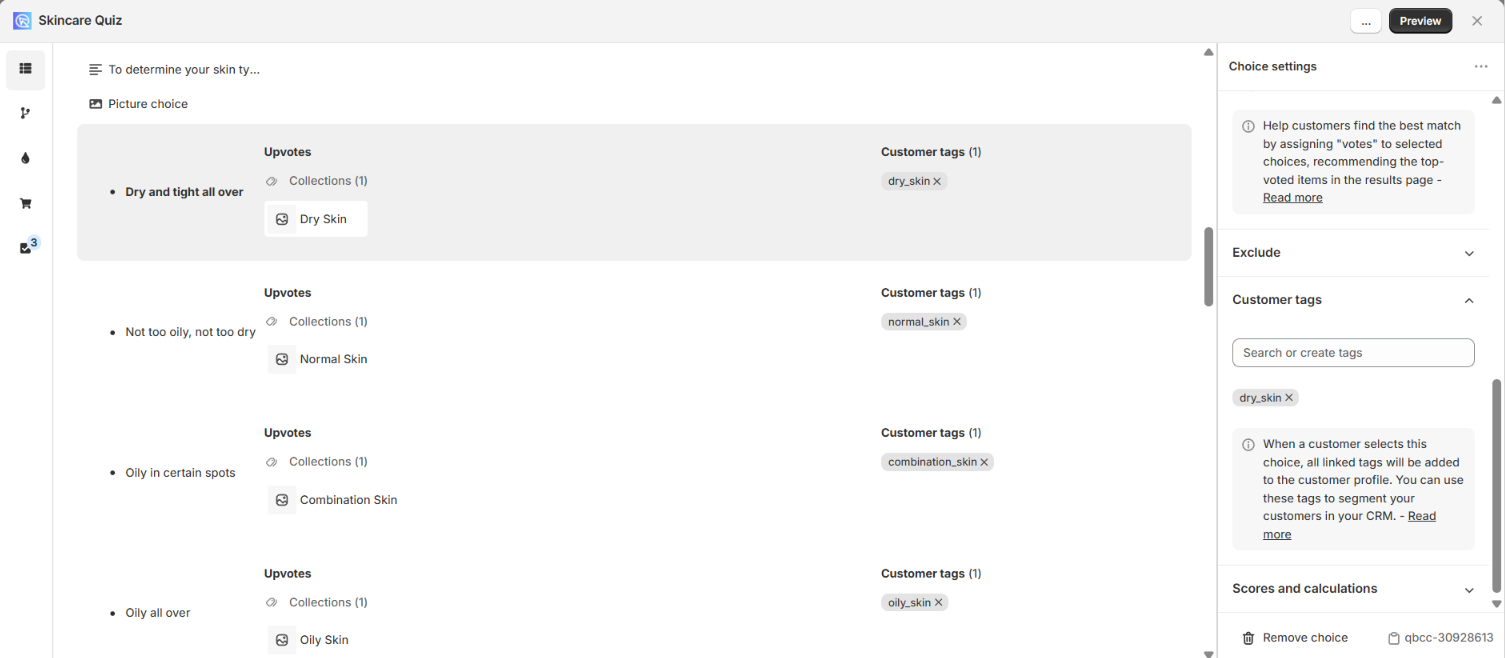
Fig. 02 The Choice Settings panel on Built for Shopify with customer tags attached to a quiz answer. Tags flow to the Shopify Customers list without the `prq_` prefix that Shopify Legacy applies.
Note: There’s no cap on the number of tags per choice or choices per tag. The setup flow for adding tags differs between Built for Shopify (Choice Settings panel) and the legacy / multi-platform versions (dedicated Customer Tags section); see the customer tags walkthrough for the full per-platform steps.
Connect your quiz to Shopify Customers
The setup path differs slightly between Built for Shopify and Shopify Legacy. Pick the one that matches your install. (Non-Shopify platforms don’t have this native integration; see the closing note below.)
On Built for Shopify
Two equivalent paths:
- App Settings → Shopify Customers tab. Toggle “Enable pushing quiz leads to Shopify Customers” and click Save. Once on, every quiz completion pushes the customer’s email, name, phone number and tags to the Shopify Customers list automatically.
- Or via the quiz Connect tab. Open the quiz in the Quiz Builder, click the Connect tab, click Connect in the Shopify Customers section, then Publish to push the change live.
Tags from quiz choices pass through to Shopify Customers without a prefix. A tag named oily_skin in the Quiz Builder lands on the customer profile as oily_skin.
On Shopify Legacy
One path:
- Quiz Builder → Connect tab. Click Connect in the Shopify Customers section, authorise the integration, then Publish.
Tags from quiz choices land on the customer profile with an automatic prq_ prefix. A tag named oily_skin in the Quiz Builder lands on the customer profile as prq_oily_skin. This matters for the Flow condition syntax in the next step.
Both versions sync the same data fields: email, name, phone number and customer tags.
Marketing-consent state
Both versions add the customer to Shopify Customers as subscribed by default (which is what enables Shopify Flow’s Marketing email action to fire). One platform difference worth knowing:
- Built for Shopify defaults to subscribed and doesn’t expose consent-state controls in the Quiz Builder.
- Shopify Legacy lets you override the default in the email or phone question settings: set the Consent state to
subscribedornon-subscribed, and the Opt-in level toconfirmed_opt_in(the customer confirms via a follow-up email before the flow fires) orsingle_opt_in(the customer receives one results email and isn’t added to ongoing marketing).
For the broader playbook on consent design inside the quiz itself, see smart ways to ask for marketing consent in a product quiz.
Create a new automation in Shopify Flow
In your Shopify admin: Marketing → Automations → View templates → Create custom automation.
- Set the trigger. Choose Customer created. This starts the automation whenever a new customer profile is created (which happens on every quiz completion that captures email).
- Add conditions. Click Then → Condition → add a variable → select Customer → select Tags. Then build the condition: “At least one customer / tags includes tags_item” + your tag name.
- Configure the action. Click Then → Action → Send marketing email → choose the email template you want sent to this segment.
- Save and activate. Save the automation and toggle it on.
The Flow condition syntax differs by platform. For a tag named oily_skin in the Quiz Builder:
- Built for Shopify: condition is
tags_item "oily_skin"(no prefix). - Shopify Legacy: condition is
tags_item "prq_oily_skin"(the prefix is added automatically when the tag is synced).
Get this wrong and the Flow trigger silently never fires. If you’re debugging a Flow that should be active and isn’t firing on new quiz completions, check the prefix first.
Monitor and improve
Once the Flow is live, watch the metrics that matter: open rate, click-through rate and revenue per email per segment. The per-segment view is what tells you whether the segmentation is doing real work or just adding complexity. If one segment converts at 12% and another at 3%, the gap is a signal: refine the low-performing template, or consider whether the segment is too small to justify its own treatment.
For the broader set of quiz metrics worth tracking, see product quiz metrics: track what converts. For the mistakes that quietly leak conversion in the quiz itself before the Flow even fires, see product quiz mistakes ranked by industry data.
Tip
Implement A/B testing to compare different quiz and email strategies and determine which ones are most effective.
What about WooCommerce, Magento, BigCommerce and Standalone?
Shopify Flow and the Shopify Customers integration are Shopify-only. If you’re running RevenueHunt on WooCommerce, Magento, BigCommerce or the Standalone version, this exact stack isn’t available, but the equivalent automation pattern is: connect the quiz to Klaviyo (or Mailchimp / ActiveCampaign / HubSpot) and build segmented flows there. The data captured is identical (email, name, phone, customer tags as profile properties); only the automation layer is different.
For the Klaviyo path end to end, see how Klaviyo segmentation unlocks once zero-party data lands in profiles. For the customer-tag design that drives the segmentation, see how to use customer tags in product quizzes.
Frequently asked questions
Which platforms support sending quiz leads to Shopify Customers?
Built for Shopify and Shopify Legacy. The integration is Shopify-only because it relies on Shopify’s native Customers list and the Shopify Customer Created event. WooCommerce, Magento, BigCommerce and Standalone don’t support this exact path; their equivalent is connecting the quiz to Klaviyo (or another email platform) and running the post-quiz automation there.
What’s the prq_ prefix and do I need to worry about it?
On Shopify Legacy, every customer tag synced from the quiz is automatically prefixed with prq_ (so a tag named oily_skin in the Quiz Builder appears as prq_oily_skin on the Shopify customer profile). On Built for Shopify, no prefix is added. This matters because Shopify Flow conditions match tag names literally: you need to include the prq_ prefix in your Flow condition on Legacy, and omit it on Built for Shopify.
Why isn’t my Shopify Flow firing on new quiz completions?
Three common causes, in order of frequency: (1) the Flow condition has the wrong tag name (missing the prq_ prefix on Legacy or including it on Built for Shopify); (2) the integration isn’t connected (check App Settings → Shopify Customers on Built for Shopify, or the Connect tab in the Quiz Builder on either version); (3) the customer didn’t capture an email (Flow only fires on Customer Created events, which require an email).
Can I configure the marketing-consent state from the Quiz Builder?
On Shopify Legacy, yes: set Consent state and Opt-in level in the email or phone question settings. On Built for Shopify, the consent state defaults to subscribed and isn’t currently exposed as a Quiz Builder setting. For full consent-design guidance, see smart ways to ask for marketing consent in a product quiz.
How does this compare to using Klaviyo instead of Shopify Flow?
Both work; the choice depends on your existing stack. Shopify Flow is free and built into Shopify, making it the cheapest path for Shopify-native stores. Klaviyo is more powerful for ecommerce-specific email automation (per-segment flows, behavioural triggers, advanced reporting) and works across every platform RevenueHunt supports. Most stores end up using both: Shopify Flow for the immediate post-quiz follow-up, Klaviyo for the longer-term nurture sequences.
Where this fits
Shopify Flow is the cheapest path to post-quiz email automation for Shopify-native stores: free, built in, and integrated end to end with the customer record. The pattern works because the quiz already does the heavy lifting (capturing structured intent), and Flow just fires the right message at the right person. It all starts with a product recommendation quiz for Shopify that captures those quiz-derived tags in the first place. The Klaviyo path produces the same outcome with more flexibility for multi-step nurture sequences and works on every platform RevenueHunt supports.
For the foundation that makes both paths work, see how to build a successful product recommendation quiz. For the metrics worth tracking after launch, see product quiz metrics: what to track to convert better. For the discount layer that compounds on top of the post-quiz email, see product quiz discounts: the conversion playbook. For the Mailchimp path on non-Shopify platforms, see Mailchimp for post-quiz email marketing. For the Omnisend path, see Omnisend quiz integration.
Install RevenueHunt: Recommender Quiz for Shopify and configure your first Flow today. Free plan available. Full docs: send quiz leads to Shopify Customers.
Free tools & data
Put these benchmarks to work on your own store.
Free tool
Quiz ROI calculator
Estimate the extra revenue and ROI a product recommendation quiz could add to your store. Built on real data, no email required.
Calculate your ROIFree report
Ecommerce quiz benchmark report
How product recommendation quizzes really perform: conversion by category, AOV uplift, and completion, from 45M+ real quiz responses.
Read the report
Most shoppers leave because they can't find the right product