
Shoppable video quiz: a complete setup guide
Shoppable video quiz setup, end to end: where to place video, the 5 types worth recording, mobile-first specs, and the per-platform setup flow.
A shoppable video quiz is a product recommendation quiz with video embedded inside the question flow and on the results page. It does three things a standalone video quiz tool can’t: it drives revenue (the quiz ends in a product recommendation, not a thank-you page), it collects zero-party data that syncs to Klaviyo and the customer profile, and it lives on a single billing line in your tech stack. This guide covers what a shoppable video quiz actually is, where to place video, the five types worth recording, mobile-first technical specs, and the per-platform setup flow.
Quick answer
A shoppable video quiz is a product recommendation quiz with video embedded inside the question flow and on the results page.
Add a video block on Built for Shopify, or a background/widget video on Shopify Legacy and the multi-platform versions. Five video types worth recording (intro, explainer, testimonial, product overview, personalised recommendation) and a per-platform setup flow below.
What you'll learn
- 01What a shoppable video quiz is, and why combining the two beats running them as separate tools.
- 02The three placement modes (background, widget, results page) and which works best for which question type.
- 03Five types of video worth recording (introduction, explainer, testimonial, product overview, personalised recommendation) with sweet-spot durations.
- 04Mobile-first technical specs (resolution, aspect ratio, bitrate, format) that keep load times fast on imperfect connections.
- 05Direct upload vs YouTube embed, cross-platform availability on every RevenueHunt version, and step-by-step setup in the Quiz Builder.
Table of contents:
- What is a shoppable video quiz?
- Where to place video in your quiz
- Five types of video to record
- Direct upload vs YouTube embed
- Available on every ecommerce platform
- Plan before you record
- Mobile-first technical specs
- How to add video to your quiz
- Categories that benefit most
- Best practices
- Frequently asked questions
What is a shoppable video quiz?
A shoppable video quiz combines two mechanics that most ecommerce stores run separately: a product recommendation quiz (the question flow that ends in a tailored product result) and embedded video (intros, demos, testimonials, ingredient explainers). The result is a single funnel that captures intent, delivers a recommendation, and uses video at the moments where text alone underdelivers.
Standalone video-quiz tools like VideoAsk, Tolstoy or Mindstamp have built around making video interactive, and on engagement metrics they perform well. But the moment one sits next to your existing product recommendation quiz, three structural problems show up:
Two billing lines for one customer interaction. You’re paying for the product recommendation quiz, then paying again for the video quiz tool, typically $50-150 per month at the relevant tier. Same customer, same funnel, two SaaS bills.
Engagement metrics, not revenue metrics. Standalone video tools report watch-through, click-through and lead-capture rate. None of those tie cleanly to revenue per quiz completion or quiz-attributed Shopify orders. The product recommendation quiz reports both because it’s connected directly to the cart.
Zero-party data stranded. When the customer answers a video question inside a standalone tool, that answer lives in the tool’s own database. Moving it into Klaviyo for segmented flows takes Zapier glue or custom integration work. When the same answer is captured by the product recommendation quiz, it lands directly in Klaviyo as a profile property via the native integration. For the activation chain, see how Klaviyo segmentation unlocks once zero-party data lands in profiles.
The fix isn’t to drop video. The fix is to add video to the recommendation quiz that’s already doing the heavier work. For a full feature-by-feature comparison with the closest video-first competitor, see RevenueHunt vs Tolstoy.
Where to place video in your quiz
The RevenueHunt video implementation differs slightly between Built for Shopify and the legacy versions. On Built for Shopify, video sits as a content block on the slide (with aspect-ratio and alignment options). On Shopify Legacy, WooCommerce, Magento, BigCommerce and Standalone, video sits as a slide-level layer with three overlay modes plus an opacity slider. The placements below describe each option.
Background mode (Shopify Legacy + multi-platform)
The video plays full-bleed behind the question text, with the play/pause menu deactivated. Best for hero questions (“Welcome to the routine builder”) and for category-introduction slides where the video sets the tone rather than carries information. On Built for Shopify, the equivalent is a Video block with a wide aspect ratio (16:9) and centred alignment.
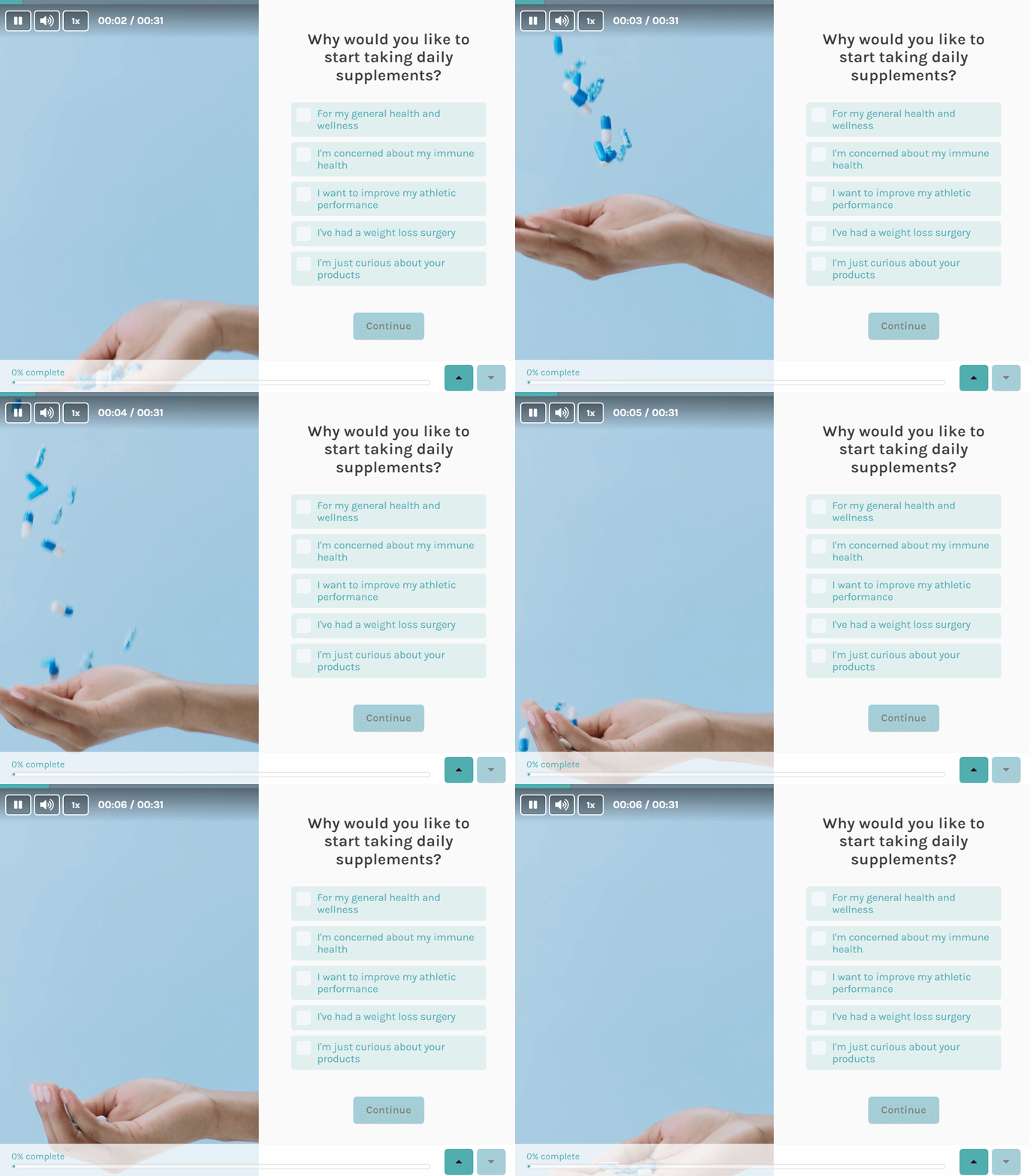
Fig. 01 Background mode on Shopify Legacy: the video plays full-bleed behind the question text. Best for hero or category-introduction slides where atmosphere matters more than instruction. On Built for Shopify, the equivalent is a Video block with a 16:9 aspect ratio and centred alignment.
Widget mode (Shopify Legacy + multi-platform)
The video plays as a small round overlay on the slide, like a vertical short embedded into the corner. Best for product demonstrations and “see this in action” moments where the video supports the question but doesn’t replace it. On Built for Shopify, the equivalent is a Video block with a vertical aspect ratio (9:16) and right-aligned placement.
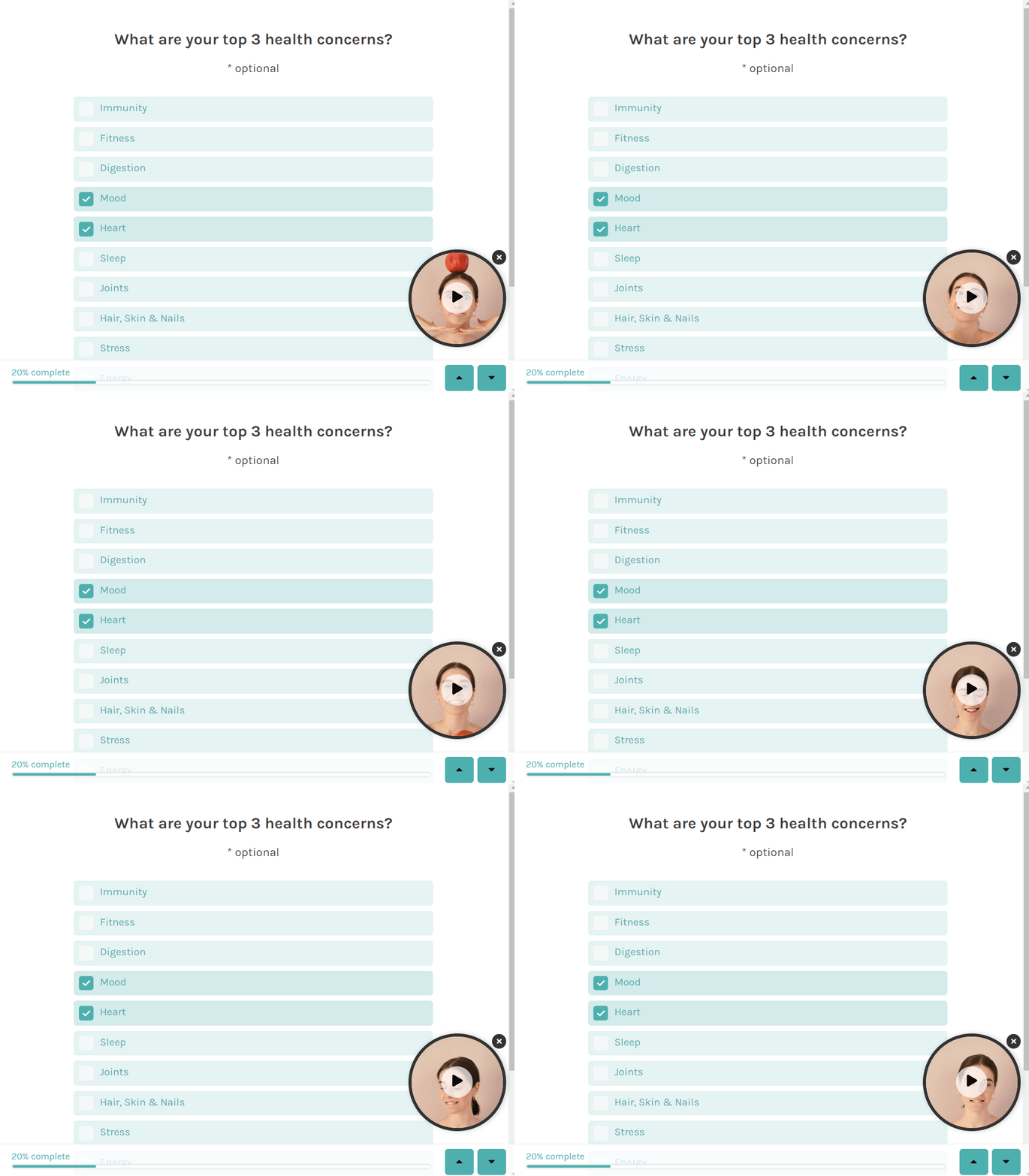
Fig. 02 Widget mode on Shopify Legacy: the video plays as a small round overlay on the slide, like a vertical short embedded into the corner. Best for product demonstrations and "see this in action" moments where the video supports the question. On Built for Shopify, the equivalent is a vertical Video block with right alignment.
Results-page video block
Drop a video into the recommendation page itself, alongside the recommended products. Best for ingredient-led brands (skincare, supplements) where a 30-second explainer next to the recommendation builds purchase confidence that the text alone can’t.
All three modes accept either a directly-uploaded video file or a YouTube embed.
Five types of video to record
Different video types serve different roles in the quiz funnel. Each has a sweet-spot duration and a placement where it works best.
Introduction videos (20-30 seconds)
Plays on the welcome slide. Briefly introduces the brand, explains what the quiz does, and tells the customer what they’ll receive at the end. Functions as the elevator pitch for the quiz itself, which is why duration discipline matters: longer than 30 seconds and the customer abandons before answering question one.
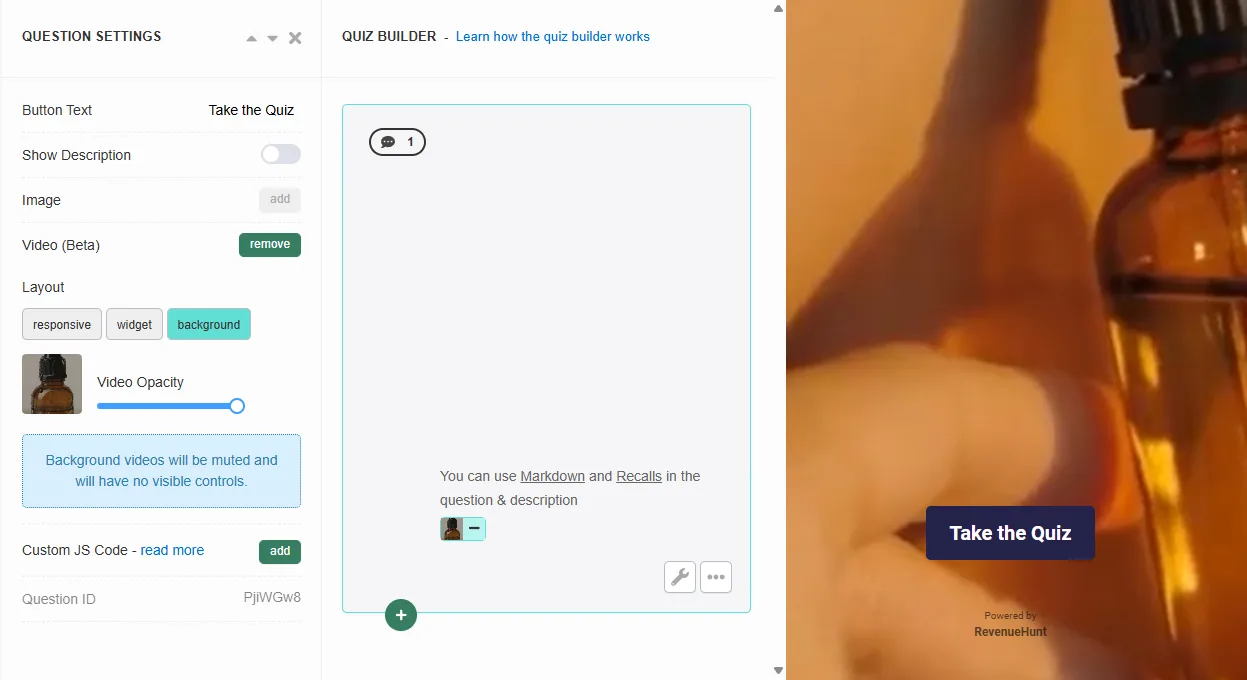
Fig. 03 The Quiz Builder welcome-slide configuration with the video upload option exposed. The 20-30 second introduction video is the first thing the customer experiences; treat it as the elevator pitch for the quiz itself.
How-to and explainer videos (1-2 minutes)
Goes wherever an instruction needs more clarity than text can carry. Use these to show how to use a product step by step, or to explain a concept the quiz asks about (“what’s your skin type?” with a 60-second primer on identifying it). Most useful on multi-choice questions where the customer needs context to answer confidently, and on the results page where the recommendation needs an ingredient explainer.
Customer testimonial videos (30-45 seconds)
Builds trust at moments where the customer is weighing a decision (just before the results page, or on the results page itself). A real customer in their own setting talking about their experience consistently outperforms a logo grid of brand testimonials. Widget-mode placement works particularly well.
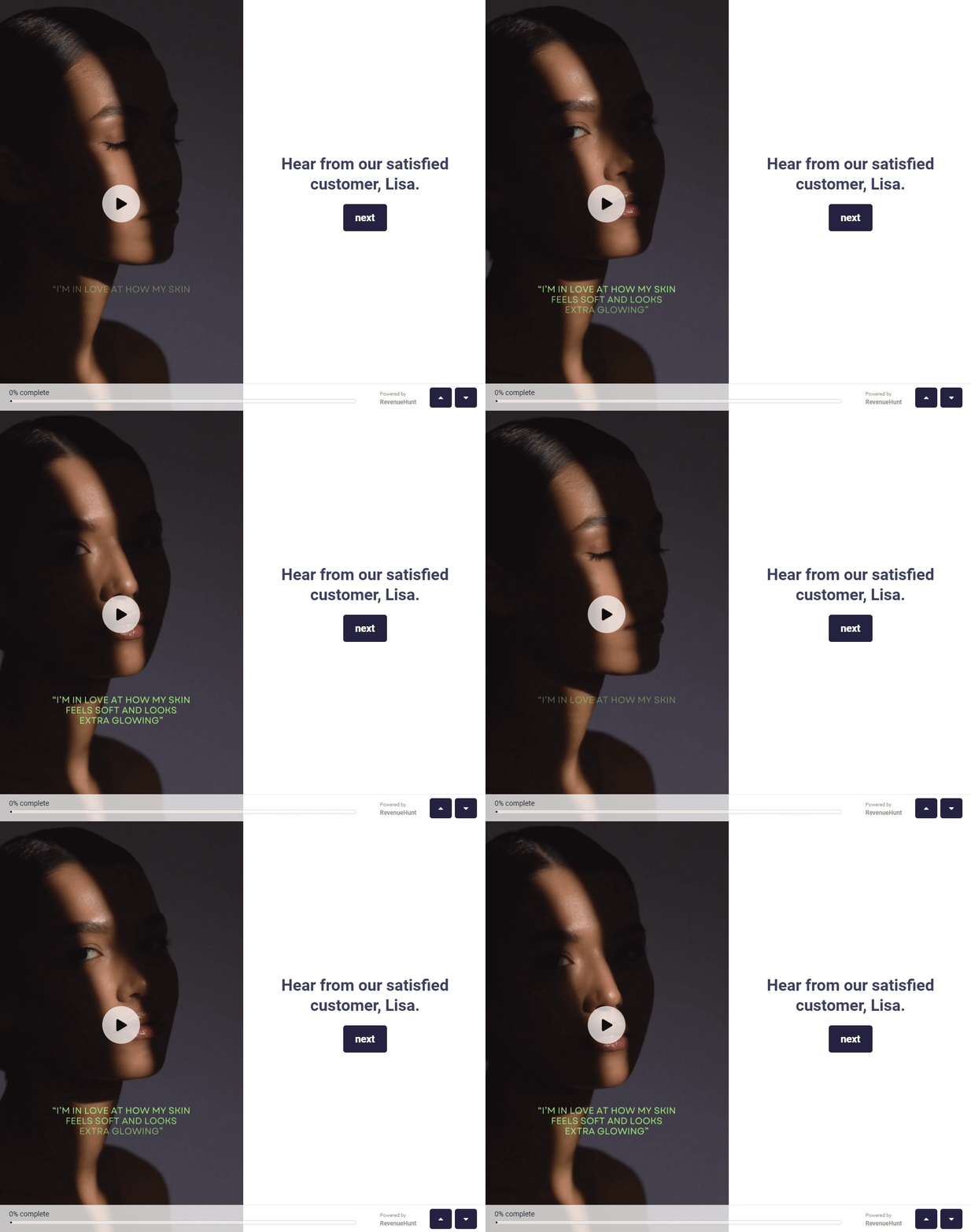
Fig. 04 A customer testimonial video in widget mode alongside the question content. A real customer in their own setting consistently outperforms a logo grid; the widget placement lets the testimonial run without crowding the question.
Product overview videos (max 30 seconds per product)
Best placed on the results page next to recommended products, or on this/that-style choice questions where the customer is picking between two SKUs. Highlights key features, benefits and usage in a fast clip; no need to be exhaustive. Animated GIF format also works for short product loops and is well-suited to picture-choice questions.
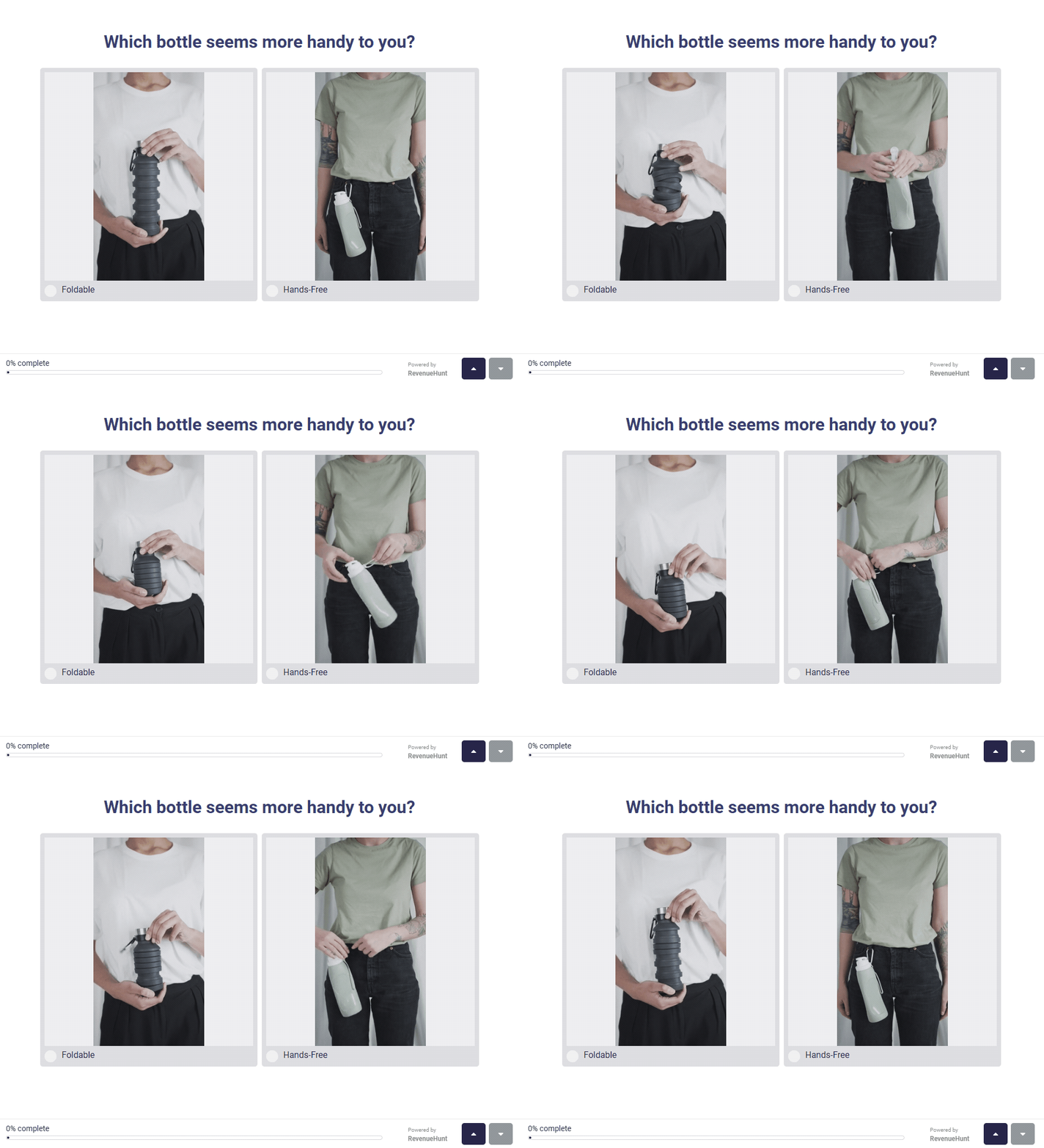
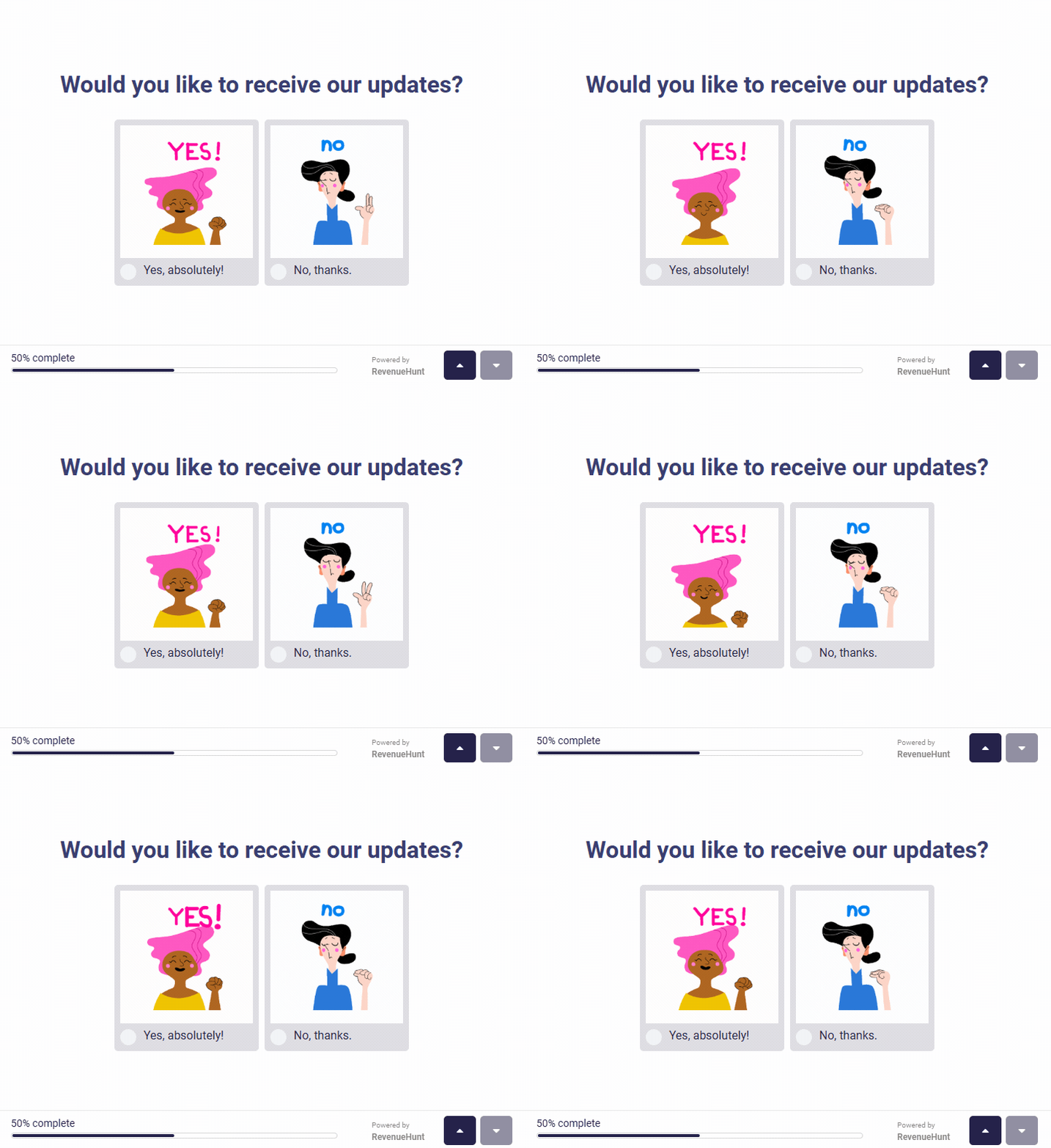
Fig. 05 Animated product overview clips on a this/that-style choice question. The short loop format works well for picture-choice questions where the customer is comparing two specific SKUs.
Personalised recommendation videos (30-45 seconds)
The most advanced placement: record a different short video for each major recommendation outcome, then conditionally show the right one on the results page based on the customer’s answers. A skincare quiz might play “your routine for oily, acne-prone skin” when the customer’s answers point there, and a different video for dry / sensitive. The recommendation feels genuinely tailored because the delivery is tailored, not just the product list.
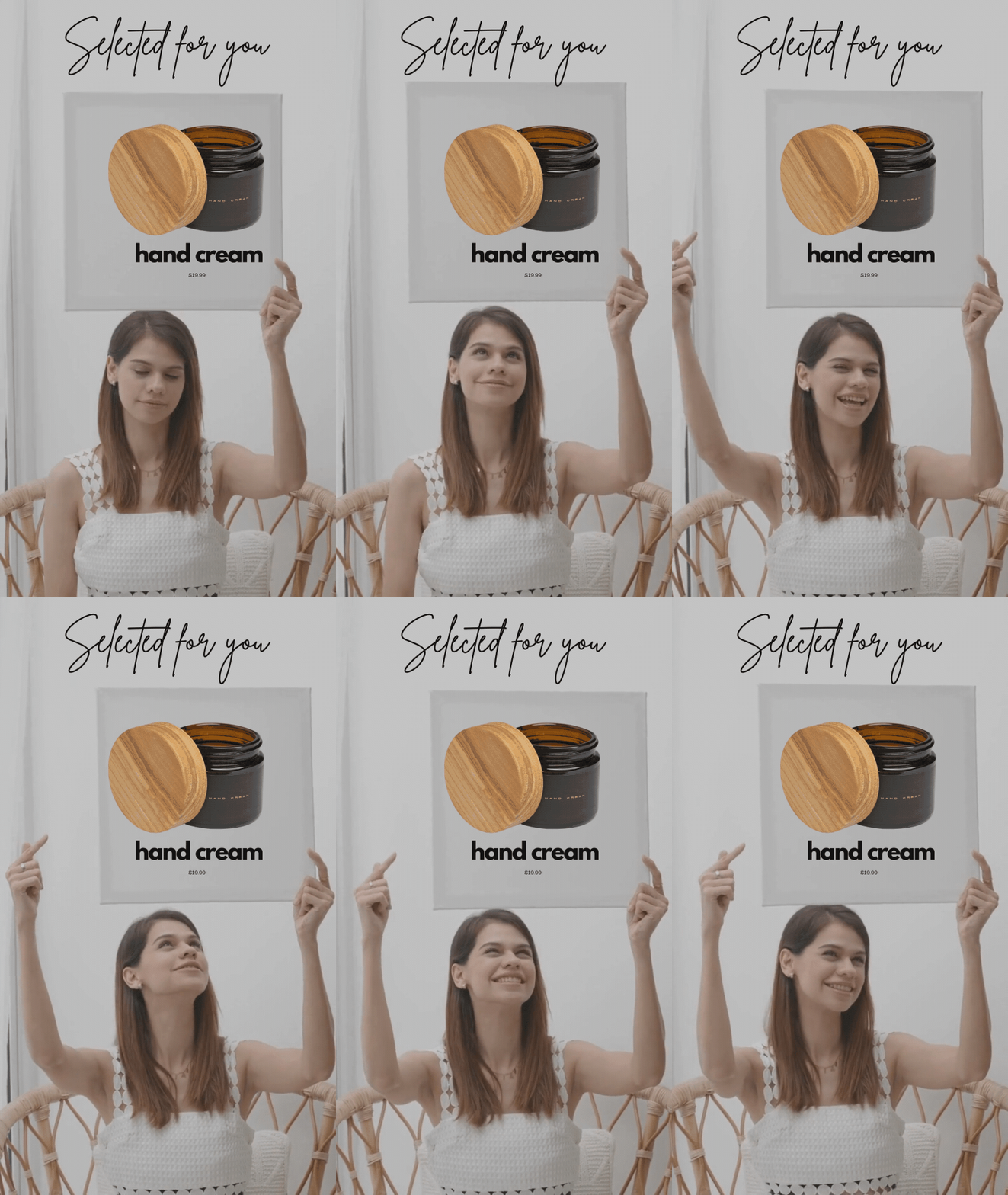
Fig. 06 Personalised recommendation video on the results page for one customer profile (oily, acne-prone skin). The video is gated by conditional content rules so each major recommendation outcome can have its own delivery, not just its own product list.
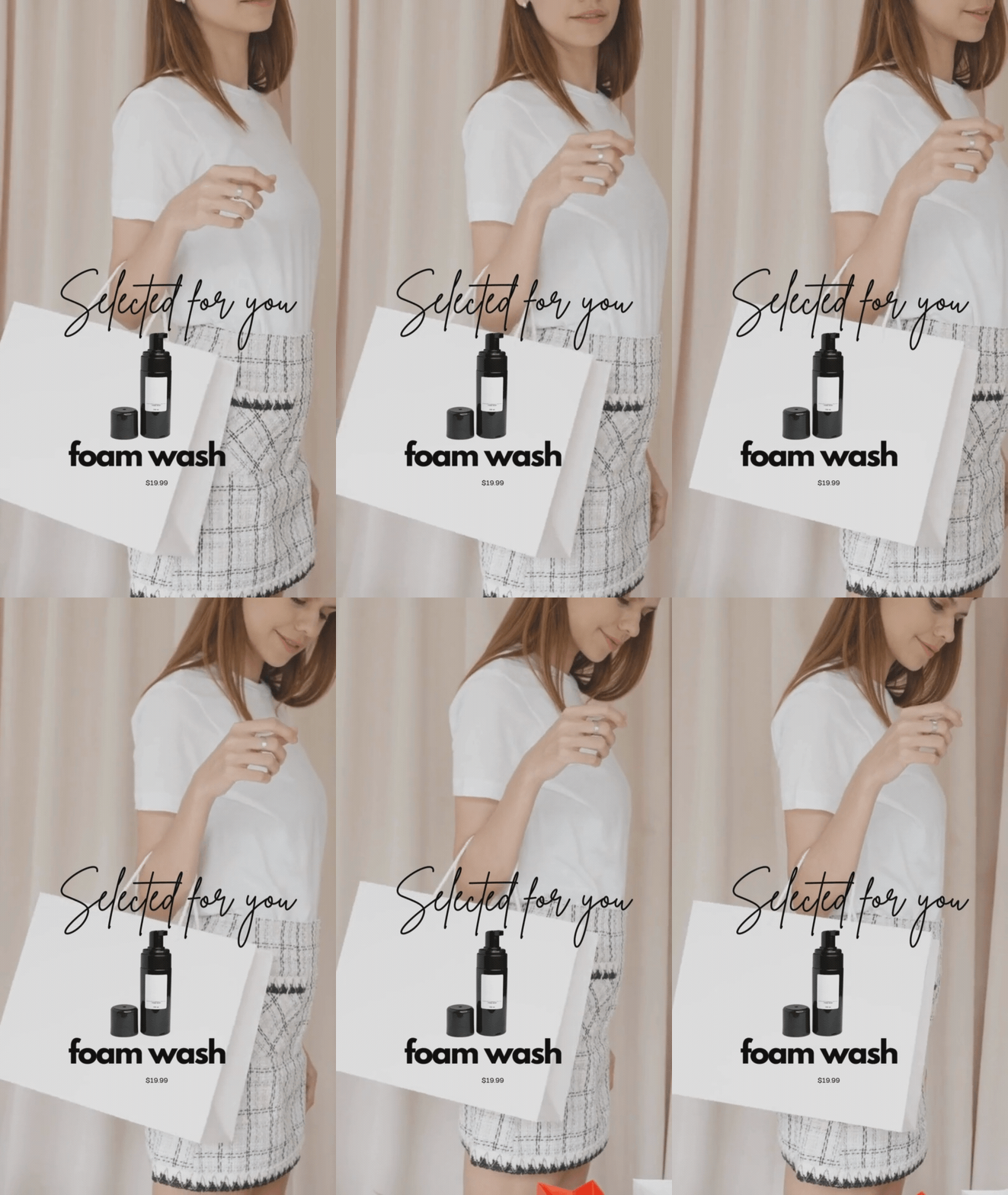
Fig. 07 A different personalised recommendation video for the dry / sensitive customer profile. Same conditional rules engine, different video. The recommendation feels genuinely tailored because the delivery is tailored, not just the product list.
RevenueHunt supports conditional content rules on the results page, which is the mechanic that gates each video to the right answer combinations.
Direct upload vs YouTube embed: when to use which
Direct upload is the right choice when the video is short (under 30 seconds), brand-controlled, and you want the cleanest playback experience without YouTube UI chrome. The video plays inline with no related-video distractions at the end and no “watch on YouTube” link inviting the viewer to leave.
YouTube embed is the right choice when the video already lives on your channel (so you’re not duplicating storage), when it’s longer-form (over a minute), or when you want to benefit from YouTube’s CDN and adaptive bitrate streaming for global viewers on slow connections. The quiz still receives the same engagement signal; YouTube just handles the delivery.
Most stores end up using both: direct upload for the per-question micro-content and hero atmospheres, YouTube embeds for the results-page explainer videos and “what to expect” walkthroughs that already exist on the brand channel.
Available on every ecommerce platform
Video is built into the core quiz engine and available with identical capability across every version of the RevenueHunt app:
- Built for Shopify
- Shopify Legacy
- WooCommerce
- Magento
- BigCommerce
- Standalone (for headless ecommerce and custom storefronts)
This is the inverse of the typical SaaS pattern where the headline feature is gated to one tier on one platform. The same upload, embed and placement mechanics work whether you’re on a Built for Shopify install, running on WooCommerce, or running the Standalone version on a custom storefront. The setup steps below apply to every version.
Plan before you record
Most video quiz problems are planning problems, not production problems. Two steps before you pick up a camera:
1. Map the quiz first. Sketch the question flow, the choices at each step, and the recommendation outcomes. The map tells you which questions are worth a video and which are fine as text.
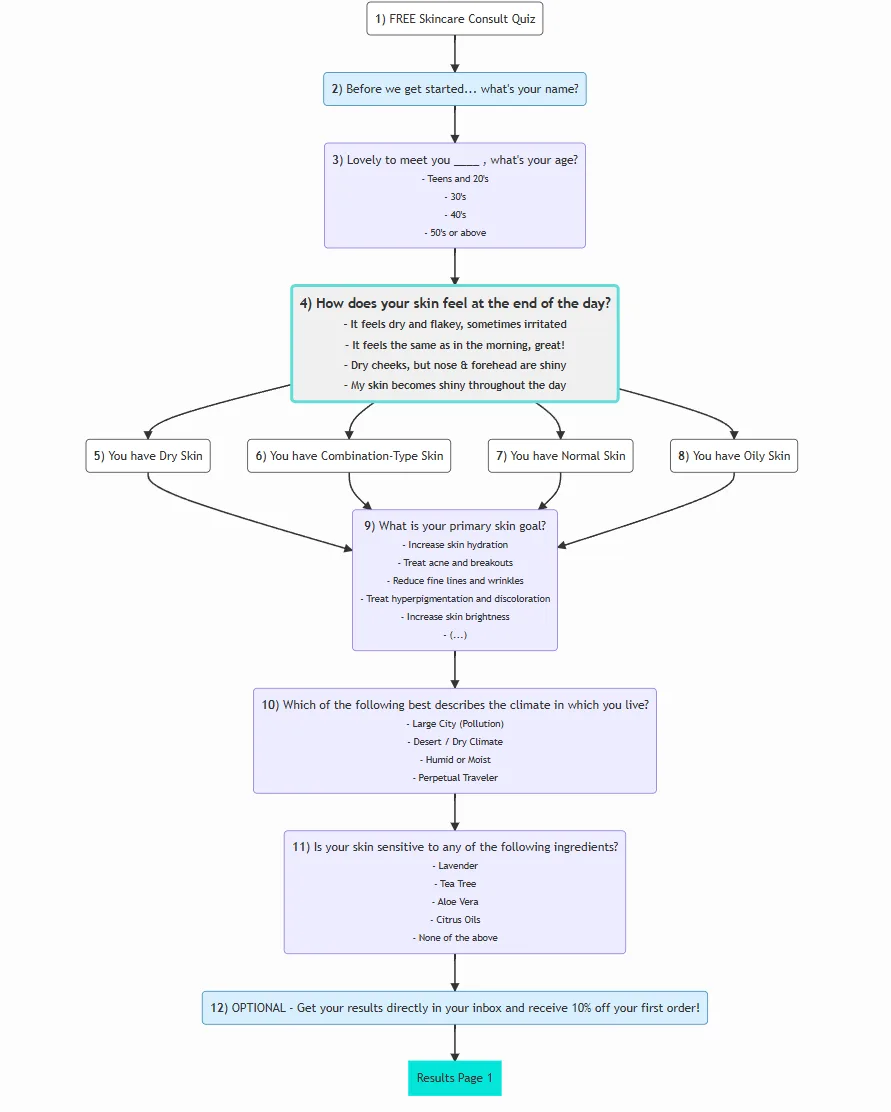
Fig. 08 A quiz map sketch: question flow, branching paths, recommendation outcomes. Sketch this first so you know which questions are worth a video and which are fine as text-only.
2. Mark the moments where a video adds the most. Not every question benefits from video; over-using it dilutes the impact. Highlight the welcome slide, two or three high-leverage decision questions, and the results page. Skip the rest.
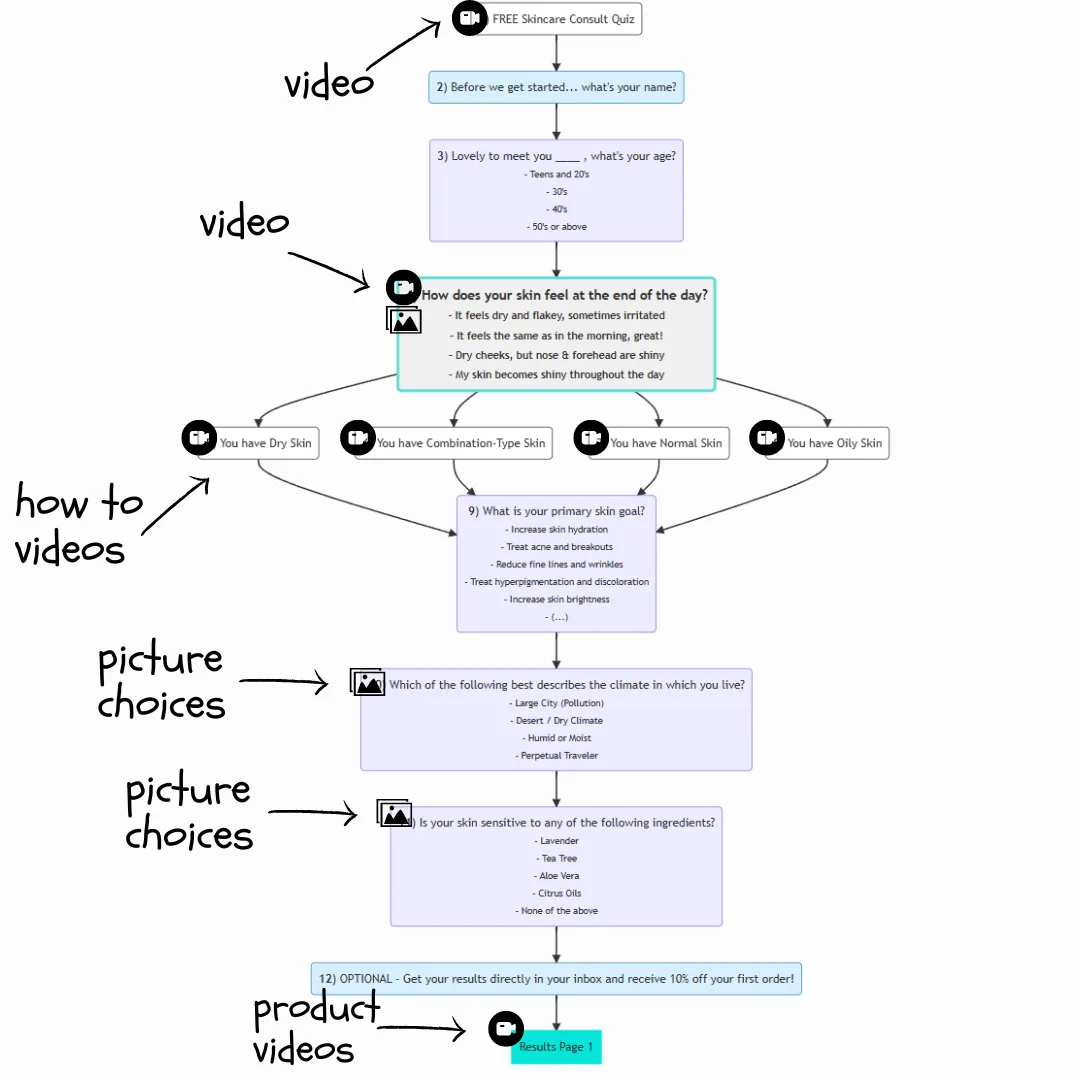
Fig. 09 The same quiz map, annotated with where each video type belongs. Most quizzes need 3-5 videos: a welcome intro, two or three per-question explainers or testimonials at high-leverage decision points, and a results-page recommendation video. Anything more dilutes the impact.
Once you’ve mapped placements and durations, script each clip and storyboard the action before shooting. Recording without a script consistently produces videos that are 50% longer than they need to be, and trimming in post is slower than getting it right in the first take.
Mobile-first technical specs
Most quiz traffic is mobile, and most mobile traffic is on imperfect connections. The video file specs below balance quality with file size so the playback stays smooth even on slow networks.
| Spec | Recommended value |
|---|---|
| Resolution | 1280×720 (720p) for high-quality playback while maintaining fast load times. 854×480 (480p) is a viable alternative for catalogues with slower-connection visitors. |
| Aspect ratio | 16:9 for background-mode and results-page placements; 9:16 vertical for widget-mode mobile-first videos. |
| File format | MP4 (H.264). Universally supported, best size-to-quality ratio. |
| Bitrate | 2.5-5 Mbps for 720p, 1-2.5 Mbps for 480p. Lower bitrates are fine when the video is short and motion-light. |
| Audio | 96 kbps minimum, 44.1 kHz sample rate. AAC codec. |
Industry context: roughly two-thirds of ecommerce traffic comes from mobile devices, and ecommerce sales follow at a similar or higher share. Optimising for mobile-first playback isn’t an option; it’s the default.
How to add video to your quiz
The setup is different on Built for Shopify versus the legacy and multi-platform versions, because the two app versions implement video differently. Built for Shopify treats video as a content block on the slide; the other versions treat video as a question-level setting with overlay modes.
On Built for Shopify
On Built for Shopify, video is a content block you add alongside other blocks (heading, text, image, choices) on each question slide.
- Open the RevenueHunt app and navigate to your quiz in the Quiz Builder.
- Select the question (or welcome slide) you want to add video to.
- Click + Add block below the question content and choose Video.
- Click Select video and upload your video file from your computer.
- Configure the block: add Alt text (for accessibility), pick a Video aspect ratio (horizontal, vertical, 16:9 or 4:3), and set Video alignment (Left, Center or Right).
- Click Save in the top-right to publish the change.
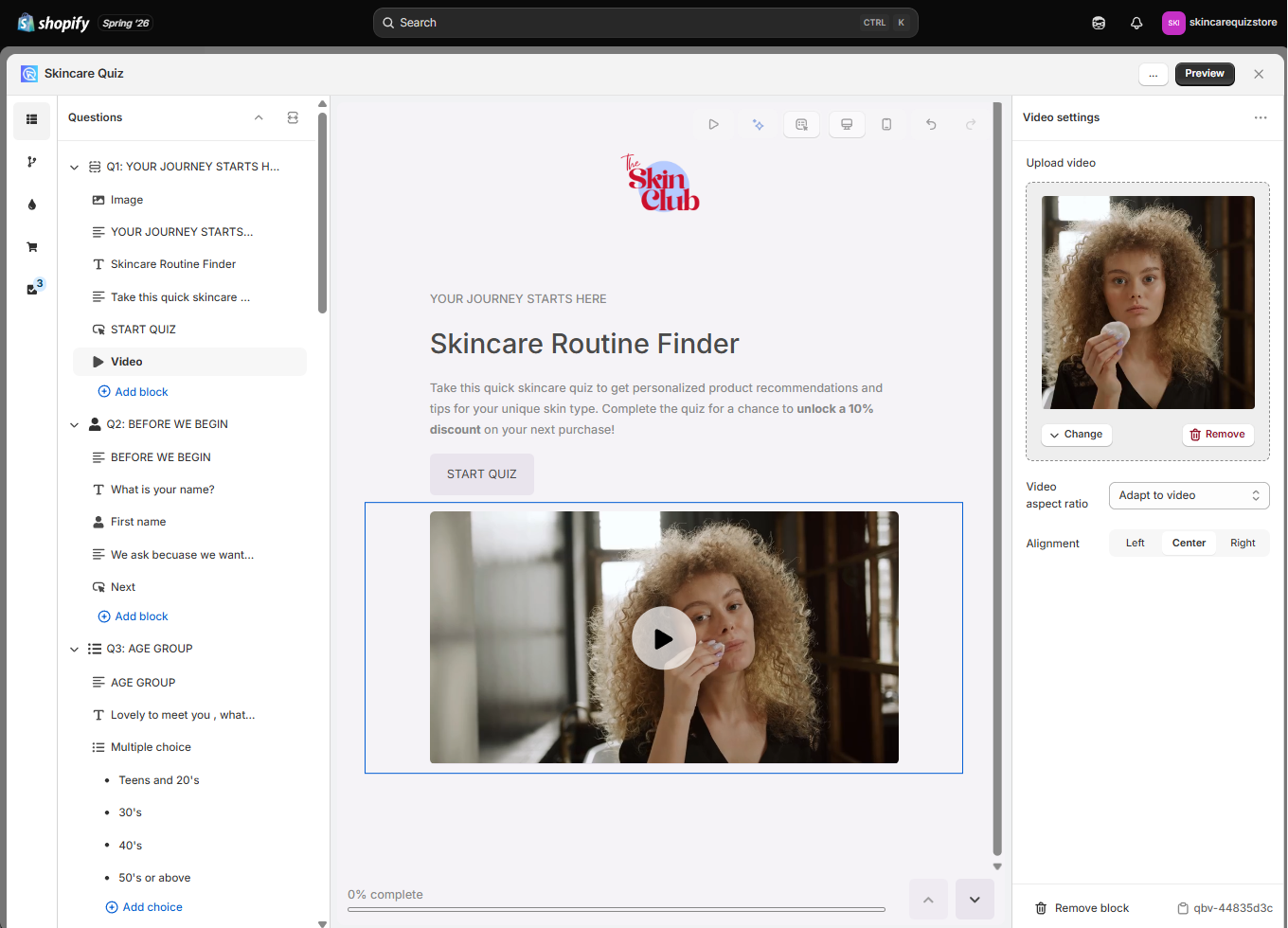
Fig. 10 The Built for Shopify Quiz Builder with a Video block configured on a question slide. Block-level controls include the Select video upload, Alt text, Video aspect ratio (horizontal / vertical / 16:9 / 4:3) and Video alignment (Left / Center / Right). No mode selector or opacity slider here; those are Legacy-only.
For the results-page placement, drop a Video block onto the results page the same way: open the results-page editor, click + Add block and choose Video.
On Shopify Legacy, WooCommerce, Magento, BigCommerce and Standalone
On the legacy and multi-platform versions, video lives inside question settings and supports overlay modes (background, widget, responsive) plus an opacity slider that Built for Shopify doesn’t expose.
- Open the RevenueHunt app and navigate to your quiz in the Quiz Builder.
- Select the question (or welcome slide) you want to add video to.
- Open question settings (the wrench icon) and find the Video section.
- Click Add to upload a video file, or paste a YouTube URL to embed.
- Choose a placement mode: responsive (background with play/pause controls), widget (small round overlay), or background (background with controls deactivated). Adjust Video Opacity if you want the video softened behind text.
- Click Publish in the top-right to apply.
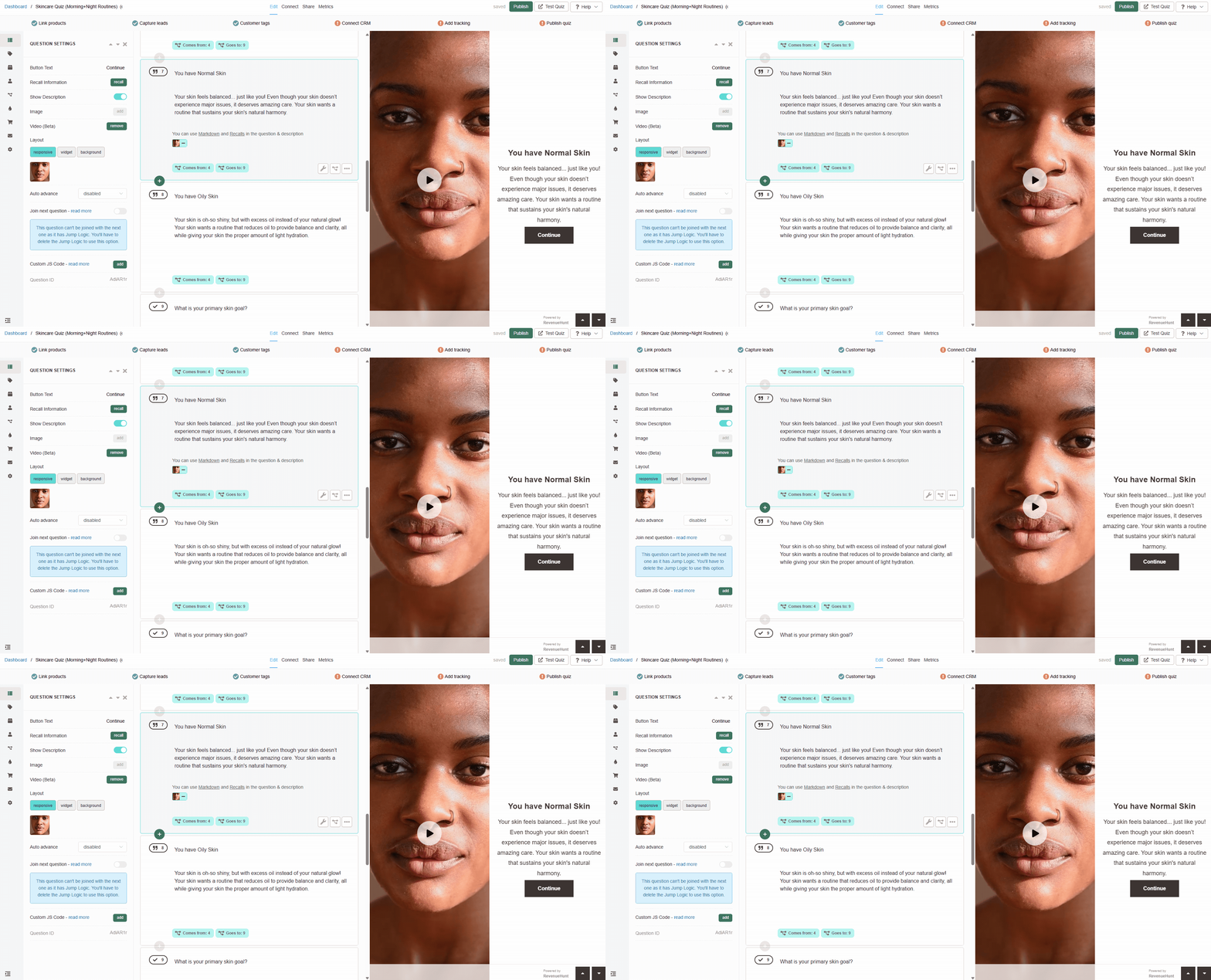
Fig. 11 The Shopify Legacy / multi-platform workflow for adding video to a question: open question settings, find the Video section, upload a file or paste a YouTube URL, pick responsive / widget / background mode, publish.
For the results-page placement on Legacy, drop a Video block into the results-page editor and configure it the same way (or insert a video via Markdown inside a Content Block).
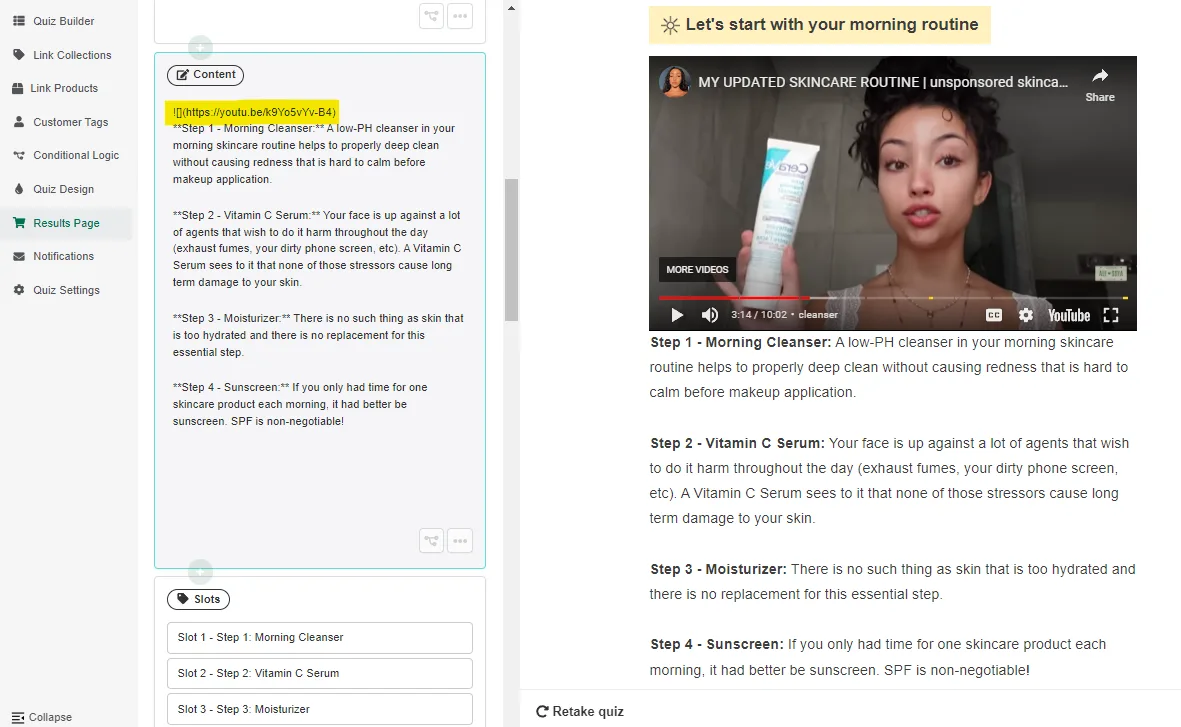
Fig. 12 The results-page editor with a video block embedded alongside the recommended products. The results-page video is the highest-impact placement because the customer is at a decision moment with the recommendation already in front of them.
For the split-screen layout where the video plays beside the question content rather than behind it, select the responsive layout option in the same Video section.
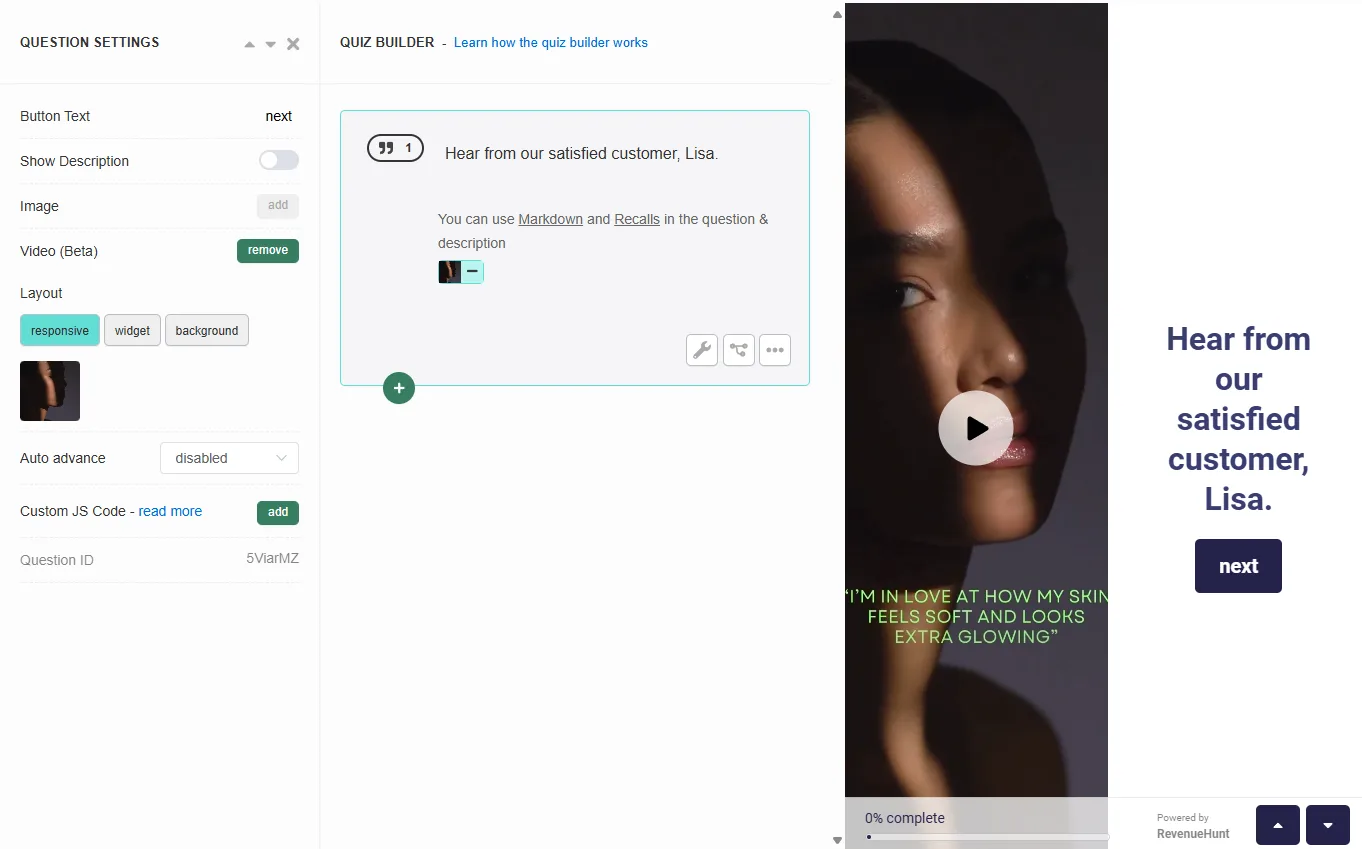
Fig. 13 The split-screen video layout in the Quiz Builder on Shopify Legacy. Select responsive in the Video section for layouts where the video sits beside the question content rather than behind it, with play/stop/volume controls surfaced.
Full configuration reference: video options in the Quiz Builder.
Categories that benefit most
The verticals that get the most lift from video quizzes are the ones where text alone can’t carry the recommendation story:
- Skincare and beauty. Texture, finish, ingredient interactions: none of these read well in text. A 15-second product demo inside the relevant quiz question, plus an ingredient-explainer video on the results page, materially lifts confidence in the recommendation.
- Supplements and wellness. The pre-purchase scepticism in this category is among the highest of any ecommerce vertical. A brief founder-explainer video alongside the diagnostic questions (“here’s why we ask about your sleep”) reframes the quiz as a consultation rather than a form.
- Fashion and apparel. Video-as-mannequin solves the “what does this actually look like on a body” problem that static product photography can’t. Best deployed in widget mode on the fit or style-preference questions.
- Home and furniture. Room-context videos showing the product in a styled space help the customer visualise scale. Strongest on the results page rather than mid-quiz.
- Tech and gadgets. Quick functional demonstrations help customers self-qualify before they buy. Most useful on questions about intended use case.
Best practices
Keep individual videos under 30 seconds when used per-question. Quiz-takers are mid-task; they’re not signed in for a 90-second product tour. The exception is the results-page video, which can be longer because the customer is at a decision moment.
Match production quality to brand positioning. A premium brand with mobile-shot videos reads worse than a premium brand with no video at all. If you can’t shoot high-quality video this quarter, lean on YouTube embeds of your existing brand content rather than producing mid-quality new material.
Subtitles or captions always on by default. Most quiz-takers complete the quiz on mobile, often with audio muted (commute, office, kids asleep). Burnt-in captions or visible subtitles ensure the message lands without sound.
Background mode for atmosphere, widget mode for instruction. The two modes serve different purposes: background sets tone, widget conveys specific information. Mixing them inside a single quiz works well because the rhythm shift keeps the experience varied across questions.
Where this fits
Video is one mechanic that can be layered onto a well-built product recommendation quiz. It can’t compensate for the foundational decisions: if your quiz is too long, video can’t rescue it; if your results page recommends 12 products instead of 1-3, no video will fix the choice paralysis. Get the foundations right first, then layer the video in where it lifts a specific question’s signal or builds confidence at the results page.
For the full foundation, see how to build a successful product recommendation quiz. For the mistakes that quietly leak conversion, see product quiz mistakes ranked by industry data. For the data category the quiz collects in parallel with the video engagement, see our zero-party data guide. For the Built for Shopify version that embeds the quiz as a native block (zero iframe overhead, no extra video CDN), see RevenueHunt is Built for Shopify. For the headless storefronts that the Standalone version supports, see product quiz for headless ecommerce. For the feature-by-feature comparison with the closest video-first competitor, see RevenueHunt vs Tolstoy. For a real-world example of AI plus video personalisation, see the Skinology case study.
Frequently asked questions
Can I add videos to my quiz on every platform?
Yes. Video is built into the core quiz engine and available with identical capability on Built for Shopify, Shopify Legacy, WooCommerce, Magento, BigCommerce and the Standalone version of the RevenueHunt app. There are no platform-specific feature gates.
Can I upload videos directly or do I have to use YouTube?
Both options are supported. Direct upload gives you the cleanest playback experience with no YouTube chrome or related-video distractions at the end. YouTube embedding is useful when the video already lives on your channel, when it’s longer than a minute, or when you want YouTube’s CDN to handle global delivery.
What’s the difference between background and widget mode?
Background and widget are the two overlay modes on Shopify Legacy, WooCommerce, Magento, BigCommerce and Standalone. Background mode plays the video full-bleed behind the question text and is best for hero or atmosphere-setting slides; widget mode plays the video as a small round overlay and is best for product demonstrations or specific informational moments. On Built for Shopify, both effects are achieved via a Video block with a chosen aspect ratio and alignment rather than via mode selection.
How is this different from VideoAsk or Tolstoy?
VideoAsk, Tolstoy and similar tools are video-first platforms with a quiz feature; RevenueHunt is a recommendation quiz with video built in. The practical difference is where the value lands: dedicated video tools optimise for engagement metrics (watch-through, lead capture), while RevenueHunt optimises for revenue (quiz-attributed orders, Klaviyo segmentation, results-page conversion). For the feature-by-feature breakdown, see RevenueHunt vs Tolstoy.
Where should I place video in the quiz?
The highest-impact placement is the results page (next to the recommended products), for a 30 to 60-second explainer that builds confidence at the decision moment. The second-highest is per-question widget mode on the two or three questions where the customer is making a category-specific decision (fit, ingredient, texture). Background mode works for hero or category-introduction slides where atmosphere matters more than information.
What technical specs should I use for mobile-friendly quiz videos?
Target 720p resolution (1280×720) in MP4 (H.264) format with a 2.5-5 Mbps bitrate and 96 kbps AAC audio at 44.1 kHz. Use 16:9 aspect for background-mode and results-page videos, 9:16 vertical for widget-mode videos that need to render well on mobile-first layouts. Keep individual videos under 30 seconds when used per-question to avoid bloating the file size and the customer’s patience.
Install RevenueHunt: Recommender Quiz for Shopify and start testing your first video question today. Free plan available.
Free tools & data
Put these benchmarks to work on your own store.
Free tool
Quiz ROI calculator
Estimate the extra revenue and ROI a product recommendation quiz could add to your store. Built on real data, no email required.
Calculate your ROIFree report
Ecommerce quiz benchmark report
How product recommendation quizzes really perform: conversion by category, AOV uplift, and completion, from 45M+ real quiz responses.
Read the report
Most shoppers leave because they can't find the right product