
RevenueHunt is Built for Shopify: what's different vs Legacy
What the Built for Shopify version of RevenueHunt adds vs Legacy: native embed, collections, Shopify Markets, drag-and-drop builder, integrations.
The Built for Shopify (BFS) version of the RevenueHunt app is the modern, recommended way to run a product recommendation quiz on Shopify. It replaces the Legacy app for new installs, embeds natively into the storefront instead of an iframe, supports Shopify Markets for multi-language and multi-currency stores, and recommends entire collections (not just products). This guide covers what’s different vs the Legacy app, which integrations work today, and how to switch.
What you'll learn
- →What "Built for Shopify" means, and why it matters for performance, tracking and theme compatibility.
- →The six features BFS adds vs Legacy: native embed, Shopify Markets, collections, fixed + dynamic recommendations, drag-and-drop logic, large-catalogue support.
- →Which integrations work natively on BFS today, and which are still coming.
- →How to switch from the Legacy app to the BFS version, and how to switch back if needed.
- →What to do if you need an integration that hasn't shipped on BFS yet.
What “Built for Shopify” means
Built for Shopify is Shopify’s highest performance and quality designation for apps. To earn the badge, an app has to meet specific bars on load speed, native theme integration, accessibility, and security. Most apps are standard installs that load inside an iframe and have limited access to Shopify primitives. BFS apps render directly as Shopify blocks, integrate seamlessly with the theme editor, and behave like first-party Shopify features.
For a Shopify product recommendation quiz, the practical effect is large: the quiz inherits your theme’s typography and colour tokens, fires Shopify-native events that all your existing tracking already understands, plays correctly with Shopify Markets and Shop Pay, and gets indexed properly by search engines because the content isn’t behind an iframe. For the strategy this all enables (quiz-as-ad-landing-page rather than collection-page-as-ad-landing-page), see why popups are walls and quizzes are doors and quiz funnels vs collection pages.
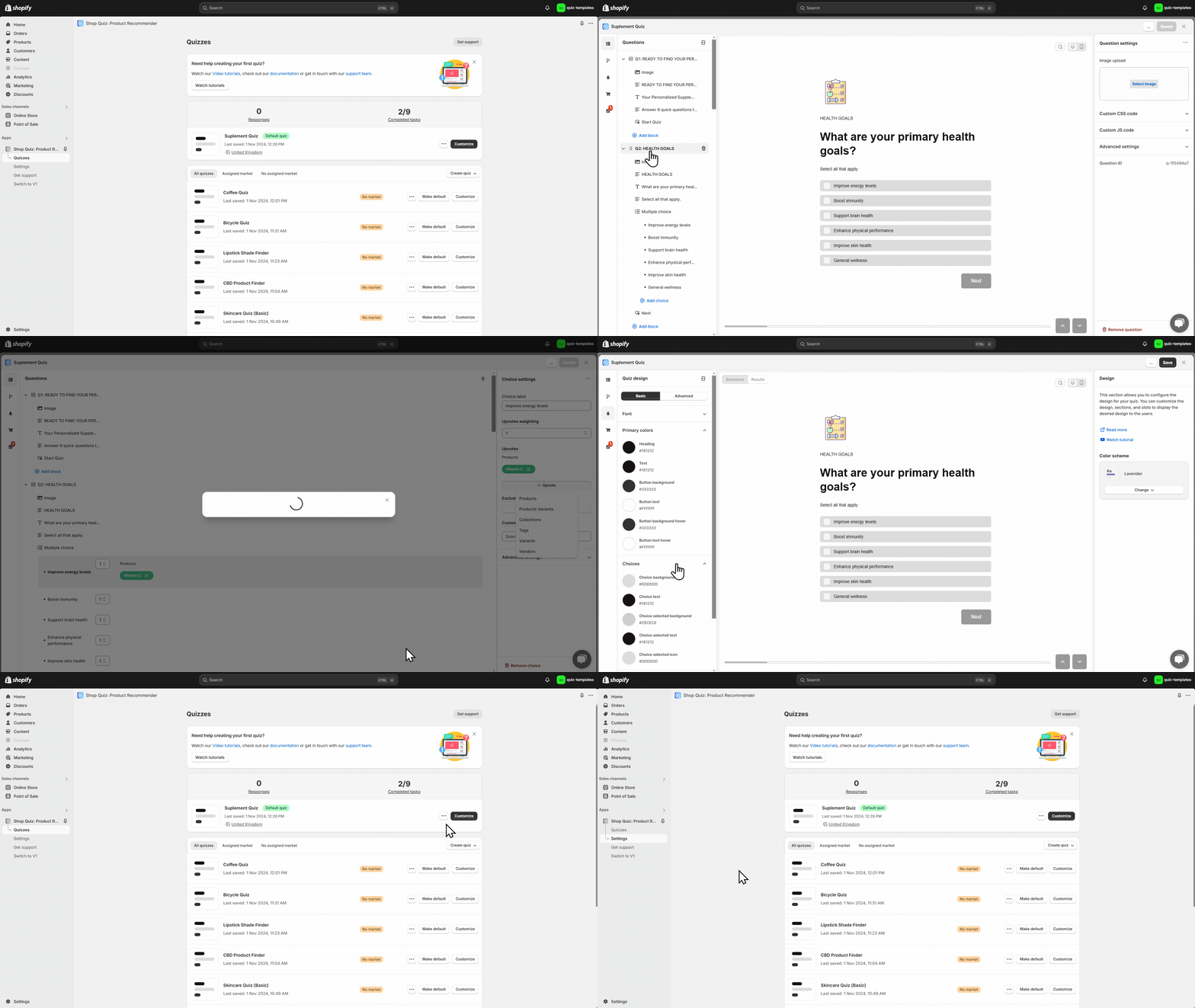
Fig. 01 The Built for Shopify quiz running natively inside a Shopify theme. The quiz inherits theme typography and colour tokens, fires Shopify-native events, and renders as a Shopify block rather than an iframe.
Core functionality: what BFS adds vs Legacy
| Feature | Legacy app | Built for Shopify |
|---|---|---|
| Build quizzes | ✓ | ✓ |
| Recommend products and variants | ✓ | ✓ |
| Recommend entire collections | ✗ | ✓ new |
| Fixed recommendations | ✗ | ✓ new |
| Large product catalogue support | limited to 5K SKUs | ✓ unlimited |
| Shopify Markets support | ✗ | ✓ new |
| Add product to cart | ✓ | ✓ |
| Send result emails | ✓ | ✓ |
Shopify Markets support
BFS integrates with Shopify Markets, which is the native way to serve different quizzes by region, currency and language. You create a separate quiz per market (or per language), and the right one auto-loads when a shopper visits from the matching region. The recommendations also surface only the products available in that market, so you don’t end up recommending a SKU the shopper can’t buy.
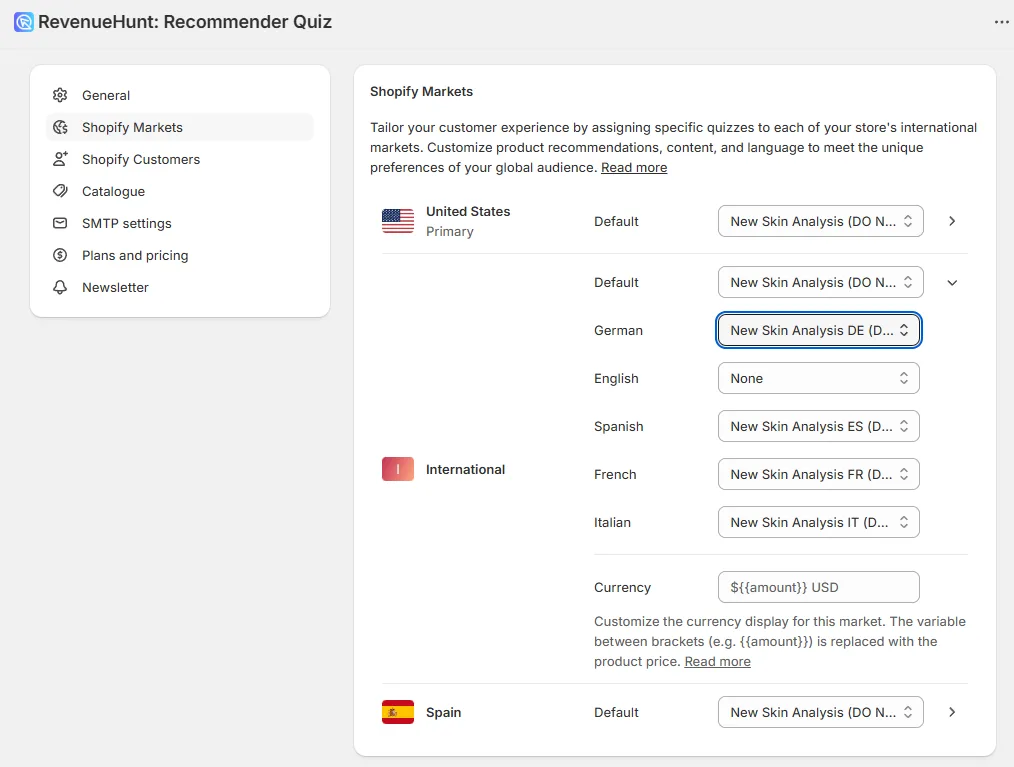
Fig. 02 Native Shopify Markets integration: assign one quiz per market or language, and the right one auto-loads based on the visitor's region. Recommendations are scoped to products available in that market, so the quiz never recommends a SKU the shopper cannot buy.
For the full walkthrough on multi-market and multi-language setup, see our how to adapt product quizzes for different markets and languages guide.
Fixed and dynamic recommendations
BFS supports the full recommendation-system flexibility documented in our product quiz recommendation systems decision tree. The defaults: dynamic (the algorithm picks based on answers) and fixed (you set the same recommendation for all takers). You can mix the two per result slot. So a five-slot result can fire the bestseller in slot 1, dynamic in slots 2-4, and another fixed pick in slot 5.
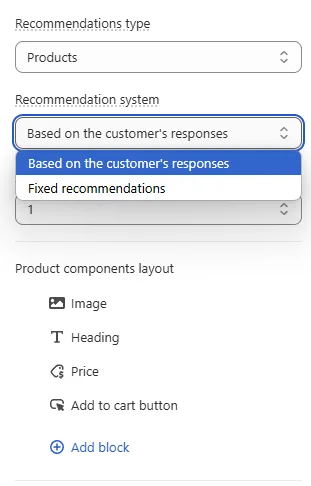
Fig. 03 Fixed vs dynamic recommendation slots. Dynamic slots let the algorithm pick based on answers; fixed slots set a specific product for every taker. Mix the two per result slot to anchor a bestseller while letting the algorithm fill the rest.
Recommend entire collections
A BFS-only feature. Instead of recommending individual SKUs, the quiz can route the shopper to a curated collection page. Useful for skincare routines, gift sets, seasonal lines, or any case where the customer should land on a selection rather than a single product. Shopify keeps the collection content fresh as you add or remove SKUs.
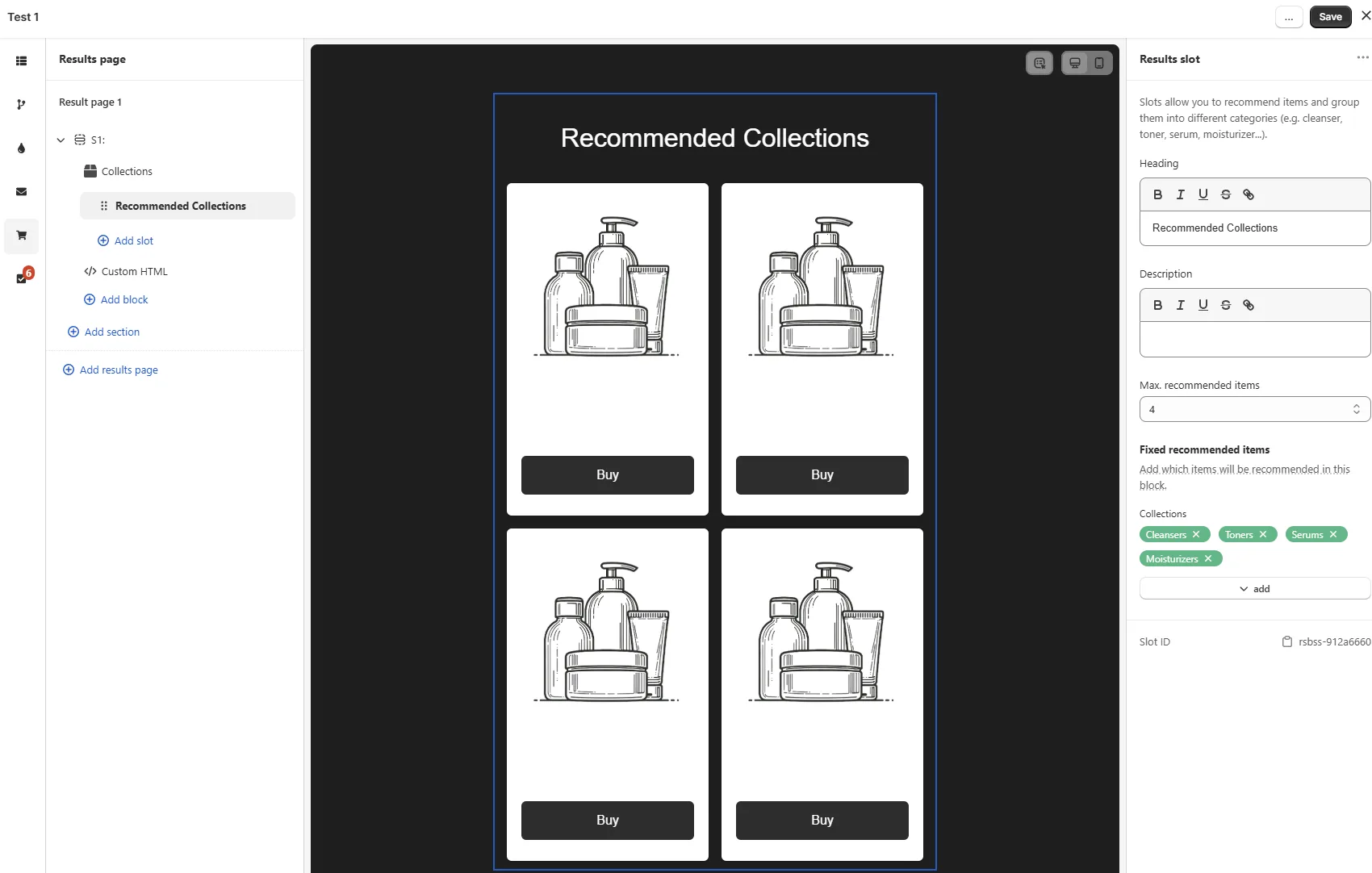
Fig. 04 A Built-for-Shopify-only feature: recommend an entire Shopify collection rather than individual SKUs. Useful for skincare routines, gift sets and seasonal lines; Shopify keeps the collection contents fresh as you add or remove products.
Design and publishing
| Feature | Legacy app | Built for Shopify |
|---|---|---|
| Quiz embed | iframe | ✓ native block or popup |
| Modern templates | ✗ | ✓ |
| In-app design customisation | limited | ✓ extensive |
| Drag-and-drop block builder | ✗ | ✓ |
| Custom CSS and JavaScript | ✓ | ✓ |
| Mobile-friendly | ✓ | ✓ |
Native quiz embed (no iframe)
The biggest single technical upgrade. On Legacy, the quiz loaded inside an iframe, which introduced the usual iframe problems: load latency, third-party tracking missing events, awkward styling boundaries, accessibility quirks. On BFS, the quiz is a native Shopify block (or a popup), which means it inherits theme styles, fires events all your existing tracking already understands, and gets indexed by search engines properly.
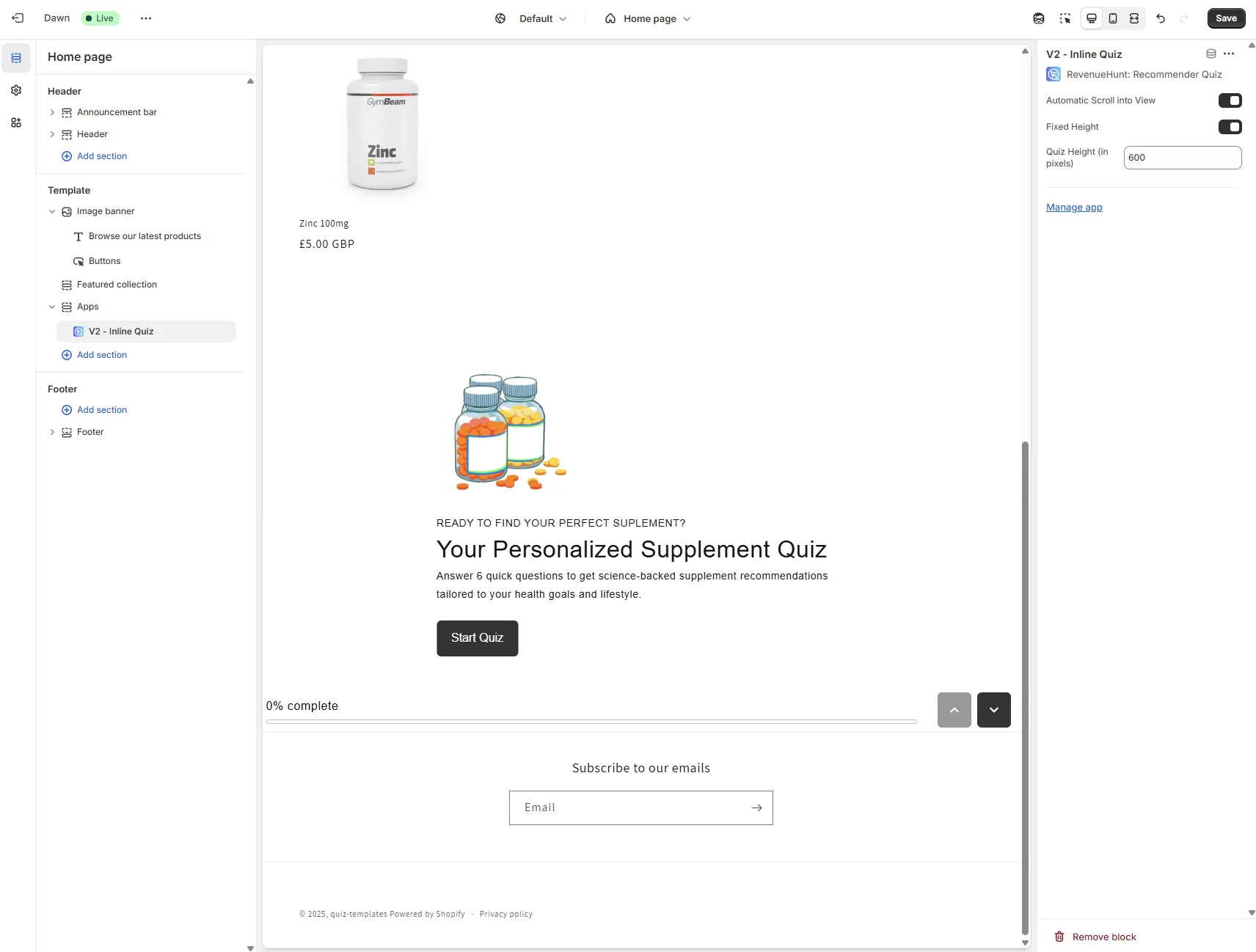
Fig. 05 The biggest technical upgrade: a native Shopify block instead of an iframe. The quiz inherits theme styles, fires events that existing tracking already understands, and gets indexed by search engines properly.
Extensive design customisation
Full in-app control over typography, colour tokens, button styles, layout, and spacing. No theme code changes required for any of it. If the brand changes later, update the design tokens once and every quiz on the store inherits the change.
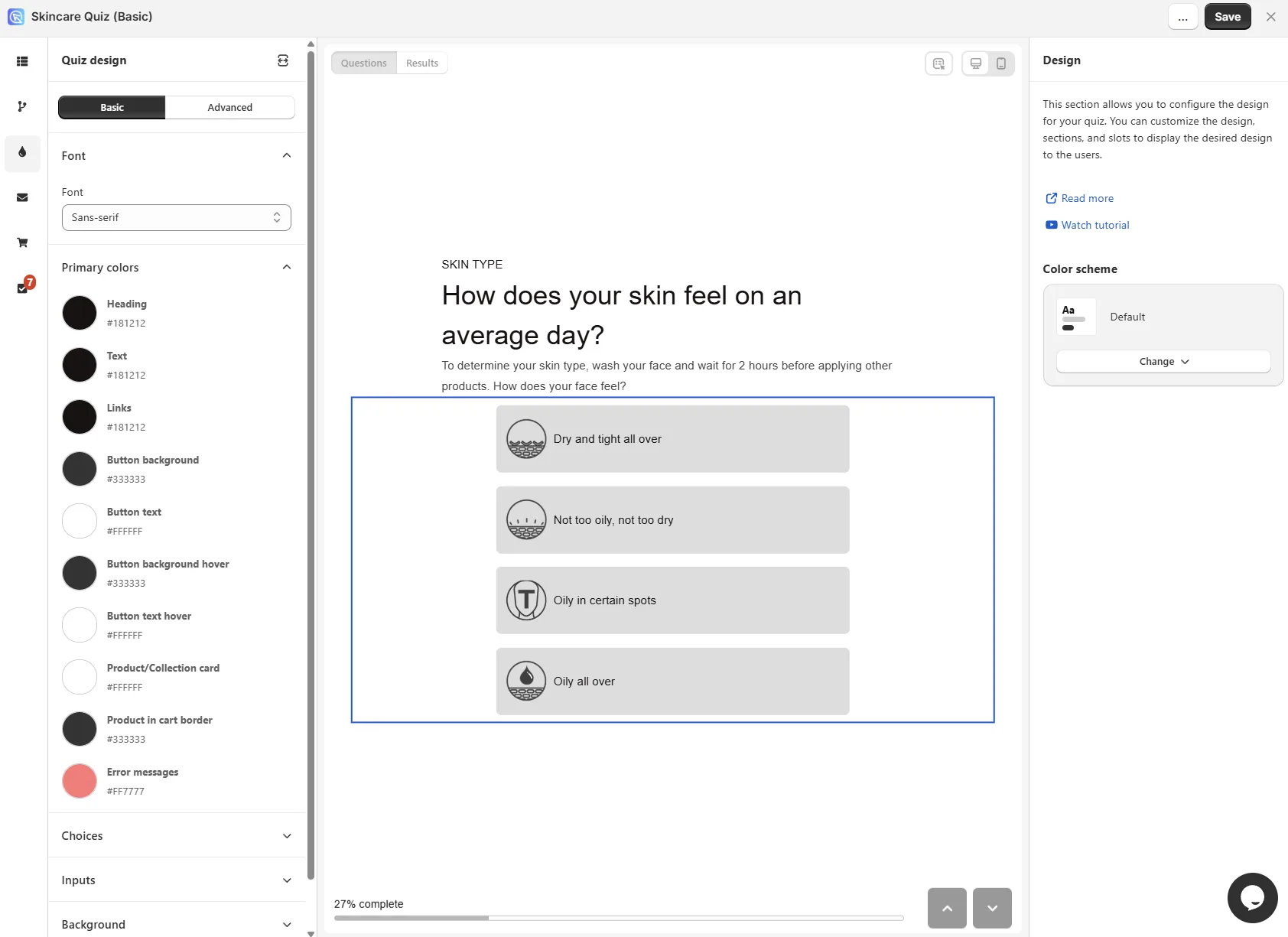
Fig. 06 Full in-app design control over typography, colour tokens, button styles, layout and spacing. No theme code changes required; update the design tokens once and every quiz on the store inherits the change.
Drag-and-drop block builder
Modelled on Shopify’s own theme editor. Add or remove blocks for question types, content, product recommendations, and custom HTML. Drag to reorder. The same block primitives appear on the question pages and the results page.
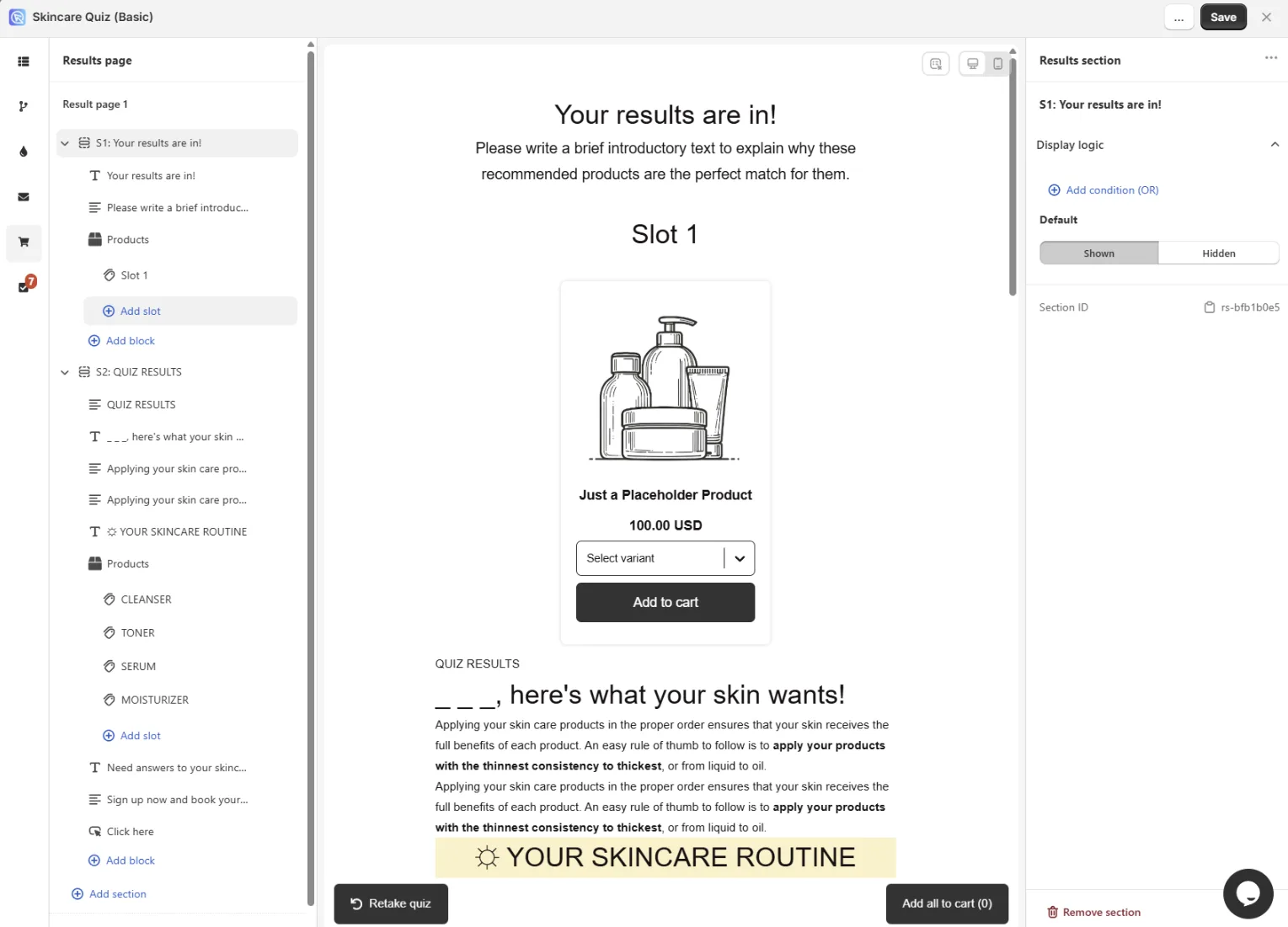
Fig. 07 Drag-and-drop block builder modelled on Shopify's own theme editor. The same block primitives (question types, content, product recommendations, custom HTML) appear on both question pages and results pages.
Drag-and-drop conditional logic
The biggest UX upgrade beyond the block builder. Jump logic, skip logic and branching all live in a visual graph that you build by drag-and-drop. The original Legacy interface was a list of if-then-else rules; the BFS interface shows the actual decision tree, which makes complex quizzes orders of magnitude easier to maintain.
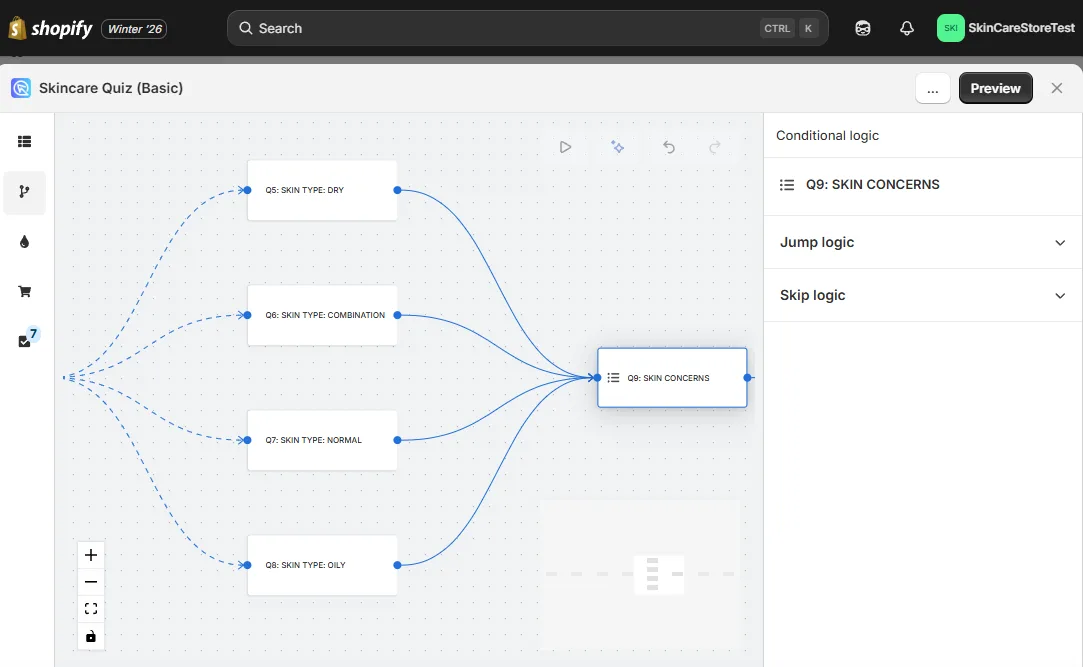
Fig. 08 The drag-and-drop conditional logic editor. Jump logic, skip logic and branching all live in a visual graph rather than the Legacy if-then-else list. Complex quizzes become orders of magnitude easier to maintain.
Integrations
The integration story has matured significantly since BFS first shipped. Most of what was “Coming Soon” at launch has shipped.
| Integration | Legacy app | Built for Shopify |
|---|---|---|
| Shopify Discounts | ✓ | ✓ |
| Product Metafields Sync | ✓ | ✓ |
| ReCharge Subscriptions | ✓ | ✓ |
| Google Analytics 4 | ✓ | ✓ |
| Meta (Facebook) Pixel | ✓ | ✓ |
| Klaviyo | ✓ | ✓ |
| HubSpot | ✓ | ✓ |
| Omnisend | ✓ | ✓ |
| Webhooks | ✓ | ✓ |
| Shopify Revenue Tracking | manual setup | ✓ automatic |
| Mailchimp | ✓ | coming soon |
| ActiveCampaign | ✓ | coming soon |
The ones still listed as “coming soon” (Mailchimp, ActiveCampaign) have workarounds documented in their respective guides: route the quiz payload through the Webhooks integration, which is natively supported on BFS and can fire to any service that accepts a webhook.
Why BFS converts and Legacy doesn’t (the platform numbers)
What quiz traffic looks like across the platform
5.5%
of shoppers who finish a quiz place an order, about 1 in 18, 2.75x a typical 2% store (RevenueHunt benchmark, 45M+ responses)
+11-15%
within-store AOV uplift on quiz orders vs non-quiz orders, holding in roughly 7 in 10 stores
1 in 5
quiz-attributed orders land more than 30 days later, so the segmentation layer keeps converting through email and ads for months
The native embed, automatic Shopify revenue tracking, and Shopify Markets support are the three biggest reasons BFS converts higher than Legacy in practice. Tracking that fires on the iframe Legacy used to lose events; the BFS native block doesn’t.
For a worked example of these mechanics on a real BFS-app store, see the anti-ageing device case study (9.8% quiz-to-purchase CVR on cold Meta traffic, +42.64% AOV lift, $691,128 in 90 days, every order verified through the native BFS Analytics dashboard). For ten more funnel patterns running in production, see ecommerce sales funnel examples.
How to switch from Legacy to BFS
If you already have the RevenueHunt app installed:
- In your Shopify admin, open Apps and click RevenueHunt: Recommender Quiz.
- From the right-hand menu, select Switch to Built for Shopify.
- Confirm app access and permissions.
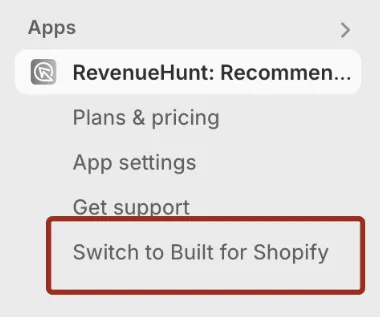
Fig. 09 The Switch to Built for Shopify option in the RevenueHunt app menu. Confirms app access and permissions, then provisions the new app with the existing quiz data carried forward.
If you don’t have the app installed yet, launch a quiz on Shopify (no code, free trial). New installs land on the BFS version by default.
Quizzes don’t migrate automatically. BFS is a fresh start. You’ll need to rebuild any existing quizzes in the new builder. The new interface is faster to build in than the Legacy editor, so the rebuild is usually quicker than expected, but plan for it.
You can switch back to Legacy any time from the same menu if you need a Legacy-only integration that hasn’t shipped on BFS yet. We continue to maintain the Legacy app.
FAQ
Is the Legacy app going away?
No. The Legacy app is still actively maintained. New installs land on BFS by default and we’re investing the bulk of our roadmap there, but Legacy is supported for existing merchants for the foreseeable future.
Do my Legacy quizzes carry over to BFS?
No. BFS is a fresh start, so quizzes need to be rebuilt in the new interface. The good news: the new builder is meaningfully faster than the Legacy editor, so the rebuild is usually quicker than the original build was.
What if I need an integration that’s only listed as “coming soon” on BFS?
Two options. The cleanest is the Webhooks integration: BFS supports it natively, and webhooks can route the quiz payload to any service that accepts them (Mailchimp, ActiveCampaign, or anything else). The other is to stay on the Legacy app until the native integration ships on BFS; you can switch back any time from the app menu.
Why is BFS faster than the Legacy iframe?
The Legacy app loaded the quiz inside an iframe, which adds load latency, blocks the host page’s tracking from seeing events, and limits styling. The BFS quiz is a native Shopify block, so the quiz renders as part of the page rather than as a nested document. Faster first paint, better tracking, cleaner styling, search-engine indexable.
Can I run both Legacy and BFS on the same store?
You can have both apps installed but only run quizzes on one at a time. The app menu toggle (“Switch to Built for Shopify” / “Switch to Legacy”) swaps which version is live. Switching is reversible at any time.
Next steps
- For the full integration cluster on BFS: HubSpot, Klaviyo, Omnisend, Meta Pixel, Shopify Flow, ActiveCampaign workaround.
- For the recommendation system options BFS unlocks: product quiz recommendation systems.
- For scoring and personality-type quizzes: scoring quiz setup.
- For Shopify-specific revenue attribution that’s automatic on BFS: first-party Shopify quiz analytics.
- For ReCharge subscriptions on BFS: product quiz subscriptions.
- For the full benchmark dataset behind every stat: the state of product recommendation quizzes.
- Estimate the lift on your own store: quiz ROI calculator.
Free tools & data
Put these benchmarks to work on your own store.
Free tool
Quiz ROI calculator
Estimate the extra revenue and ROI a product recommendation quiz could add to your store. Built on real data, no email required.
Calculate your ROIFree report
Ecommerce quiz benchmark report
How product recommendation quizzes really perform: conversion by category, AOV uplift, and completion, from 45M+ real quiz responses.
Read the report
Most shoppers leave because they can't find the right product