
ActiveCampaign quiz integration: send leads and segment by quiz answers
Connect a RevenueHunt quiz to ActiveCampaign on Shopify Legacy, WooCommerce, Magento, BigCommerce, Standalone, plus the Built for Shopify workaround.
A product recommendation quiz captures zero-party data while shoppers are actively engaged: stated preferences, skin types, goals, gift recipients, budget bands. ActiveCampaign turns that into a CXA (Customer Experience Automation) pipeline: CRM records, segmented contacts, lead generation quiz flows, and trigger-based automations.
The catch worth knowing before you start: Built for Shopify (the new RevenueHunt app on Shopify) does not currently have a native ActiveCampaign integration. Shopify Legacy, WooCommerce, Magento, BigCommerce and Standalone all do. BFS merchants can still get quiz data into ActiveCampaign via the Webhooks integration or a manual CSV upload; both are covered below.
This guide walks the exact setup paths by platform, the 10 data fields that land on the contact record, the recommended-products limitation worth knowing about, and how to wire the data into an automation.
Fig. 01 The ActiveCampaign quiz integration: ten fields from each quiz response land on the contact record as both standard fields and custom-field tags. The whole sequence becomes available to ActiveCampaign automations as the contact is created.
What you'll learn
- →Which RevenueHunt platform versions have a native ActiveCampaign integration and which need a workaround.
- →The two setup paths: from the RevenueHunt Connect tab or from the ActiveCampaign Apps menu (and the branding-toggle gotcha if the Apps page won't appear).
- →The 10 contact fields that auto-populate from the quiz, and how to map them.
- →How to trigger a follow-up automation on quiz submission, and the recommended-products limitation to plan around.
- →When Webhooks, Zapier or CSV are the better path over the native integration.
Platform support at a glance
Why pair a quiz with ActiveCampaign
Quizzes capture interest at its peak: the moment a shopper is actively choosing. ActiveCampaign handles what happens next: contacts, segments, CXA flows, predictive sending. Three things change when you connect them:
Zero-party data lands on the contact record automatically (on every supported platform). Email, name, every tag the quiz logic assigned, and the recommended product IDs all flow into ActiveCampaign as custom fields on the contact. This is the same data layer the first-party data guide covers in depth, and the same data that powers the popups-vs-quizzes argument on why interrupt-style popups don’t produce segmentable lists.
Segments stay accurate by themselves. Filter on a custom field (e.g. quiz_tags contains "oily_skin") and the segment updates as new quiz responses arrive.
Automations trigger directly off quiz submission. ActiveCampaign exposes a native “Product Recommendation Quiz” trigger in the Automations builder once the integration is connected, with no separate webhook plumbing required (on supported platforms).
Why post-quiz email automation pays off
5.5%
of shoppers who finish a quiz place an order: about 1 in 18, 2.75x a typical 2% store (RevenueHunt benchmark, 45M+ responses)
71%
of top-converting quizzes collect email (75% make it required), which is the seed the ActiveCampaign segments are built on
1 in 5
quiz-attributed orders land more than 30 days later, so the segmentation layer keeps converting for months
Built for Shopify: the workaround paths
Native integration isn’t available on Built for Shopify yet. Two well-trodden workarounds get you to the same outcome.
Option 1: Webhooks (recommended)
The cleanest path. RevenueHunt’s Webhooks integration fires a payload on every quiz completion that you can route into ActiveCampaign via ActiveCampaign’s own webhook receiver.
- In RevenueHunt, open the quiz, then the Connect tab and find the Webhooks section. Configure a webhook to fire on quiz completion.
- In ActiveCampaign, set up a webhook listener that maps incoming fields to ActiveCampaign contact properties. See ActiveCampaign’s webhooks docs.
- Test by completing the quiz; confirm the contact appears in ActiveCampaign with the expected custom fields populated.
You can route any of the 10 fields the quiz emits, including custom tags and the recommended product IDs.
Option 2: manual CSV upload
For low-volume quizzes or one-off campaigns. Export quiz responses as CSV from Metrics > Responses in the RevenueHunt app, then upload to ActiveCampaign as a new contact list.
Neither workaround triggers the “Product Recommendation Quiz” automation trigger that native integrations get; on BFS you trigger automations off custom-field changes or list additions instead.
Native setup: Shopify Legacy, WooCommerce, Magento, BigCommerce, Standalone
All five platforms use the same flow. There are two starting points: from the RevenueHunt app, or from the ActiveCampaign Apps menu.
Starting from the RevenueHunt Connect tab
- Open the quiz in the Quiz Builder and click the Connect tab.
- Find the ActiveCampaign section and copy the API Token shown there. You’ll paste it into ActiveCampaign in a moment.
- Click Connect. You’ll be redirected to ActiveCampaign.
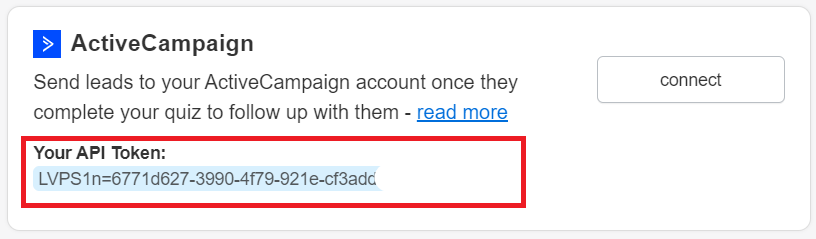
Fig. 02 The ActiveCampaign section inside the RevenueHunt Connect tab. Copy the API Token shown here, click Connect, and complete the authorisation in ActiveCampaign.
- In ActiveCampaign, click Add an account.
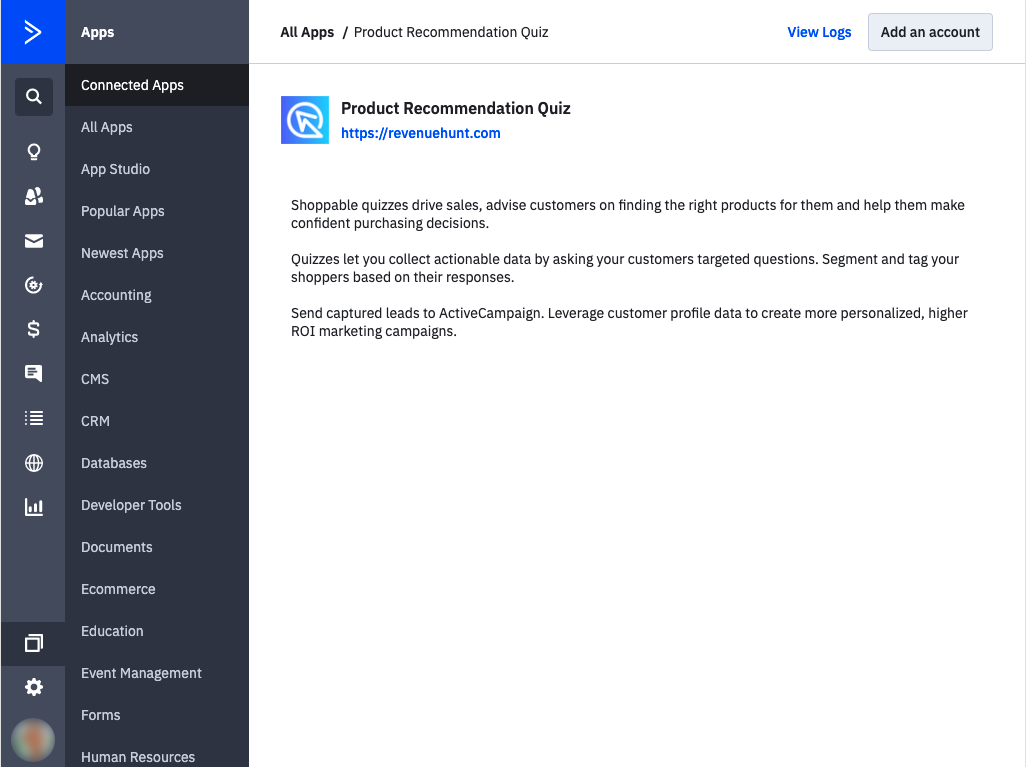
Fig. 03 The Add an account screen in ActiveCampaign. Click Add an account, then paste in the API Token copied from the Connect tab.
- Paste the API Token.
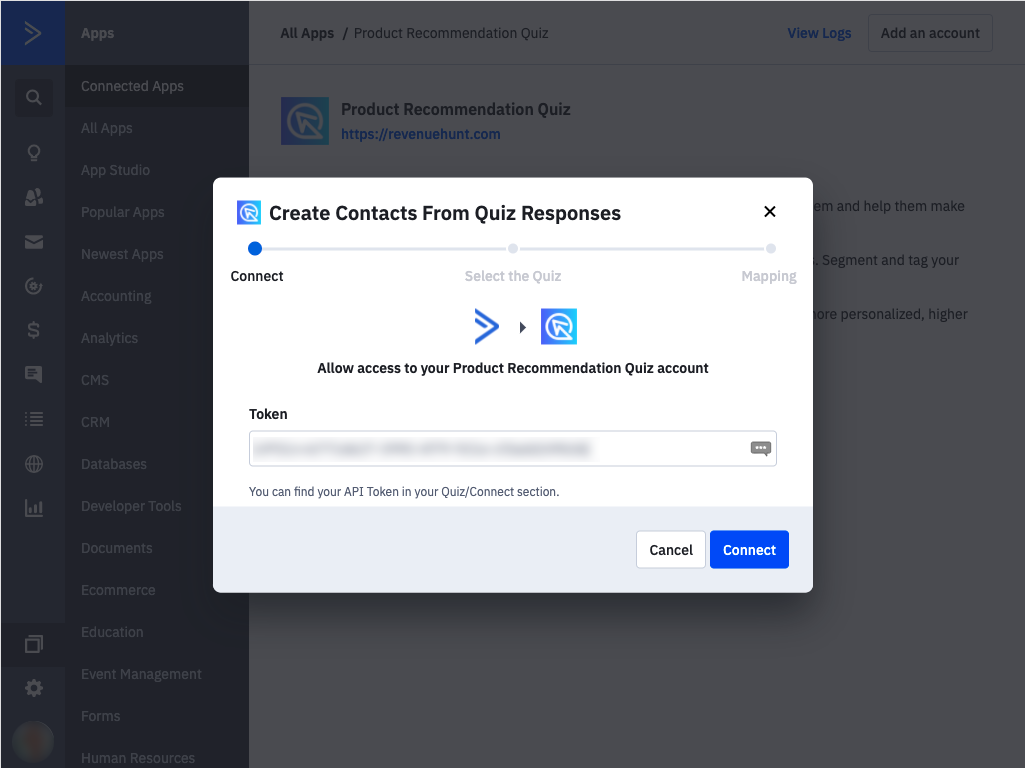
Fig. 04 Pasting the API Token in ActiveCampaign authorises the connection. The next screen lets you pick the specific quiz to sync.
- Select the quiz you want to sync and click Continue.
- Map the quiz response fields to ActiveCampaign contact fields. Each quiz field on the left pairs to the corresponding ActiveCampaign field on the right.
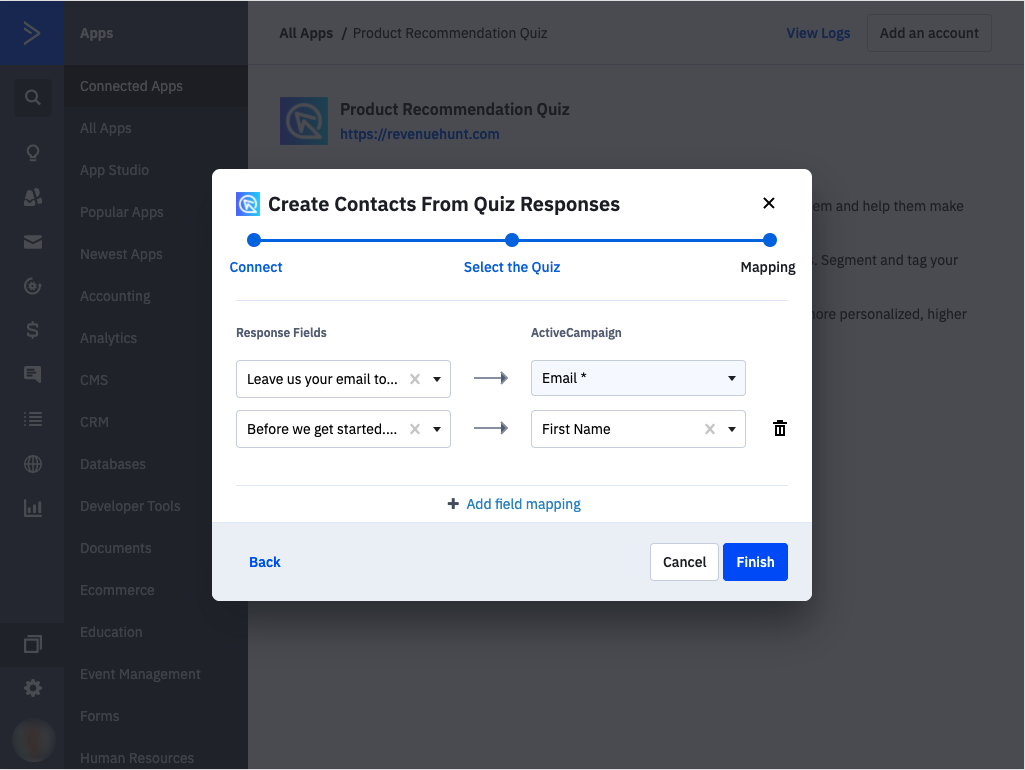
Fig. 05 The field mapping screen. Each quiz response field on the left pairs to the matching ActiveCampaign contact field on the right. Map the ten standard fields first, then add custom fields for the quiz-specific signals you want to drive automations on.
Save the configuration. The quiz is connected. New responses will land in ActiveCampaign with the mapped fields populated. To verify the integration is firing correctly against your own order data (rather than against the ActiveCampaign side alone), cross-reference the quiz response count and revenue against the first-party Shopify quiz analytics dashboard.
Starting from the ActiveCampaign Apps menu
- In ActiveCampaign, open the Apps menu and search for Product Recommendation Quiz.
- Select the quiz app and follow the setup. When prompted for the API Token, copy it from the RevenueHunt Connect tab > ActiveCampaign section.
If the Apps page won’t appear in ActiveCampaign, check that ActiveCampaign branding isn’t disabled for your account. Toggle it off and back on in account settings; the Apps page should reappear. The Apps menu is gated on branding being enabled.
What lands on the ActiveCampaign contact
When a quiz completes, the integration posts the following fields to ActiveCampaign:
| Field | Description |
|---|---|
Email | Shopper’s email address (mandatory; sync only fires when an email is captured) |
First Name | First name from the quiz |
Full Name | Full name from the quiz |
Quiz ID | Internal identifier for the quiz |
Quiz Name | Display name of the quiz |
Response ID | Unique identifier per response (useful as a primary key for downstream segmentation) |
Tags | Quiz-assigned tags (e.g. oily_skin, dry_hair, over_40) |
Permalink | URL to view the shopper’s specific results page |
Permalink Hash | Short hash version of the Permalink |
Recommended Product IDs | The SKU or product IDs the quiz recommended |
All ten fields auto-populate on the contact record after mapping. To add a new custom field that doesn’t exist yet in ActiveCampaign, navigate to Lists > Manage fields > Add Field in ActiveCampaign first, then revisit the mapping screen in the quiz integration to point to it.
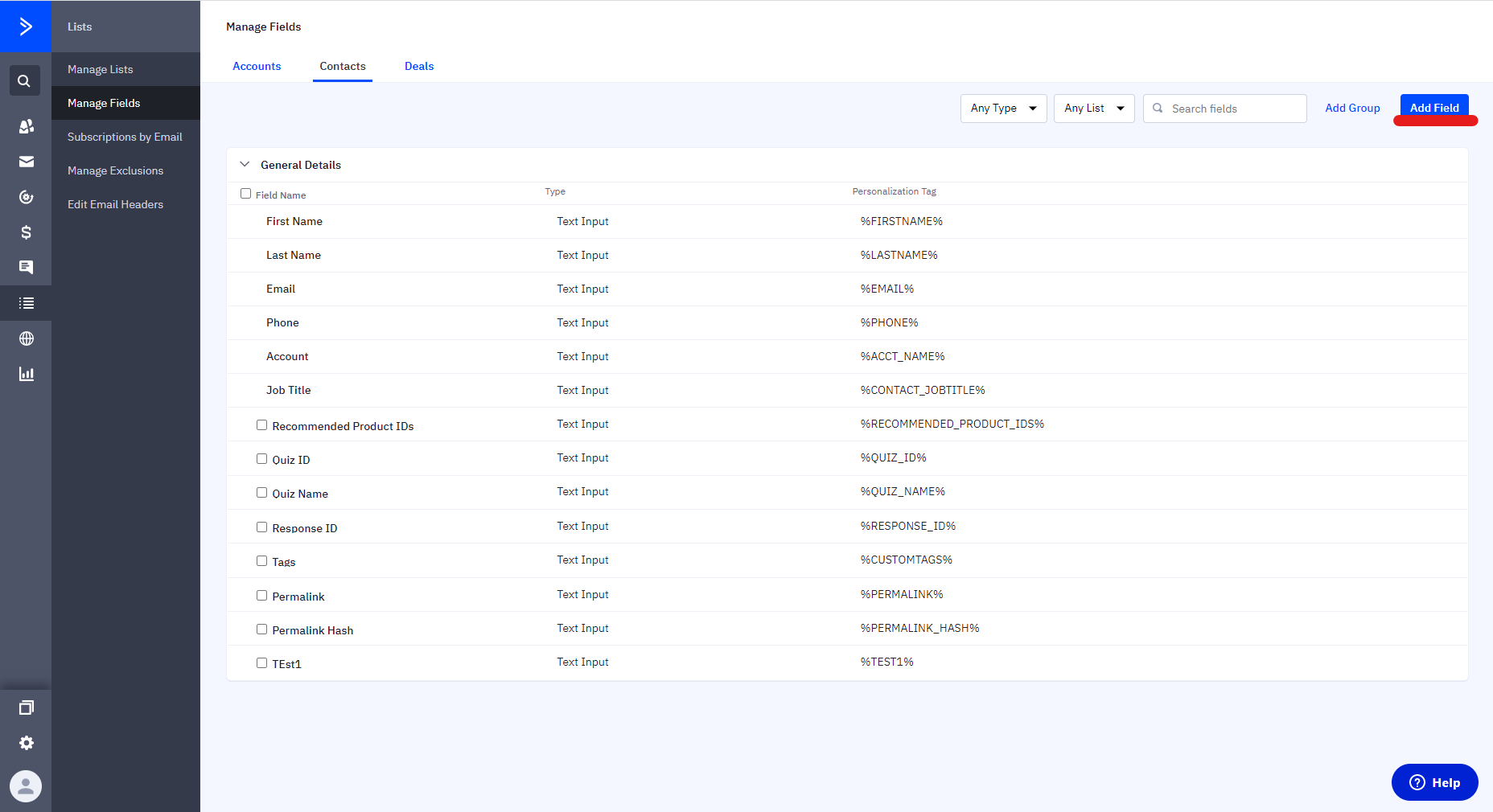
Fig. 06 Adding a new custom field in ActiveCampaign (Lists, Manage fields, Add Field). Create the field in ActiveCampaign first, then revisit the mapping screen so the quiz integration can point to it.
Triggering a follow-up automation
Once the integration is connected on a supported platform, the Product Recommendation Quiz trigger becomes available in the Automations builder.
- In ActiveCampaign, open Automations > New automation.
- Choose the Product Recommendation Quiz trigger (under Apps) and select your quiz.
- Build the email sequence. Use Personalization tags to drop quiz fields into the email body. For example:
%QUIZ_NAME%,%TAGS%, or the Permalink to link the shopper to their personalised results page. - Add Wait steps and conditional branches based on tag values (e.g. branch on
Tags contains "oily_skin"). - Activate the automation.
On Built for Shopify (Webhooks workaround), trigger off custom-field changes or new contacts entering a specific list instead; the native trigger isn’t exposed without the Connect-tab integration.
The recommended-products limitation
Worth knowing before designing the follow-up email: only the recommended Product IDs come through to ActiveCampaign, not the full product details (name, image, description, price). To show actual product cards in the email, you’ll need to connect ActiveCampaign directly to your store (Shopify, WooCommerce, Magento or BigCommerce) so ActiveCampaign can pull live product data on its own.
Once connected, you can add a Product block in the email, filter the block by collection, and use the Recommended Product IDs as the filter input. Some merchants use multiple Product blocks with show/hide conditions based on which IDs the shopper received, though this configuration isn’t always plug-and-play.
For a simpler email design, link to the Permalink (the shopper’s personalised results page on your store) instead of trying to recreate the recommendation inside the email. The link drives clicks back to the store where the recommendation is already rendered.
When Webhooks, Zapier or CSV are the better path
Even on platforms with native integration, the workaround methods are sometimes the right call:
- Webhooks when you want full control over the payload structure or need to fan-out the data to multiple systems beyond ActiveCampaign at once. The Webhooks integration fires once and you route it however you want.
- Zapier when you want a no-code way to add steps between the quiz and ActiveCampaign: filter by tag values, enrich with third-party data, write to other tools. Available on Shopify Legacy, WooCommerce, Magento, BigCommerce and Standalone.
- CSV upload when you’re running a one-off campaign or doing the initial backfill for a list that already has historic quiz takers.
Where ActiveCampaign fits in the stack
ActiveCampaign is CXA: CRM, email, automation, sales pipeline, all in one. It shines when the post-quiz journey crosses email + a sales hand-off, or when the automations need branching logic deeper than most ESPs expose. Stores running on Shopify with high transactional email volume often prefer Klaviyo for the deeper Shopify-native triggers. For sales-pipeline-driven follow-up, HubSpot is the heavier-weight option. For email + SMS + web-push in one tool, Omnisend is purpose-built for ecommerce.
If you’re already on ActiveCampaign and need email + CRM with quiz-driven CXA, this integration is the cleanest path (on the platforms that support it natively). If you’re choosing greenfield on Built for Shopify, the lack of native ActiveCampaign integration is worth factoring in.
FAQ
Does ActiveCampaign integrate with the new Built for Shopify version of RevenueHunt?
Not natively yet. The Connect tab on Built for Shopify does not have an ActiveCampaign section. The supported workarounds are the Webhooks integration (route the quiz payload to ActiveCampaign’s webhook receiver) or a manual CSV upload from Metrics > Responses. Both get the same data into ActiveCampaign.
Why can’t I see the Apps page in ActiveCampaign?
Likely because ActiveCampaign branding is disabled in your account settings. The Apps menu is gated on branding being enabled. Toggle the branding setting off and back on in account settings, then check whether the Apps page appears.
What customer fields can the quiz send to ActiveCampaign?
Ten fields: Email, First Name, Full Name, Quiz ID, Quiz Name, Response ID, Tags, Permalink, Permalink Hash, Recommended Product IDs. All ten auto-populate on the contact record after mapping. Use Lists > Manage fields > Add Field in ActiveCampaign to add new custom fields, then map them.
Why can’t I show the recommended products inside the ActiveCampaign email?
The integration sends only the Recommended Product IDs, not the full product details (name, image, price). To render products in the email, connect ActiveCampaign directly to your store (Shopify, WooCommerce, Magento, BigCommerce) so ActiveCampaign can fetch live product data. Alternatively, link to the Permalink (the shopper’s personalised results page) and let the store render the products.
Should I use Klaviyo or ActiveCampaign?
If you’re on Shopify and your tooling is transactional email plus on-store automation, Klaviyo is usually the better pick: deeper Shopify-native triggers and a larger ecommerce-focused template library. If you need CRM + sales hand-off as part of the same platform, or you’re on WooCommerce / Magento / BigCommerce / Standalone and want the CXA toolkit (predictive sending, lead scoring, deep automation logic), ActiveCampaign is the cleaner fit.
Next steps
- Compare with HubSpot, Klaviyo, Omnisend and Mailchimp before committing to one platform.
- For tag-driven Shopify-native automations: Shopify Flow.
- For the data layer downstream: customer tags in product quizzes.
- For consent collection at quiz time: marketing consent in your quiz.
- For the full strategy this integration fits into: build a sales funnel on a Shopify store.
- Estimate the lift on your own store: quiz ROI calculator.
Free tools & data
Put these benchmarks to work on your own store.
Free tool
Quiz ROI calculator
Estimate the extra revenue and ROI a product recommendation quiz could add to your store. Built on real data, no email required.
Calculate your ROIFree report
Ecommerce quiz benchmark report
How product recommendation quizzes really perform: conversion by category, AOV uplift, and completion, from 45M+ real quiz responses.
Read the report
Most shoppers leave because they can't find the right product