
Omnisend quiz integration: segment leads by quiz answers
Connect a product recommendation quiz to Omnisend: setup, what data lands in customer profiles, segmenting by quiz answers, and templated follow-ups.
A product recommendation quiz captures zero-party data while shoppers are actively engaged: stated preferences, skin types, goals, gift recipients, budget bands. Omnisend turns that into segmented email and SMS flows. Wired together, the two run as one customer segmentation and lead generation quiz pipeline.
This guide covers the exact setup paths by platform, the data fields that land on the Omnisend contact, how to segment shoppers by quiz answer, and how the existing template library plugs into the workflow.
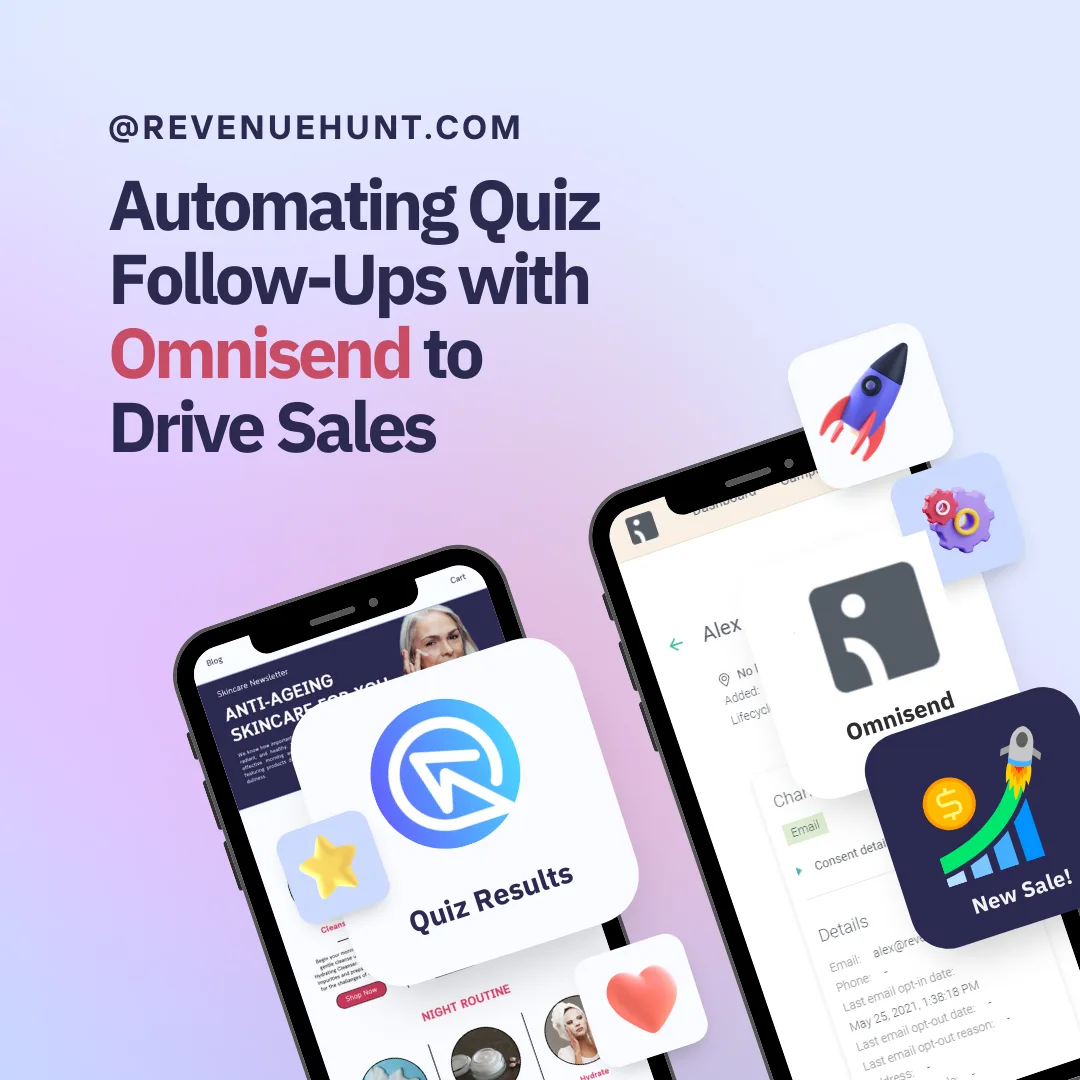
Fig. 01 The Omnisend quiz integration: every completion creates an Omnisend contact with the quiz answers, tags and variable scores attached as custom properties. The contact lands in Omnisend already segmentable on the quiz signal.
What you'll learn
- →How to connect Omnisend on Built for Shopify and on Shopify Legacy, WooCommerce, Magento, BigCommerce and Standalone.
- →Which contact fields and custom properties auto-create in Omnisend when a shopper finishes a quiz.
- →How to segment by quiz answer and trigger workflows from those segments.
- →How to plug the existing Slots and Products List email templates into the workflow.
- →When Omnisend is the right call versus Klaviyo, Shopify Flow, Mailchimp or HubSpot.
Why pair a quiz with Omnisend
Quizzes capture interest at its peak: the moment a shopper is actively choosing. Omnisend handles what happens next: segmentation, automation, email + SMS + web-push in one workflow tool. Three things change when you connect them:
Zero-party data lands on the Omnisend contact record automatically. Every answer a shopper selects, every tag the quiz logic assigns, every product the quiz recommends ends up as a custom property on the contact. No CSV exports, no Zapier middle layer.
Segments stay accurate by themselves. Segments defined on quiz custom properties update as new responses come in, so “oily skin shoppers in the mid budget band” is always the current set.
Templates from the docs library plug in directly. RevenueHunt publishes three Google-Doc HTML templates (Basic Slots, Advanced Slots, Products List) you can drop into Omnisend as custom HTML blocks once the property names match your quiz.
For the strategy this fits into (why an interrupt-style popup doesn’t produce segmentable lists, why a quiz funnel does), see why popups are walls and quizzes are doors. For a worked example of the full pipeline running in production, see the anti-ageing device case study (9.8% quiz-to-purchase CVR on cold Meta traffic, +42.64% AOV lift, $691,128 in 90 days, every answer synced to the brand’s ESP).
Why personalised follow-up converts
5.5%
of shoppers who finish a quiz place an order, about 1 in 18, roughly 2.75x a typical 2% store (RevenueHunt benchmark, 45M+ responses)
3x
revenue per recipient on segmented email campaigns vs generic sends (Omnisend and Klaviyo segmentation benchmarks both report a similar shape)
1 in 5
quiz-attributed orders land more than 30 days after the quiz, so the segmentation layer keeps converting through email for months
Setup paths by platform
The Omnisend connection is API-key based on every platform. The fields the integration sends are identical. The only difference is where the connection UI lives.
Built for Shopify
- In Omnisend, open Store Settings > API and create a new API key with all permissions.
- In the RevenueHunt app, open the quiz, then Settings > Integrations and select the Omnisend tab.
- Paste the API key into the input field and click Save.
Shopify Legacy, WooCommerce, Magento, BigCommerce, Standalone
- In Omnisend, open Store Settings > API and create a new API key with all permissions.
- In the RevenueHunt app, open the quiz, then the Connect tab and find the Omnisend section.
- Click Connect, paste the API key, click Save, then Publish the quiz from the top-right button.
Heads-up: the integration only fires when a quiz completion includes an email address. Without an email there’s no Omnisend contact to attach the answers to. Make the email question required if Omnisend follow-up is the goal of the quiz.
To verify the integration is firing correctly against your store’s actual order data (rather than against the Omnisend side alone), cross-reference the quiz response count and revenue against the first-party Shopify quiz analytics dashboard.
What lands on the Omnisend contact
The sync fires when a shopper finishes the quiz and provides an email address. The customer’s contact details and all their answers post to Omnisend in a single payload.
Each completed response sends:
Standard contact fields
emailfirstname,lastnamephone(when collected)
Quiz-specific custom properties (naming convention quiz_{id}_{field})
quiz_{id}_quiz_namequiz_{id}_response_id, the unique response identifier, useful for building a deep-link back to the personalised results page- Per-question answers, recommended products (with names, links and images), assigned tags, variable scores if the quiz uses scoring
permalink_quiz_id, the property segments are typically built on
You don’t need to pre-create these in Omnisend. They auto-create the first time a response is posted.
Segmenting by quiz answer
- In Omnisend, open Audience > Segments and click Create segment.
- Add a filter on the custom property the quiz creates, for example
quiz_12345_tag_oily_skin is trueANDquiz_12345_variable_scores contains "budget:under_40". - Name the segment (e.g. Oily skin · under £40) and save.
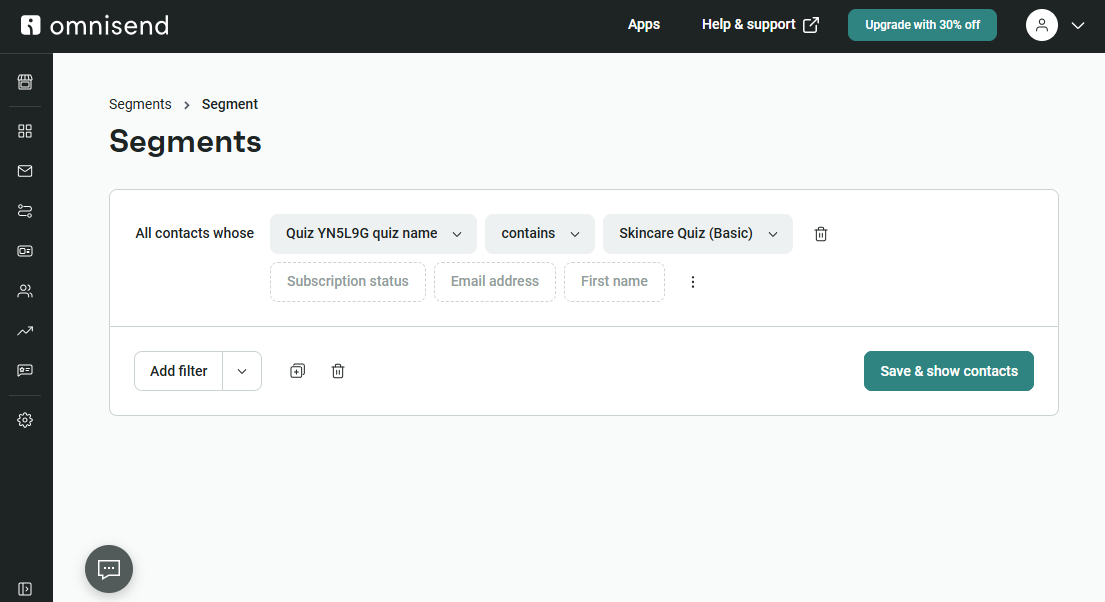
Fig. 02 The Omnisend segment builder filtering on quiz custom properties. Layer multiple conditions (skin type AND budget tier AND chosen concern) to create precise segments without leaving Omnisend.
To target only people who completed a specific quiz, filter on permalink_quiz_id for that quiz’s ID. To target shoppers across all quizzes, filter on quiz_{id}_response_id is known.
Building the workflow + email template
Once the segment exists, the workflow does the actual sending.
- In Omnisend go to Automations and create a new workflow.
- Choose the Segment-based trigger and pick the segment.
- Add an Email step. If the email doesn’t exist yet, create one from Campaigns > Create campaign.
- Add a Delay between steps (e.g. 1 day, then 3 days, then 7 days).
- In the email editor, drop in a Custom HTML block and paste in one of the RevenueHunt template HTML files.
- Match the template’s custom-property names to your actual quiz ID (the templates ship with placeholder IDs that need to be replaced).
- Test, then turn the workflow on.
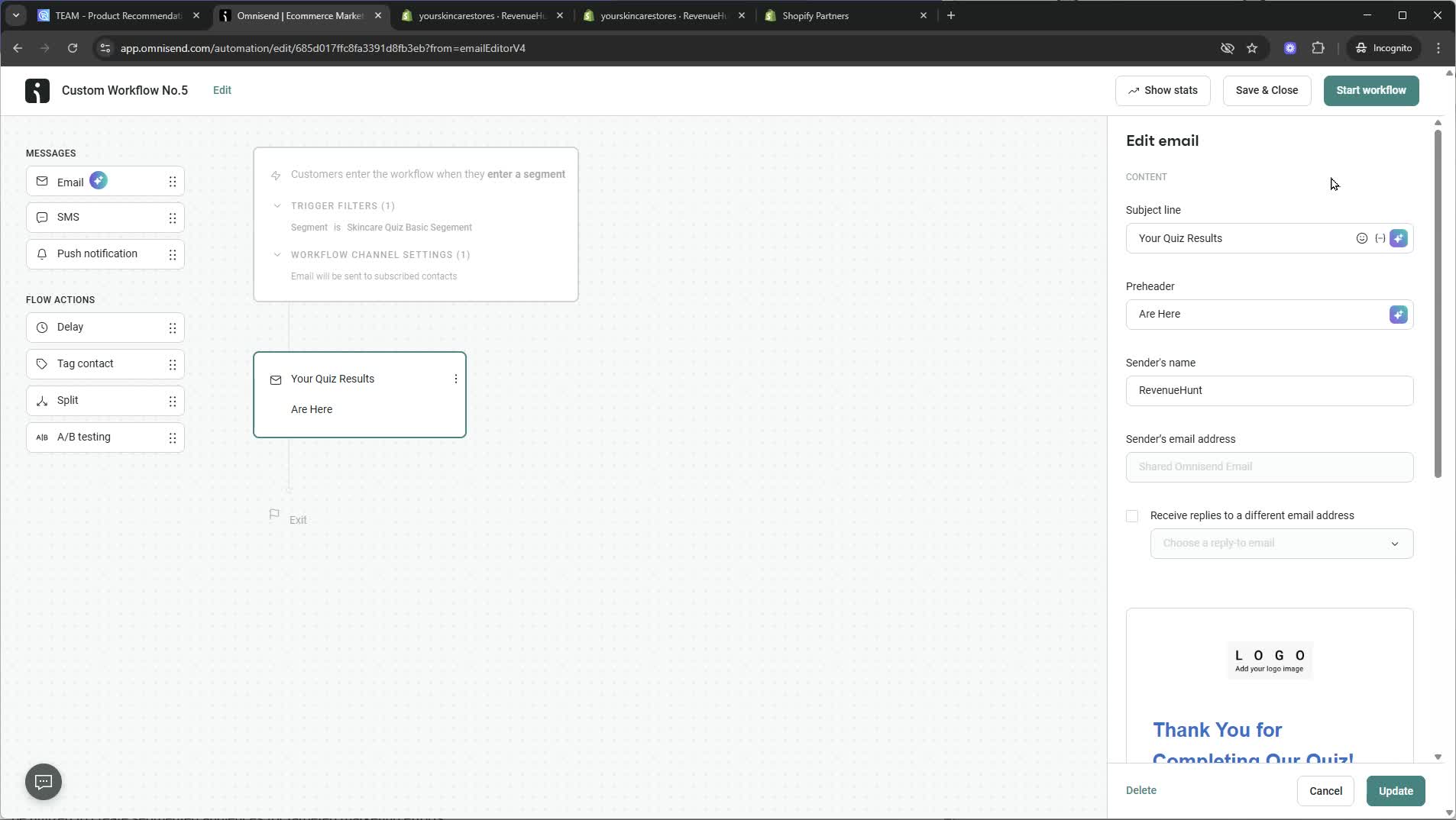
Fig. 03 An Omnisend Automations workflow triggered by quiz-segment entry. The flow fires the moment a new contact matches the segment, so the follow-up email arrives while the recommendation is still fresh.
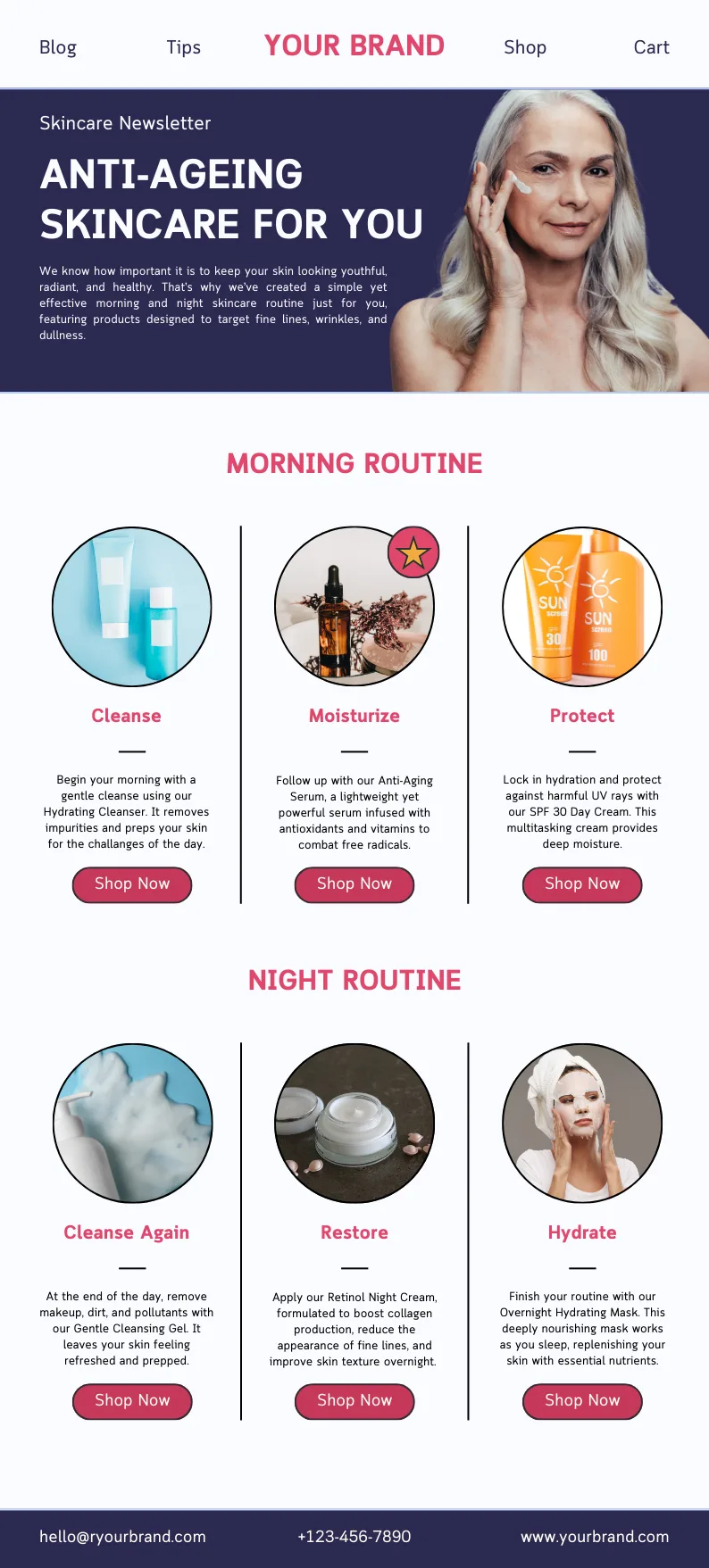
Fig. 04 An Omnisend email rendered from the quiz-result HTML template. The template substitutes the customer's recommended products into the layout via the custom property tokens populated when the quiz completion synced.
Template starting points
Three ready-made HTML templates ship as reference docs:
- Basic Slots Template (4-Step Skincare Routine)
- Advanced Slots Template (Morning & Night Routine)
- Products List Template (Coffee Recommendations)
These won’t render correctly by copy/paste alone: the placeholder property names (and the quiz ID baked into them) need to be replaced with the actual ones from your quiz. A developer with five minutes of Omnisend familiarity can do this in one pass.
Omnisend vs Klaviyo (and the other options)
Omnisend is the right call when:
- You’re already on Omnisend for email + SMS + web-push and want one platform across all three channels.
- You’re on WooCommerce, Magento, BigCommerce or Standalone and Klaviyo’s pricing is overkill for the list size.
- You want a quick segment-and-send setup without the depth of Klaviyo’s flow logic.
Klaviyo generally wins on Shopify when segmentation depth matters: deeper conditional splits, larger template library, native Shopify event triggers (browse abandonment, replenishment, win-back). For most Shopify DTC stores, Klaviyo is the default choice. See Klaviyo zero-party data for the activation chain.
Shopify Flow is the right tool when the trigger is tag-driven and the action lives entirely inside Shopify: add to customer segments, route to teams, fire transactional email.
Mailchimp suits non-ecommerce-first audiences and works on Legacy / Woo / Magento / BigCommerce / Standalone but doesn’t connect on Built for Shopify.
HubSpot is the right call when the quiz feeds a CRM with sales follow-up alongside marketing.
FAQ
Does Omnisend’s quiz integration work the same on Built for Shopify and the Legacy / multi-platform versions?
The data fields and the sync trigger are identical. The only difference is the menu path: Settings > Integrations > Omnisend on Built for Shopify, Connect tab > Omnisend on Legacy and the multi-platform versions.
What data does the integration send to Omnisend?
Standard contact fields (email, first name, last name, phone) plus quiz-specific custom properties: quiz name, response ID, per-question answers, recommended products with names and links, assigned tags, and variable scores. Every property auto-creates in Omnisend the first time a response is posted.
Why aren’t my quiz contacts showing up in Omnisend?
Three usual causes. First, the quiz isn’t capturing an email; the sync only fires when one is captured. Second, the API key permissions are too narrow; recreate the key with all permissions granted in Omnisend’s API settings. Third, the quiz hasn’t been published since the connection was saved (on Legacy / multi-platform you have to hit Publish explicitly).
How do I send the personalised recommendation in the follow-up email?
Use one of the published HTML templates (Basic Slots, Advanced Slots, Products List). Drop the HTML into a custom block in Omnisend’s email editor, then swap the placeholder property names for the ones your quiz actually emits. Five minutes of search-and-replace, no developer required.
Should I pick Omnisend or Klaviyo for a Shopify store?
If you’re already paying for Omnisend’s SMS or web-push, keep Omnisend and skip the migration. If you’re starting from scratch on Shopify DTC, Klaviyo is the default: deeper segmentation, larger template library, native Shopify event triggers. The migration from Omnisend to Klaviyo is well-trodden if you outgrow it later.
Next steps
- Decide upstream what data the quiz must capture: marketing consent in your quiz before Omnisend starts emailing.
- Use the answers and tags to drive segments: customer tags in product quizzes.
- Compare with Klaviyo zero-party data, Shopify Flow automations, Mailchimp and HubSpot before you commit to one stack.
- Avoid the design traps that nullify the data: product quiz mistakes ranked by industry data.
- Track the right numbers post-launch: product quiz metrics.
- For the full strategy this fits into: build a sales funnel on a Shopify store and 11 ecommerce sales funnel examples.
- Estimate the lift on your own store: quiz ROI calculator.
Free tools & data
Put these benchmarks to work on your own store.
Free tool
Quiz ROI calculator
Estimate the extra revenue and ROI a product recommendation quiz could add to your store. Built on real data, no email required.
Calculate your ROIFree report
Ecommerce quiz benchmark report
How product recommendation quizzes really perform: conversion by category, AOV uplift, and completion, from 45M+ real quiz responses.
Read the report
Most shoppers leave because they can't find the right product