
Scoring and personality-type quiz setup on RevenueHunt
Build a scoring or personality-type quiz: native variables and display logic on Built for Shopify, plus the custom-JavaScript path for other platforms.
A scoring quiz routes shoppers to a result based on the pattern of answers, not on which products got voted up the most. A dosha test, a personality type quiz, a “what’s your skin type” quiz, a wine-pairing quiz that returns a single style based on a 0-40 boldness score: these all share the same underlying mechanic. Variables and numeric scores attach to choices, and either Display Logic or Jump Logic uses the tally to decide what the customer sees on the Results Page.
The RevenueHunt platform supports this natively on the Built for Shopify (BFS) version. On Shopify Legacy, WooCommerce, Magento, BigCommerce and Standalone, the same outcome is achievable with a small custom-JavaScript layer that watches choices and writes to the Results Page. This guide walks the three scoring patterns, their per-platform setup, and the simpler alternatives if your quiz doesn’t actually need scoring.
For context on how scoring fits alongside the platform’s other recommendation systems (Voting, Fixed, Slots, Display Logic), see the product quiz recommendation systems decision tree.
What you'll learn
- →The three scoring patterns: Winning Variable, Scoring with one results page, Scoring with multiple results pages.
- →Which patterns are supported natively on Built for Shopify, and which need a branching tree or a custom-JavaScript workaround on the other platforms.
- →The exact Quiz Builder steps: where to add scores, where Display Logic and Jump Logic live, how to wire sections to score ranges.
- →A clean
prq.getSlideValuecode template for the platforms without native scoring. - →When a simpler approach (Information Recalls, one pivotal question, fewer outcomes) beats a full scoring setup.
Why the routing layer pays back
5.5%
of shoppers who finish a quiz place an order, about 1 in 18, 2.75x a typical 2% store (RevenueHunt benchmark, 45M+ responses)
+11-15%
within-store AOV uplift on quiz orders vs non-quiz orders. A correctly-tuned scoring layer routes higher-intent shoppers to the right bundle.
1 in 5
quiz-attributed orders land more than 30 days later, so the outcome a scoring quiz writes to each profile keeps converting through email for months
Platform support at a glance
The three scoring patterns
Pick the pattern that matches the shape of the outcome you want, then jump to the platform-specific setup below.
1. Winning Variable Quiz (Most Voted Variable)
For: personality types, dosha tests, archetype quizzes, “what’s your X” tests where the result is a single category determined by the variable that received the most hits.
How it works: every choice attaches to one of N variables (e.g. dry skin, oily skin, combination skin). The variable with the highest count at the end wins, and Display Logic shows the corresponding section on the Results Page.
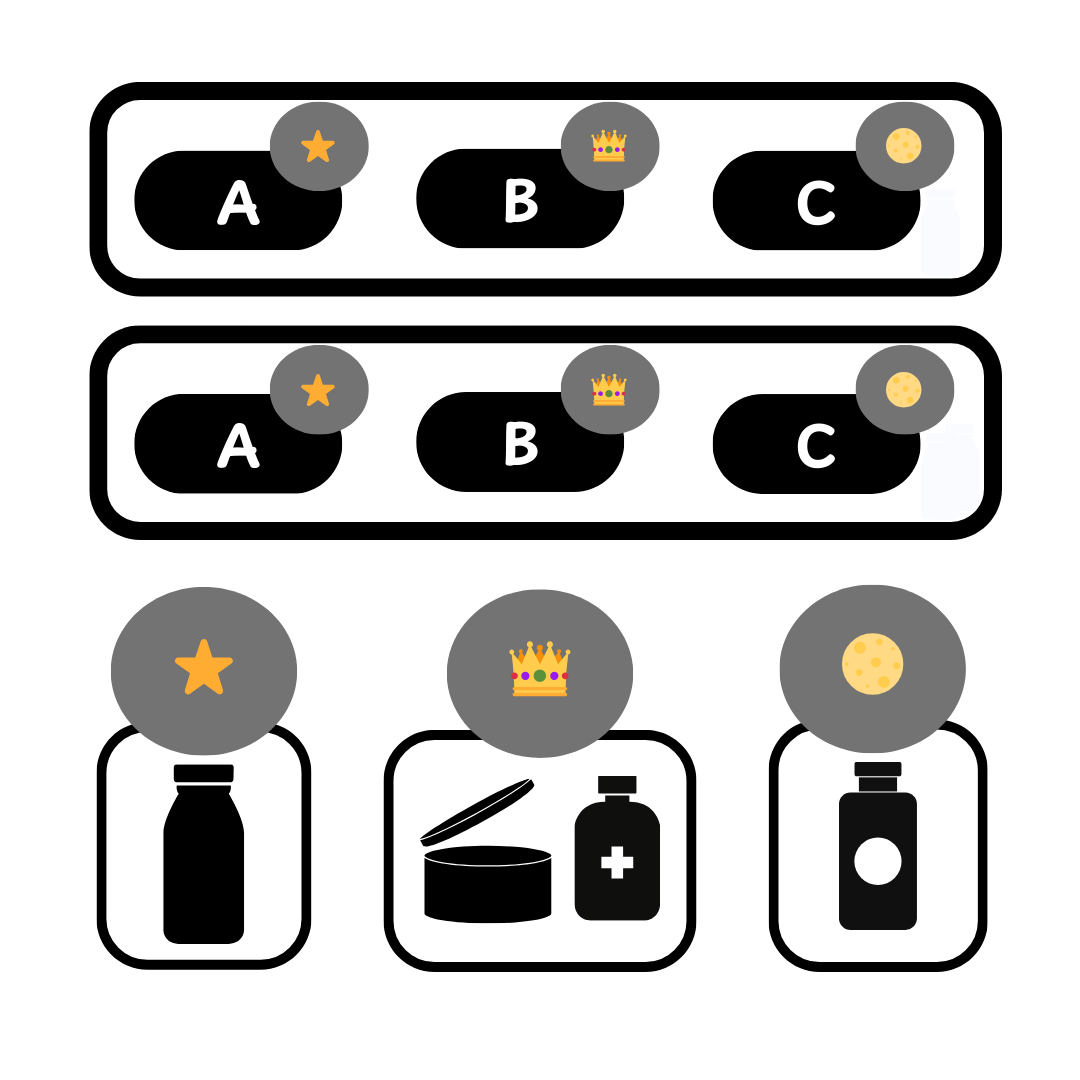
Fig. 01 The winning-variable scoring model: every answer adds a count to one of N variables (skin type, hair type, body type) and the variable with the highest count at the end picks the recommendation. Best for personality-type quizzes where each shopper has one dominant answer.
2. Scoring quiz with one results page
For: quizzes where the outcome is a single result that varies by a numeric score range (a wine-pairing quiz that returns one of five styles, a skin-type quiz where the band 13-17 means “oily”).
How it works: every choice adds points to one or more numeric variables. The Results Page has multiple sections, each gated by Display Logic on a score range. One section is visible at a time.
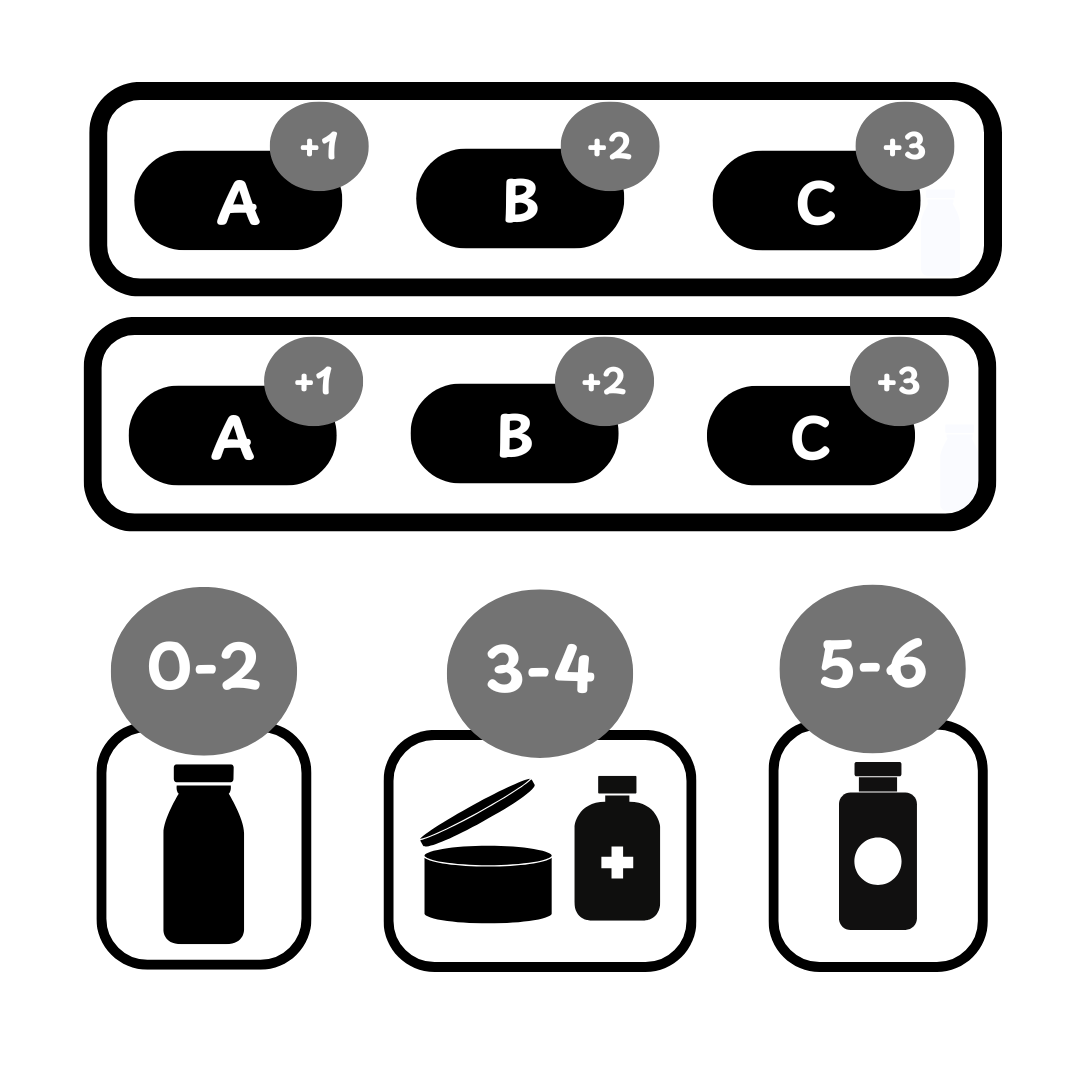
Fig. 02 Numeric scoring with a single results page: each answer adds points to one or more variables, and Display Logic on the results page reveals different sections depending on the score range. Same page, different visible content.
3. Scoring quiz with multiple results pages
For: when the result is substantial enough to deserve its own dedicated page (a full routine, a multi-product stack, a long-form personality description with hero imagery).
How it works: numeric scores accumulate the same way, but instead of toggling sections on one page, Jump Logic on the last question routes the shopper to one of several full results pages.
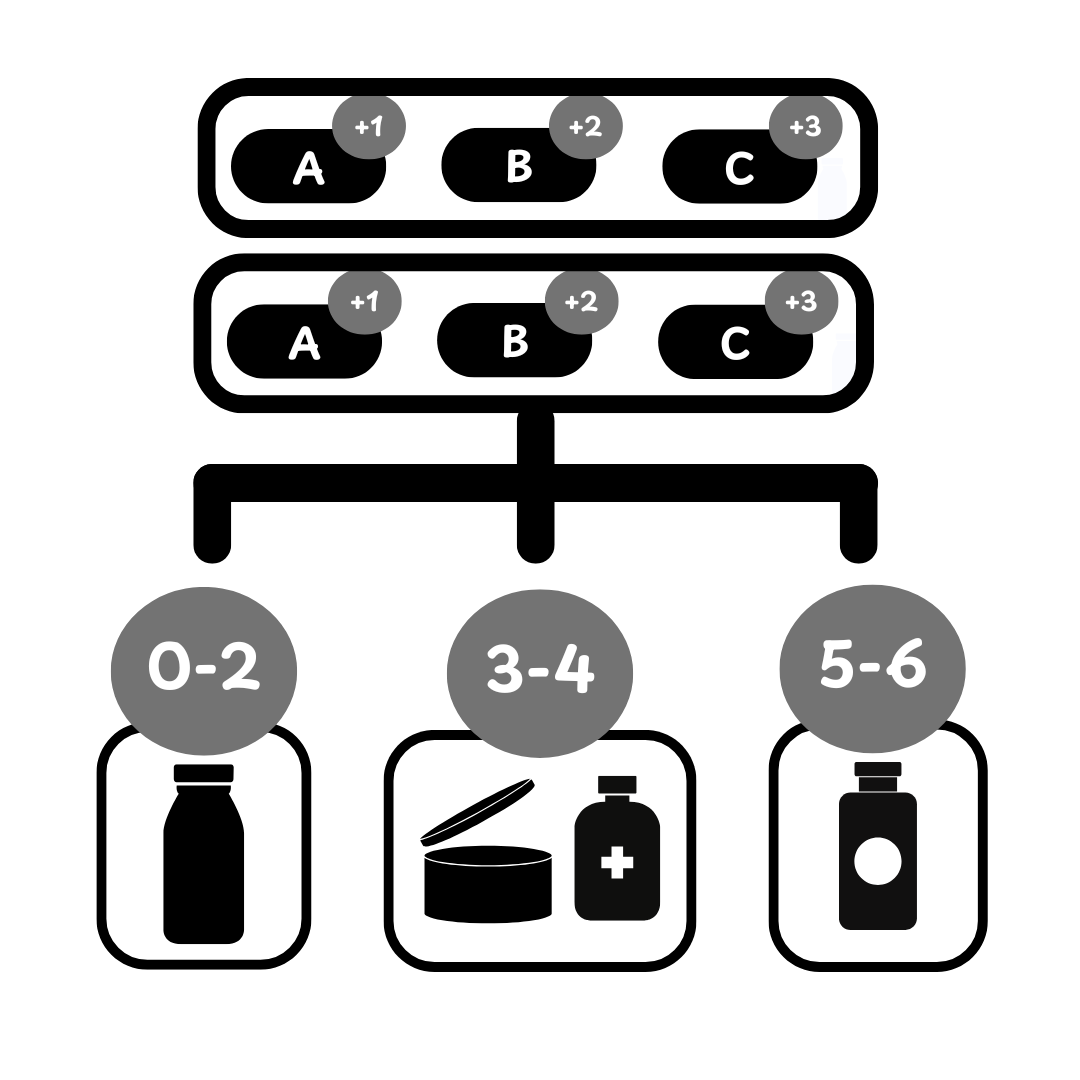
Fig. 03 Numeric scoring with multiple results pages: Jump Logic on the last question routes the shopper to one of several full results pages. Useful when each outcome deserves its own visual identity or product set.
Built for Shopify: the native setup
All three patterns work natively in the Built for Shopify version. There’s also a pre-built Scoring Quiz template under Quiz Templates on the Dashboard, which is the fastest start.
For a worked example of these mechanics in a real qualifying funnel, see the anti-ageing device case study (the 7-question / 5-persuasion-screen architecture routes shoppers into a single qualified outcome and produces 9.8% CVR on cold Meta traffic). Whichever pattern you choose, the outcome variable can sync as a Klaviyo custom property: see your Klaviyo list is a graveyard for how the outcome becomes a segmented welcome flow downstream.
Step 1: design the questions and map the outcomes
Decide the outcomes first, then build the quiz around them. For a skin-type quiz, the outcomes are typically Dry / Normal / Oily / Combination / Sensitive. Map every choice in every question to either a variable (Pattern 1) or a numeric score (Patterns 2 and 3) for each outcome.
A Google Sheet works for simple mappings; Miro handles the larger matrices.
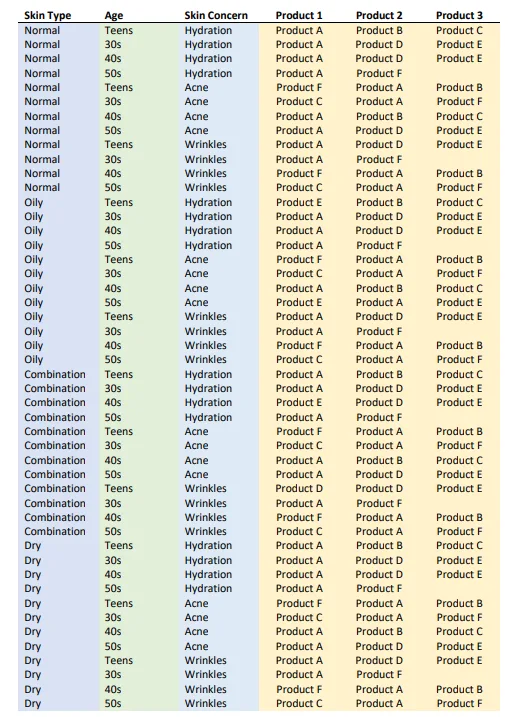
Fig. 04 The outcome mapping matrix: choices on one axis, variables on the other, point values in the cells. Build this in a spreadsheet before touching the Quiz Builder. The matrix is what makes the scoring logic reviewable, debuggable and easy to tune later.
Step 2: add scores or variables to choices
- Open the Quiz Builder and add your multiple-choice questions.
- On any choice, open Choice Settings and find Scores and calculations.
- The default
scorevariable can be adjusted with the up/down arrows (negative values allowed). - To create a new named variable (e.g.
dry skin), click the Search or create variable bar, type the name, then click Create a new variable in the dropdown. - Assign a numeric score to the new variable for that choice. Repeat for every other choice in the question, then move to the next question.
Step 3: build the Results Page
The Results Page structure differs by pattern.
Pattern 1, Winning Variable: add one Section per outcome (Dry Skin, Oily Skin, etc.). Each Section contains a Heading, Text, and a Product Block with the Recommendation System set to Fixed Recommendations and the matching products selected. Then attach Display Logic to each section: “If the variable with the highest score is dry skin, this section is visible; default is hidden.” Repeat for every variable.
Pattern 2, One results page with score ranges: same Sections-and-Display-Logic structure, but the condition uses The score of the variable… with a numeric range (e.g. “Total score is between 13 and 17”). One Section per band.
Pattern 3, Multiple results pages: create multiple Results Pages via + Add Results Page. Each gets its own content and Product Blocks. Then open Conditional Logic > Jump Logic on the last question and route to the right Results Page based on the score ranges.
Step 4: save and test
Click Save top-right. Publish the quiz on a real page (preview mode handles scoring but not subscription components, so use a real page for full QA) and run through enough answer paths to confirm every outcome fires.
Shopify Legacy, WooCommerce, Magento, BigCommerce, Standalone
Native scoring isn’t available on these platforms; there’s no Scores and calculations panel in Choice Settings. There are two workarounds, both well-trodden by merchants. The first is no-code and uses the conditional-logic system the platforms already ship. The second is a small JavaScript layer.
Option 1: a branching quiz with linked products (no code)
This is the path most non-BFS merchants pick, especially when there’s no developer on-site. It trades upfront effort for a permanently no-code maintenance story: once the tree is built and the products are linked, the quiz just works.
The idea is to replace the score with branching. Use Jump Logic on every question to route the shopper down a path that corresponds to one outcome. Every branch terminates at a final question whose choices are linked to the products you want that outcome to surface. The platform’s regular recommendation algorithm then shows those products at the end.
Setup, end to end:
- Sketch the tree first. Every branch should terminate at one outcome (Dry skin, Oily skin, etc.). Draw it on paper or in Miro before touching the builder; this is the part where a missed branch becomes hours of fix-up later.
- Build the questions. Each multiple-choice question represents a node in the tree.
- Wire Jump Logic on each question’s choices. Choice A jumps to question 3; Choice B jumps to question 4; Choice C jumps to question 5. The branches converge at the right final question per outcome.
- Add a final question per outcome path. It can be a real diagnostic question or a hidden one (“Confirm your match” with one auto-select choice).
- Link products to each choice on the final question. That’s where the recommendation surfaces. Every outcome path has its own final question, and its choices carry the products that map to that result.
- Use Information Recalls on the Results Page to echo the answer back (“Based on your answer, your skin is
dry”) if you want the result-page copy to feel personalised without scoring logic.
The trade-off is honest: the tree gets large quickly (5 outcomes × 3 binary branches = up to 8 final questions). For 4-6 outcomes it’s manageable. Past that, the JavaScript path is usually less work to maintain.
Option 2: custom JavaScript on the Results Page
When the tree gets too big to maintain by hand, a small script accumulates points and writes the result. The mechanism uses prq.getSlideValue(slideId), which returns the value selected on a given slide. The script accumulates points per outcome and displays the winner.
document.addEventListener("DOMContentLoaded", function () {
  // Map slide IDs to per-choice point values.
  // Find the slide IDs by inspecting the quiz elements in your browser.
  var slidePoints = {
    "mGiOjOq": { "Yes": 3, "No": 1 },
    // Add more slides and per-choice mappings here.
  };

  var totalPoints = 0;
  for (var slideId in slidePoints) {
    if (!slidePoints.hasOwnProperty(slideId)) continue;
    var value = prq.getSlideValue(slideId);
    if (value && slidePoints[slideId][value] !== undefined) {
      totalPoints += slidePoints[slideId][value];
    }
  }

  // Render the result into a container you've placed on the Results Page.
  var el = document.getElementById("quizResults");
  if (el) el.innerHTML = "Total points: " + totalPoints;
});
The script goes in Results Page Settings > Advanced > Custom JavaScript.
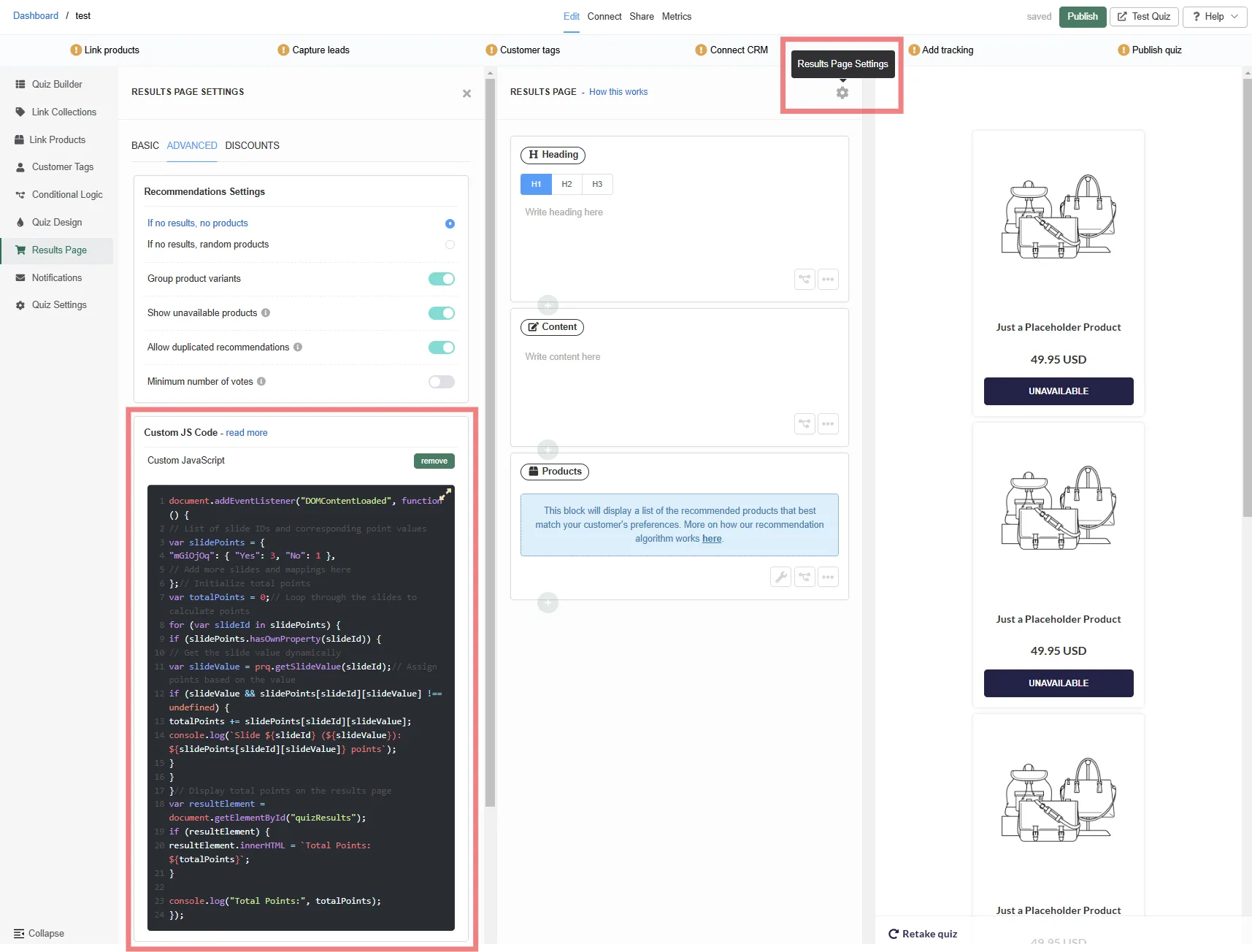
Fig. 05 The Custom JavaScript field on the Results Page settings. Drop the headline-personalisation script here so each variant of the winning variable produces its own headline copy, without duplicating the entire page per outcome.
For the full custom-JS reference, see our custom CSS and JavaScript guide. For multi-outcome quizzes, extend the script to accumulate per-variable counts (one total per outcome) and write the winning category into the Results Page DOM.
Tip: ChatGPT or a similar assistant can adapt this template to your specific outcomes if you describe the variables and the per-choice point values. Paste the snippet, list the slide IDs, list the choice → score mapping per slide, and ask for the extended version.
Which option to pick
- 3-6 outcomes and no developer on hand: the branching tree. Slow upfront, free to maintain forever, no code in the page.
- More than 6 outcomes, weighted scoring, or some answers should count more than others: the JavaScript path. Faster to build at scale, but you’ll want someone comfortable with JavaScript whenever the logic changes.
Simpler alternatives that often work
Before you commit to a full scoring setup, three lighter alternatives are worth trying. They cover a surprising share of quizzes that look like they need scoring at first glance.
Information Recalls (echo the answer)
Insert the customer’s actual answer into the Results Page copy: “Based on your answer, your skin tends to be dry.” No scoring system needed. Type @ in any text block to insert an Information Recall. Customers feel the quiz understood them without any logic firing under the hood.
Predefined product descriptions
If the recommendation copy lives on the product itself (“This moisturiser is perfect for dry skin, providing deep hydration”), you don’t need the Results Page to repeat it; the product card on the results carries the message. Set Results Page Settings > Individual Product Settings > Show description to surface them.
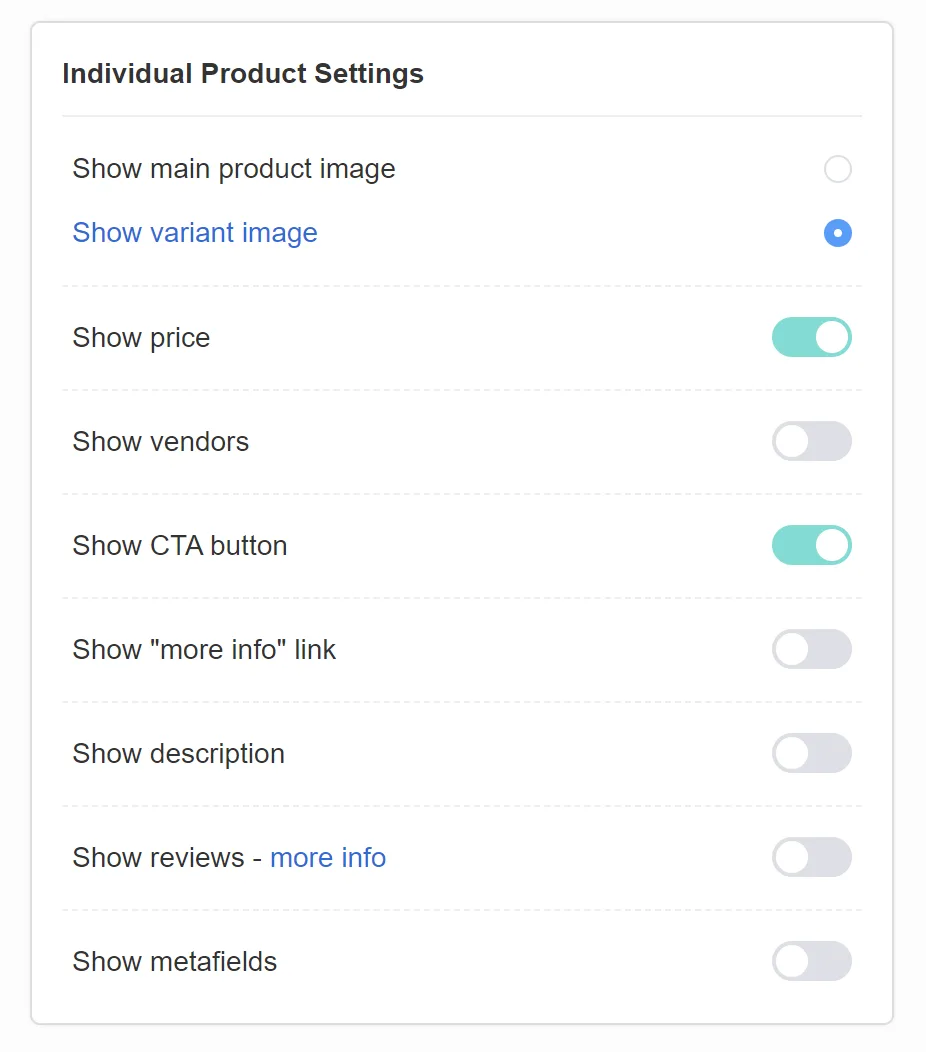
Fig. 06 The Show description toggle inside Individual Product Settings on the Results Page. If the recommendation copy already lives on the product, enabling this surfaces it on the result card instead of duplicating it as a separate section.
Base results on a single pivotal question
Often, one question carries more diagnostic weight than the others. If “How does your skin feel by midday?” determines the outcome almost on its own, just use block logic on that one question’s answer. The other questions enrich the customer profile but don’t drive the routing. Faster to build, easier to maintain, very nearly as accurate.
FAQ
Can I build a scoring quiz on platforms other than Built for Shopify?
Yes, via one of two well-trodden routes. The no-code option is a branching quiz: build a conditional logic tree with Jump Logic, and link products to the choices on each branch’s final question. The code option is a small prq.getSlideValue script on the Results Page that accumulates points. Plenty of merchants ship the branching version once and never touch it again; the JavaScript version scales better when the tree gets large.
What’s the difference between the Winning Variable pattern and the Scoring with One Results Page pattern?
The Winning Variable pattern picks the variable that received the most hits (each answer adds 1). The Scoring pattern accumulates numeric points per variable, and the result is determined by which range the score falls into. Use Winning Variable for “what type are you” outcomes (dosha, personality), Scoring for cases where some answers should count more than others.
Should I use scoring or the Voting / Fixed Recommendation systems?
If the outcome is “this customer is a [type]”, use scoring. If the outcome is “show the top-voted products across all the customer’s answers”, use the Voting System. The recommendation-systems decision tree walks the full choice.
How many outcomes is too many?
If you have more than 6-8 outcomes, the time to maintain the score ranges, sections and product mappings grows faster than the benefit. Consider collapsing rare outcomes into the nearest neighbour, or routing the long-tail to a generic results page.
Why is my scoring quiz showing the wrong section?
Three usual causes. First, a choice has no score on a variable: every choice needs at least one score assignment for the variable it should influence. Second, the score ranges in Display Logic overlap (two sections set “5-7” and “6-9”). Third, the Default visibility on the section was left as Visible instead of Hidden, so the section shows even when its condition isn’t met.
Next steps
- For the broader decision of which recommendation system fits your quiz: product quiz recommendation systems.
- For custom-JS reference and the rest of the
prq.*API: custom CSS and JavaScript guide. - For the data layer behind segmenting by outcome: customer tags in product quizzes and zero-party data.
- For 11 funnels in production that use scoring or scoring-adjacent patterns (HUM Nutrition, Stitch Fix, Casper, the anti-ageing brand): ecommerce sales funnel examples.
- For the strategic context (why personalised post-click routing beats catalogue browsing on paid traffic): quiz funnels vs collection pages and why popups are walls and quizzes are doors.
- For the full strategy this fits into: build a sales funnel on a Shopify store.
- For the operating mode this fits into: how to build a successful ecommerce quiz.
- Estimate the lift on your own store: quiz ROI calculator.
Free tools & data
Put these benchmarks to work on your own store.
Free tool
Quiz ROI calculator
Estimate the extra revenue and ROI a product recommendation quiz could add to your store. Built on real data, no email required.
Calculate your ROIFree report
Ecommerce quiz benchmark report
How product recommendation quizzes really perform: conversion by category, AOV uplift, and completion, from 45M+ real quiz responses.
Read the report
Most shoppers leave because they can't find the right product