
Voting, scoring, or fixed? 6 product quiz recommendation systems compared
Voting, scoring, or fixed: the six product quiz recommendation systems explained. Decision tree, per-platform setup (Built for Shopify vs Legacy), and the AOV uplift each one drives.
The single biggest decision when you build a product recommendation quiz is which recommendation logic to use. It controls how customer answers translate into the products on the results page, and it dictates how the quiz scales when you add more questions, more products, or more exceptions later.
RevenueHunt’s product recommendation engine supports six distinct recommendation systems: fixed lists, voting, slot routines, two scoring systems, and display logic. They’re not interchangeable. Some are right for a 12-SKU candle store; others are designed for dosha quizzes or matrix-driven skincare routines.
This guide walks the decision tree, explains each system, and gives you the platform-by-platform setup path.
What you'll learn
- →The six recommendation systems and the kind of quiz each one is designed for.
- →The decision tree: a flowchart that points you to the right system in under a minute.
- →How votes, scores, variables, and display logic actually compute the result.
- →Platform differences: what Built for Shopify, Shopify Legacy, WooCommerce, Magento, BigCommerce, and Standalone each support.
- →The setup walkthrough (link products, edit the results page, test) and the advanced patterns: slots, matrix, ReCharge, always-on products, explanations.
Why the right recommendation logic pays back
5.5%
of shoppers who finish a quiz place an order, roughly 2.75x a typical 2% store (RevenueHunt benchmark, 45M+ responses). The recommendation system is what turns answers into the products that drive that order rate.
+11-15%
within-store AOV uplift on quiz orders vs non-quiz orders, holding in roughly 7 in 10 stores. Slots routines and scoring quizzes drive most of the AOV story by bundling matched picks.
1 in 5
quiz-attributed orders land more than 30 days later, so the system you pick keeps converting through email and retargeting for months after the visit.
The decision tree
Start at the top. Three questions narrow you down to one of six systems.
Fig. 01 Decision tree mapping three yes/no questions to the right recommendation system. Start at the top and follow the path to one of the six outcomes.
The six systems
Each system is suited to a different shape of problem. Read them in order; the complexity grows as you go down.
1. Fixed Recommendations
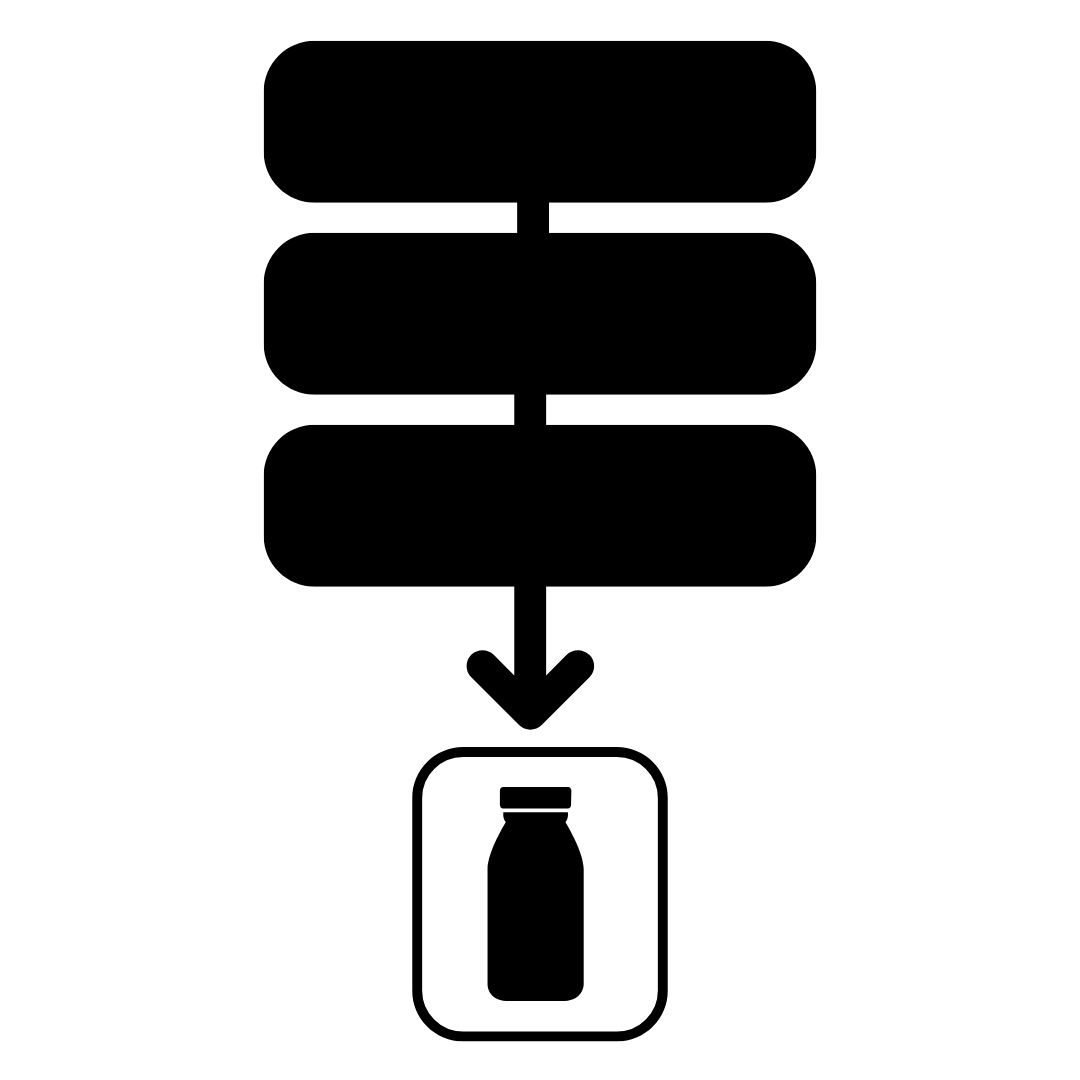
Fig. 02 Fixed Recommendations: one static product list, shown to every quiz finisher regardless of answers.
Best for: simple stores with a small catalogue, lead-magnet quizzes, or content-first quizzes where the recommendation is more or less the same for everyone.
How it works: you set a static product list on the results page. Every shopper sees those products in that order, regardless of what they answered.
Computes: nothing. The list is hard-coded.
Complexity: very low. Maintenance: low, but the recommendation is the same for everyone.
Example: a tea brand with one bestseller bundle they want every quiz finisher to see, with a one-question quiz used purely as a lead-capture form.
2. Voting System (Funnel Quiz)
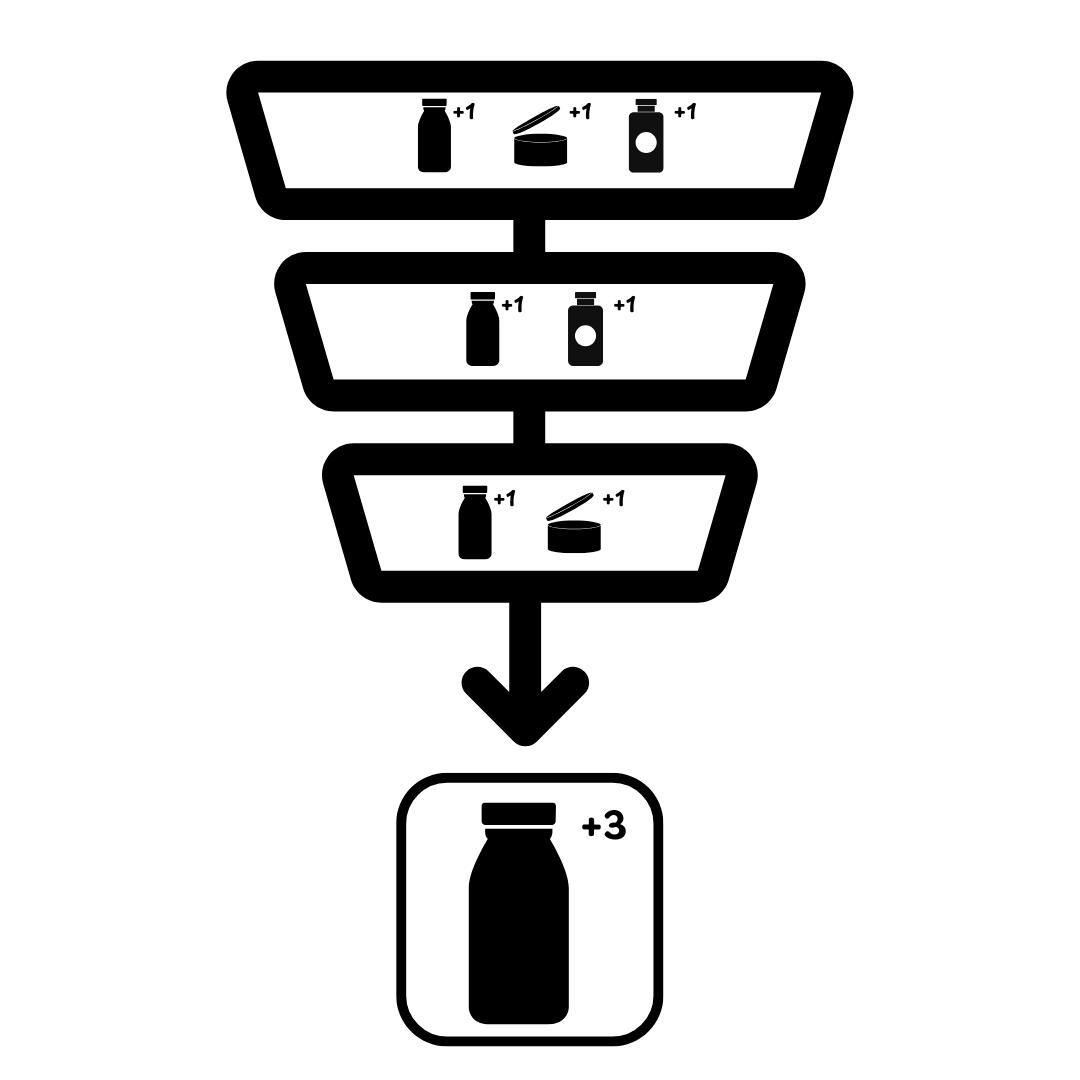
Fig. 03 Voting System (Funnel Quiz): each choice contributes votes to linked products; the results page shows the most-voted items.
Best for: the majority of product quizzes. Skincare, supplements, pet food, wine, fragrance, anything where the catalogue is 20-500 SKUs and the recommendation should adapt to answers.
How it works: you link products (or collections, or tags) to each choice in the quiz. When the shopper selects a choice, every linked product receives one vote. The results page shows the most-voted products, sorted by vote count. Ties resolve randomly (or by the collection’s product order, depending on the platform).
Computes: vote tally per product. Optional minimum-vote threshold filters out low-relevance products. Exclusions hard-veto a product regardless of votes.
Complexity: low to medium. Maintenance: low. Adding new products just means linking them to the relevant choices.
Example: a customer picks dry skin and 30+ age group. The hydrating serum is linked to both choices, so it gets two votes. The age-specific moisturiser is linked to one, so it gets one. The serum is recommended first.
Worked examples: the anti-ageing device case study shows a Voting-System variant pushed end-to-end on cold Meta traffic (9.8% quiz-to-purchase CVR, +42.64% AOV lift, $691,128 in 90 days). The Extreme Kids World case study demonstrates the same system running across three niche quizzes, with the narrowest hitting 76.9% completion. The Skinology case study shows a Voting + Slots variant used for personalised skincare routines.
3. Voting System (Funnel Quiz with Slots)
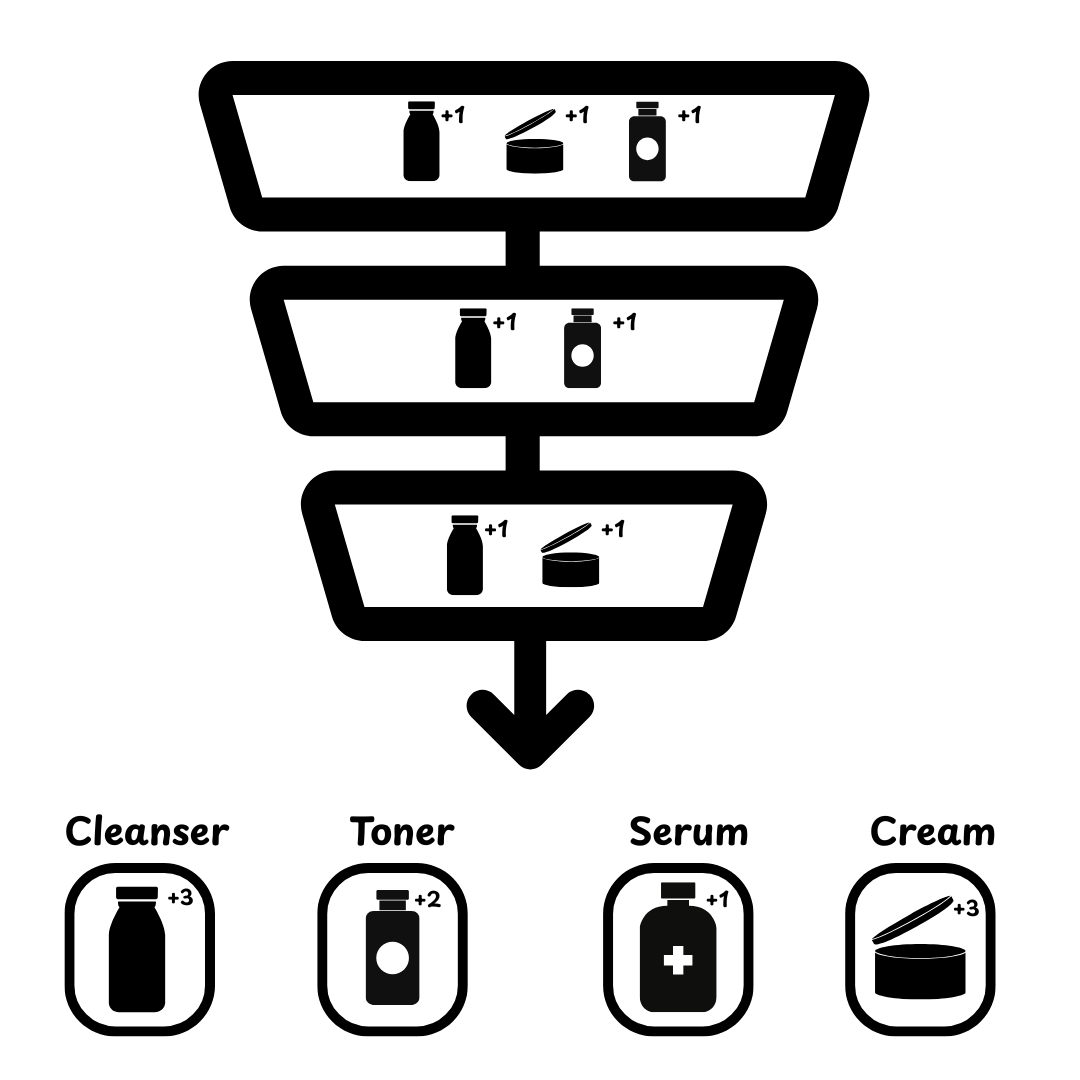
Fig. 04 Voting + Slots: the same vote tally as the Voting System, split across Product Slot Blocks so each step of the routine surfaces its top-voted match.
Best for: multi-step routines where the result is a bundle, not a single product. Think skincare routines (cleanser + toner + serum + moisturiser) or pet kits (food + treats + supplement).
How it works: same vote tally as the standard voting system, but the results page uses Product Slot Blocks instead of a single Product Block. Each slot has its own filter (typically a tag or collection): “cleanser slot”, “toner slot”, “serum slot”. Within each slot, the most-voted matching product wins.
Computes: votes accumulate across the whole quiz, but each slot picks its top-voted product within the slot’s category filter.
Complexity: medium. Maintenance: medium. Products need correct slot tags or collection membership.
Example: the quiz returns one cleanser, one toner, one moisturiser. Each is the most-voted item that matches its slot’s tag filter.
4. Fixed Recommendations with Display Logic
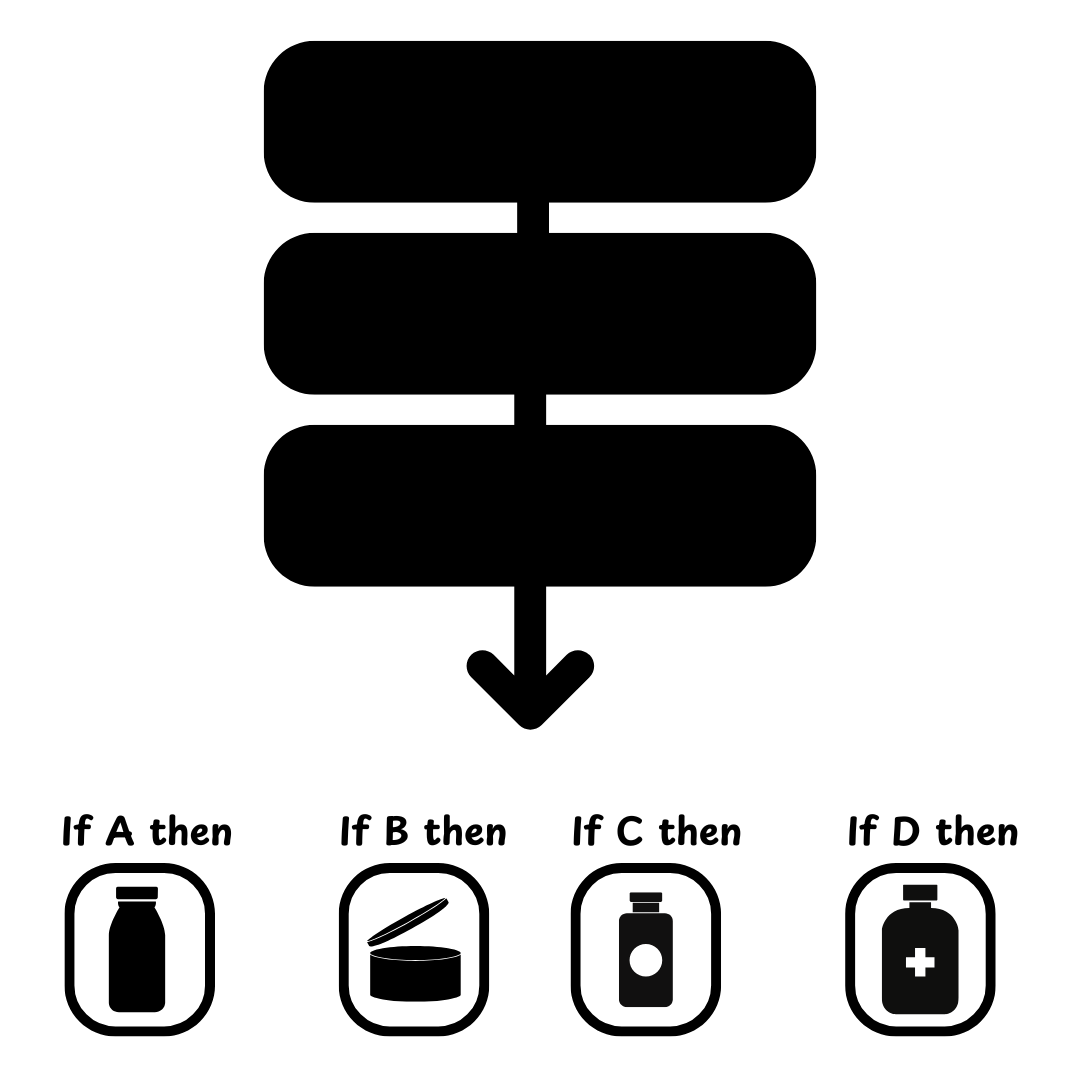
Fig. 05 Fixed Recommendations with Display Logic: multiple result sections, each gated by boolean rules over the answer set.
Best for: quizzes with specific, rule-based outcomes that aren’t a smooth function of votes. “If they answered A and not B, show this exact set.” Highly curated catalogues, or merchants who want absolute control over which products appear in which scenario.
How it works: you build multiple result sections (or multiple results pages), each with its own fixed product list. Display logic conditions evaluate the shopper’s answers and show the right section (or route to the right page).
Computes: boolean expressions over the answer set, for example answer X is "oily" AND answer Y is "20-30" → show section A.
Complexity: high. Maintenance: high. Every catalogue change means revisiting the rules.
Example: a hair-care brand with exactly 6 hair profiles; each profile maps to a fixed three-product set, and there’s no overlap or gradient between them.
5. Custom Scoring System (Most Voted Variable)
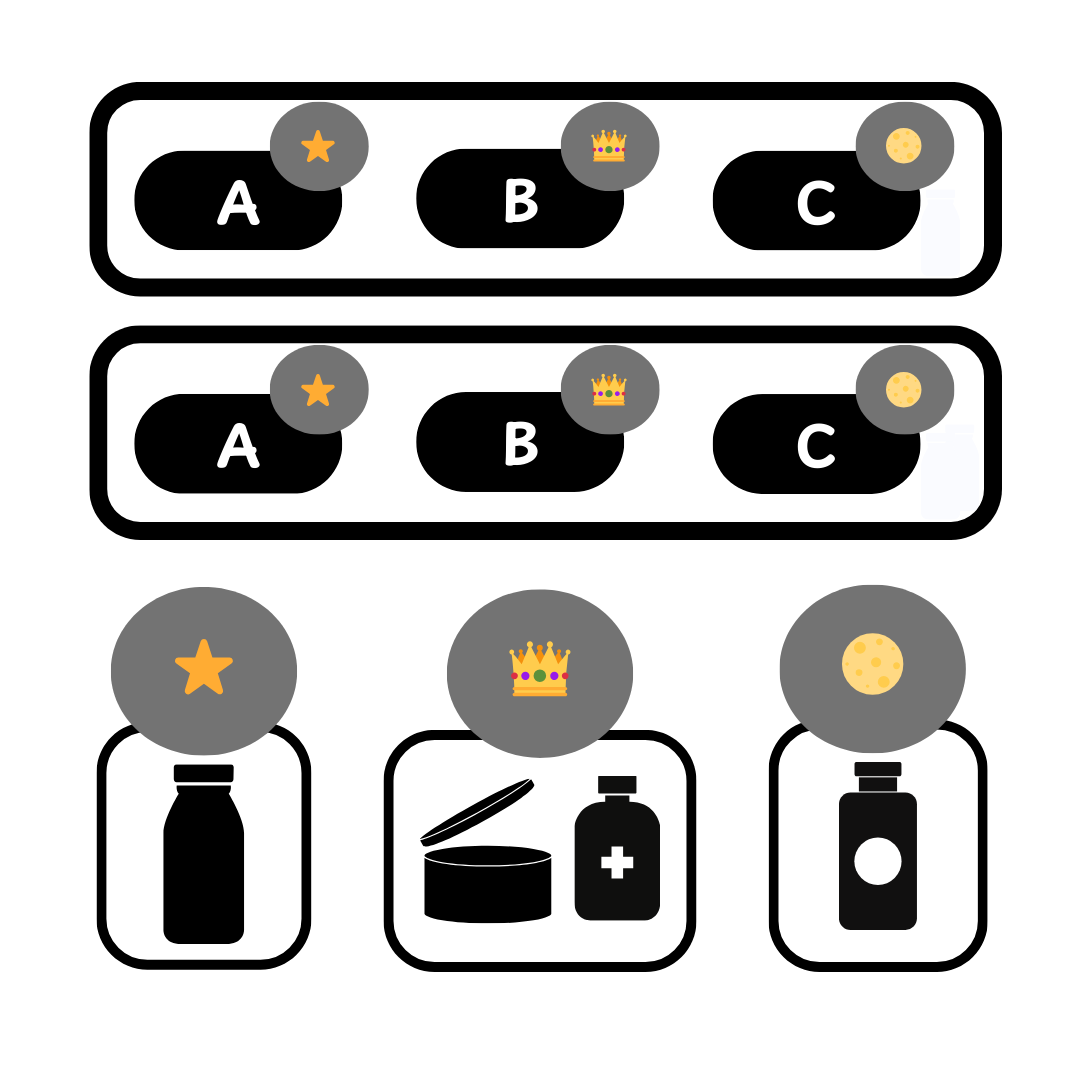
Fig. 06 Custom Scoring (Most Voted Variable): each answer increments a variable; the variable with the highest count wins and surfaces its associated products.
Best for: personality-type quizzes, archetype quizzes, dosha (Vata/Pitta/Kapha), enneagram-style, or any quiz where the outcome is a single category determined by majority vote. For the full per-platform setup walkthrough (native on Built for Shopify vs the branching-tree and custom-JS workarounds on Legacy/multi-platform), see scoring and personality-type quiz setup.
How it works: instead of linking products to choices, you attach variables (A, B, C) to choices. The variable with the most “hits” wins, and the results page shows the products tied to that winning variable.
Computes: per-shopper tally of each variable; pick the variable with the highest count; show its associated products. Ties handled by display-logic rules you define.
Complexity: medium. Maintenance: low. Products are bound to the variable, not to individual choices.
Example: a yoga-mat brand runs a dosha quiz. 12 questions, each answer adds to Vata, Pitta, or Kapha. The winning dosha decides which three mats to recommend.
6. Custom Scoring System (Score + Variable)
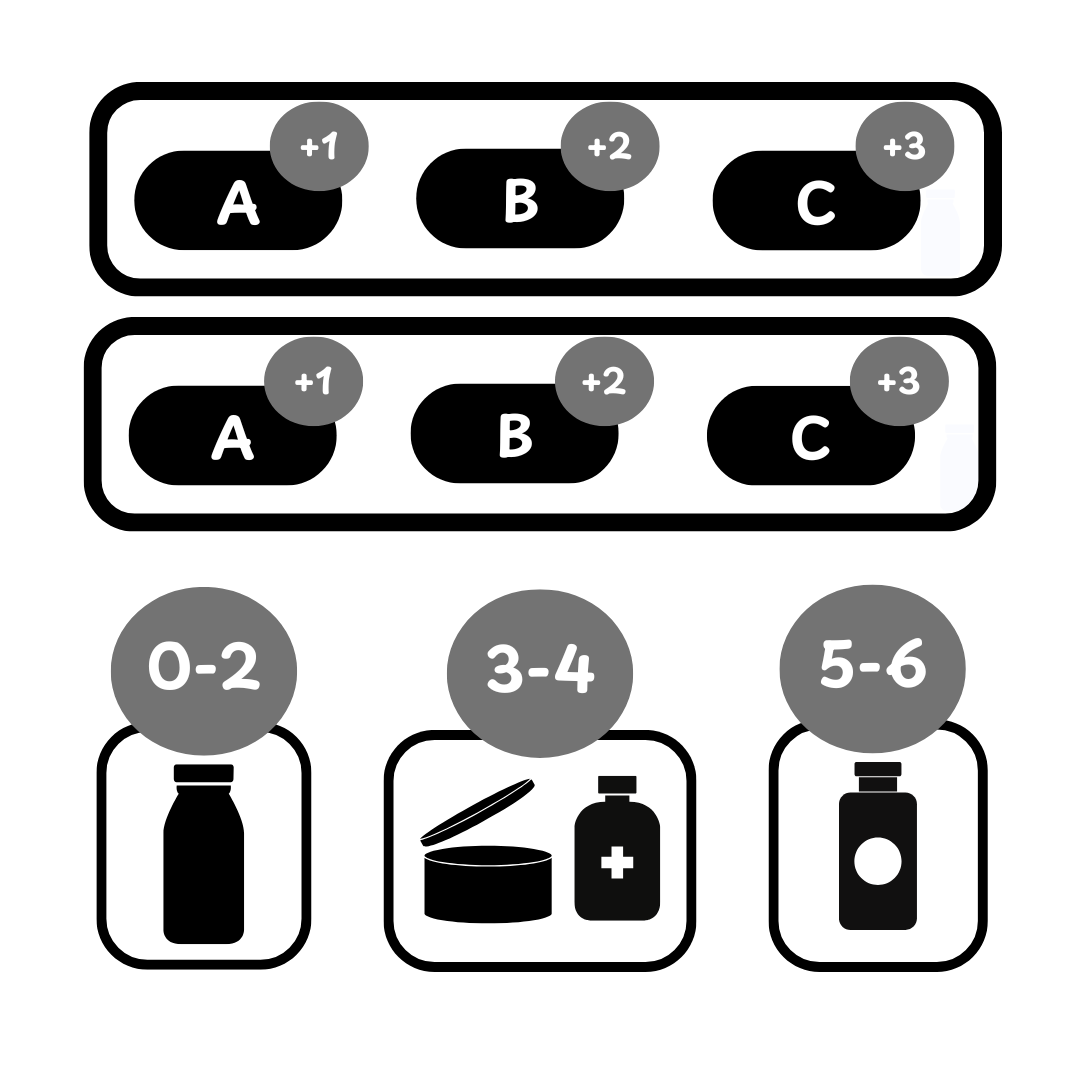
Fig. 07 Custom Scoring (Score + Variable): answers add weighted points to numeric variables; thresholds in Display Logic fire conditional result sections.
Best for: weighted quizzes that need fine-grained numerical scoring mixed with conditional rules. Think wine-pairing quizzes that compute a “boldness score” out of 50, or supplement quizzes that need a “needs-iron-score” plus “is-vegan” gate.
How it works: each choice contributes points to one or more numeric variables. Display logic on the results page uses those scores: if boldness_score > 35, show full-bodied reds; else show medium-bodied. You can layer multiple scores and combine them with boolean rules.
Computes: numeric accumulation per variable, then conditional sections fire based on the totals.
Complexity: medium to high. Maintenance: medium. The score thresholds need re-validating when you add new products.
Example: a wine quiz. Tannin = 0-40, fruitiness = 0-40, body = 0-40. Display sections fire on bands: tannin > 25 AND body > 30 → bold reds; fruitiness > 25 AND tannin < 15 → light fruity reds; etc.
For the technical walkthrough on configuring scoring per platform (including the Legacy/multi-platform prq.getSlideValue JavaScript path), see scoring and personality-type quiz setup.
At-a-glance comparison
| System | Adapts to answers? | Best for | Complexity |
|---|---|---|---|
| Fixed Recommendations | No | Lead-magnet quizzes, single bestseller | Very low |
| Voting System (Funnel) | Yes | Most product finders, 20-500 SKUs | Low–medium |
| Voting + Slots | Yes | Routines, bundles, multi-category kits | Medium |
| Fixed + Display Logic | Yes (rules) | Curated, low-product-count outcomes | High |
| Custom Scoring (Most Voted Variable) | Yes | Personality and dosha quizzes | Medium |
| Custom Scoring (Score + Variable) | Yes (weighted) | Weighted scoring, multi-variable gates | Medium–high |
Platform capabilities
What you can recommend varies slightly by platform. The voting algorithm is the same; the displayable units differ. For the canonical reference on what the Built for Shopify version of the app adds over Legacy, see that overview.
| Platform | Variants | Main products | Collections | Notes |
|---|---|---|---|---|
| Built for Shopify | ✓ | ✓ | ✓ | Recommendations Type block setting lets you pick Products, Variants, or Collections |
| Shopify Legacy | ✓ | ✓ | ✗ | Category-specific products supported via slots, not as direct collection output |
| WooCommerce | ✓ (one type) | ✓ | ✗ | Variable products can only sync one variant type at a time |
| Magento, BigCommerce, Standalone | ✓ | ✓ | ✗ | No collection or category recommendations |
ReCharge subscription products are supported across all platforms via the Connect tab; sync the catalogue once, then link subscription items to choices the same way you would regular products.
Built for Shopify vs Legacy: how setup actually differs
The table above covers what each platform can recommend. The bigger gap, especially for merchants picking a system, is how each system gets set up. The voting algorithm is the same; the setup effort is not.
Built for Shopify: native, with Quiz Copilot AI
Every recommendation system (Voting, Scoring, Fixed) is built into the Quiz Builder UI. Quiz Copilot AI can read your brief and pick the right system, then generate the questions, link the products, and pre-configure the results page in one pass.
- Voting (Funnel): link via the Quiz Builder’s Choice Settings → Upvotes. Upvote types include Main Products, Product variants, Collections, Tags, Variant collections, Vendor collections.
- Fixed Recommendations: one click on the Product Block. Set Recommendation System to Fixed Recommendations, pick the fixed items, save.
- Scoring: native in every Choice Settings panel under Scores and calculations. A built-in
scorevariable plus any custom variables you create, with positive or negative values per choice. The variables flow straight into Display Logic on the Results Page.
Shopify Legacy, WooCommerce, Magento, BigCommerce, Standalone: voting only, no built-in scoring
Voting works on every platform (you link products to choices via the Link Products tab) and the algorithm is identical. The two systems that aren’t natively supported are Scoring and Fixed Recommendations.
- Scoring is not part of the app on these platforms. To run a personality-type or weighted scoring quiz, a developer adds custom JavaScript on the Results Page using
prq.getSlideValue. See scoring and personality-type quiz setup for the full walkthrough. - Fixed Recommendations has two workarounds. Either (a) link the fixed products to every choice in one question so they always accumulate votes and rank first, or (b) create a dedicated collection of fixed products and surface it through a Slot Block linked to that collection via the Link Products tab.
What this means in practice
A scoring or fixed-recommendation quiz that takes minutes in Built for Shopify can take a developer half a day on Legacy or a non-Shopify platform. For Voting-System quizzes (the majority of product quizzes) the setup time is comparable across versions. For the canonical reference on what the Built for Shopify version of the app adds over Legacy, see that overview.
Setting up product recommendations
Before you start, finish adding all your quiz questions and choices. The recommendation step depends on the choices existing.
Tip
New to the builder? Start with our guide to building a successful ecommerce quiz, then come back here for the recommendation step.
The flow is the same across platforms; the menu names are nearly identical.
1. Link products to choices. In the Quiz Builder, open each question and use the Choice Settings panel on the right. For every choice, attach the products that should vote when that choice is selected (and, for scoring quizzes, set variables under Scores and calculations).
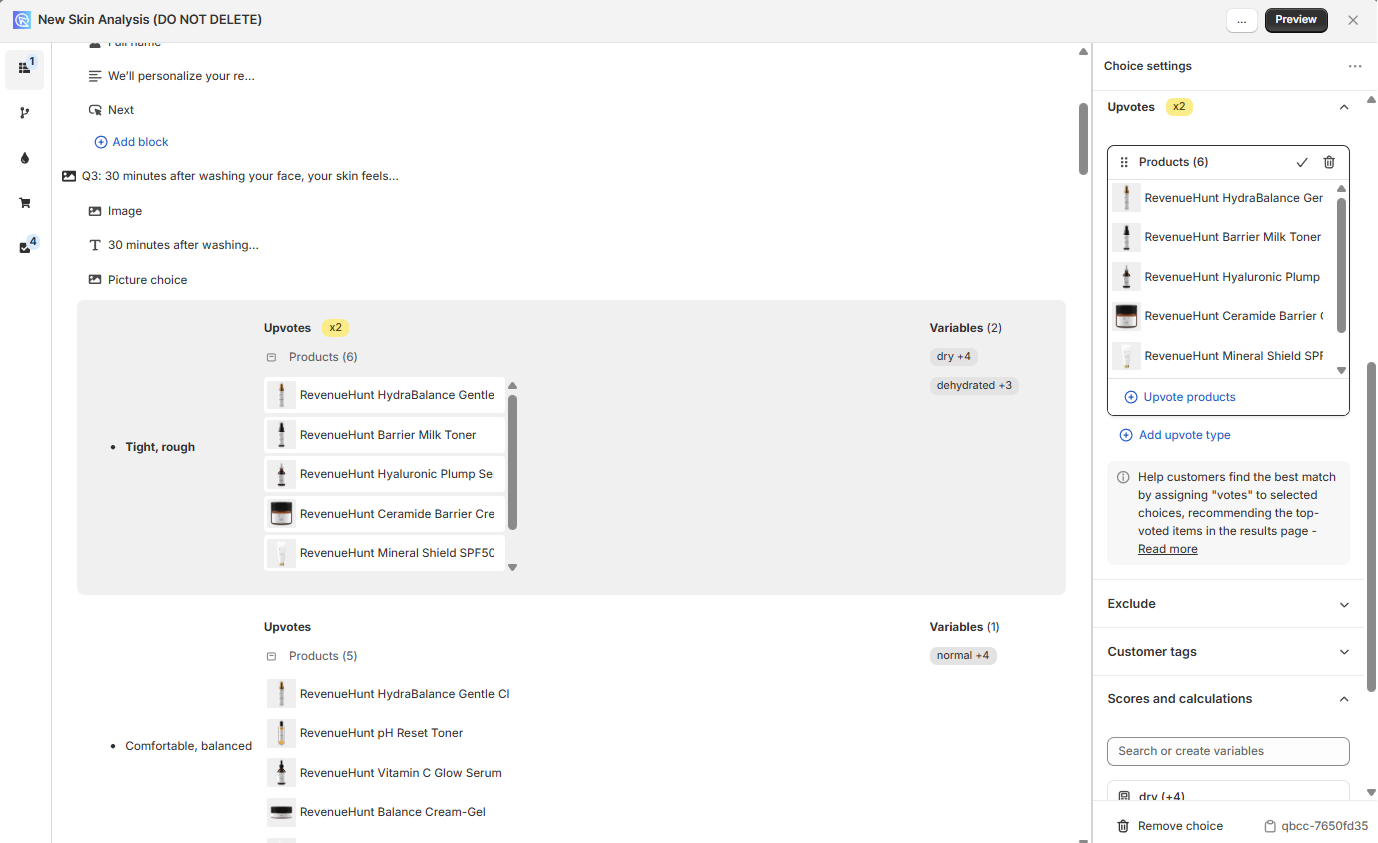
Fig. 08 Choice Settings panel on Built for Shopify. Each choice carries upvoted products (Voting), and, when needed, variable scores under "Scores and calculations" (Scoring).
2. Edit the results page. Open the Results Page tab. Add a Product Block for a single ranked list, or one or more Product Slot Blocks (Cleanser / Toner / Serum / Moisturiser / SPF) if you want a routine or category-bundle layout. Display Logic on the right gates each section.
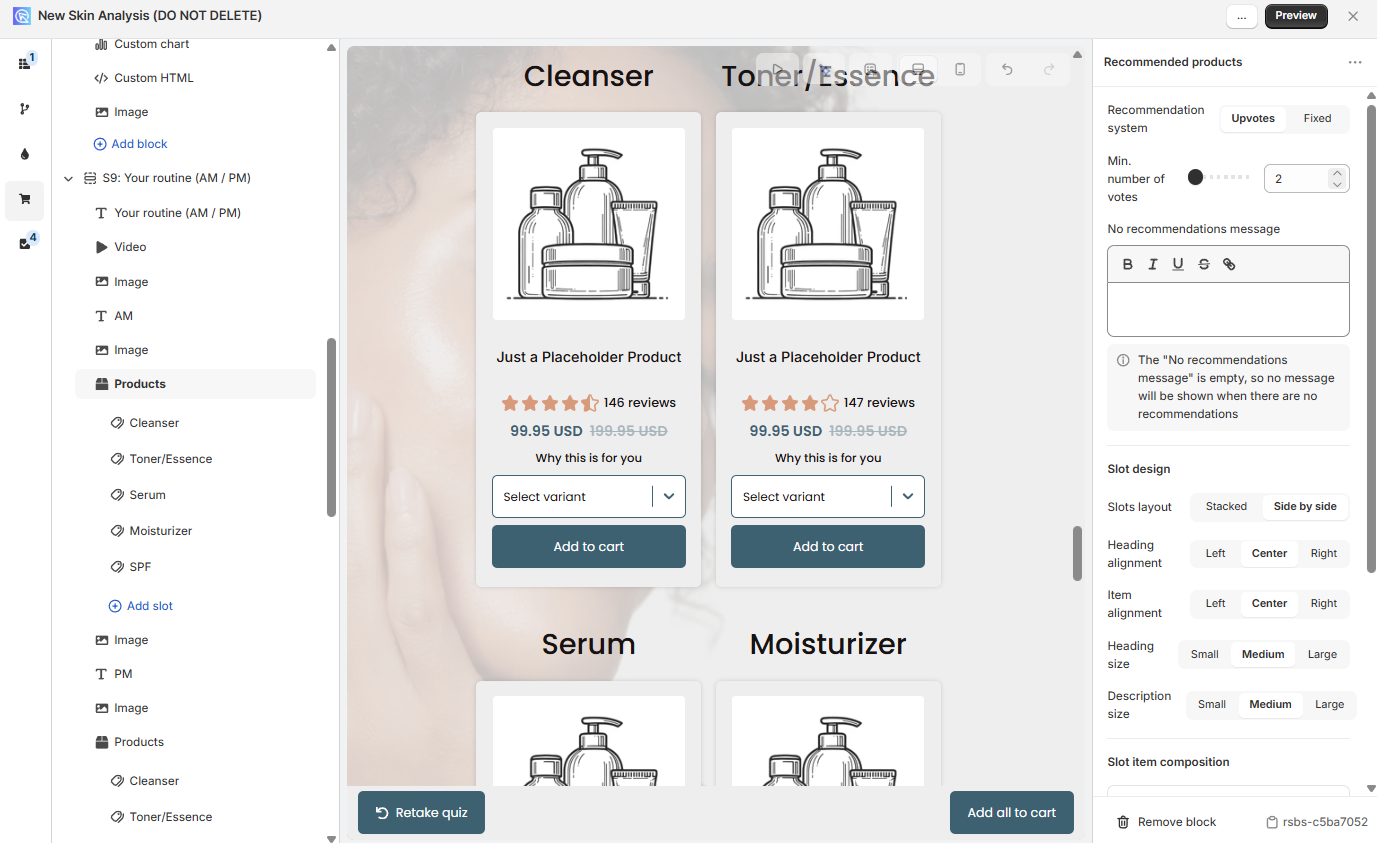
Fig. 09 Results Page with Product Slot Blocks for a routine layout (Cleanser, Toner/Essence, Serum, Moisturiser, SPF). Display Logic on the right controls when each section is visible.
3. Test and troubleshoot. Click Preview in the top right and run the quiz with the answer paths that matter. If a product doesn’t appear when it should, check the Metrics > Responses view to confirm the vote tally for that response.
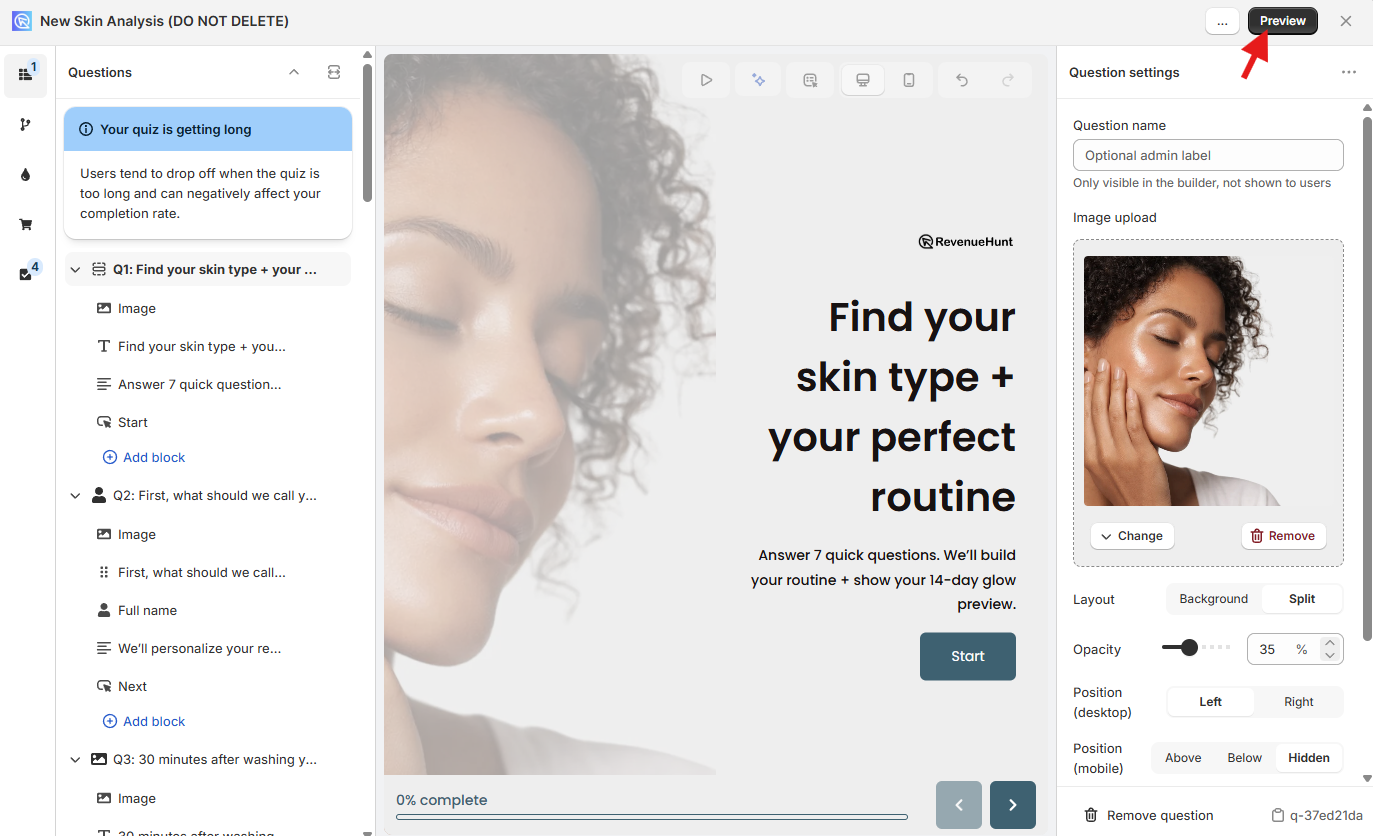
Fig. 10 Preview button in the Quiz Builder top bar. Test every answer path before you publish.
Troubleshooting checklist: every choice has at least one linked product; no products are accidentally excluded; the minimum-vote threshold (if set) isn’t filtering out otherwise good matches; for slots, the slot filter (tag or collection) actually matches the products you expect to land in it.
Refinements
Minimum votes. Set a threshold so only products with at least N votes appear. Stops one-vote products diluting the list on short quizzes.
Exclusions. A choice can exclude specific products. Excluded products never appear, even if they accumulated votes elsewhere. Useful for allergens, price ceilings, or stock-control rules.
Advanced patterns
Skincare routines with Product Slots
Add multiple Product Slot Blocks to the results page. Each slot represents a step in the routine (cleanser, toner, serum, moisturiser). Tag the products with the matching slot tag, and each slot will show the highest-voted product carrying that tag.
Tip
For a full walkthrough see the slots setup guide in the docs.
Matrix criteria
For combinations like “age + skin type”, build collections that represent each segment (e.g. “teens with oily skin”) and link each collection to the appropriate combined choices. Branching logic can route shoppers through different question paths to keep the matrix manageable.
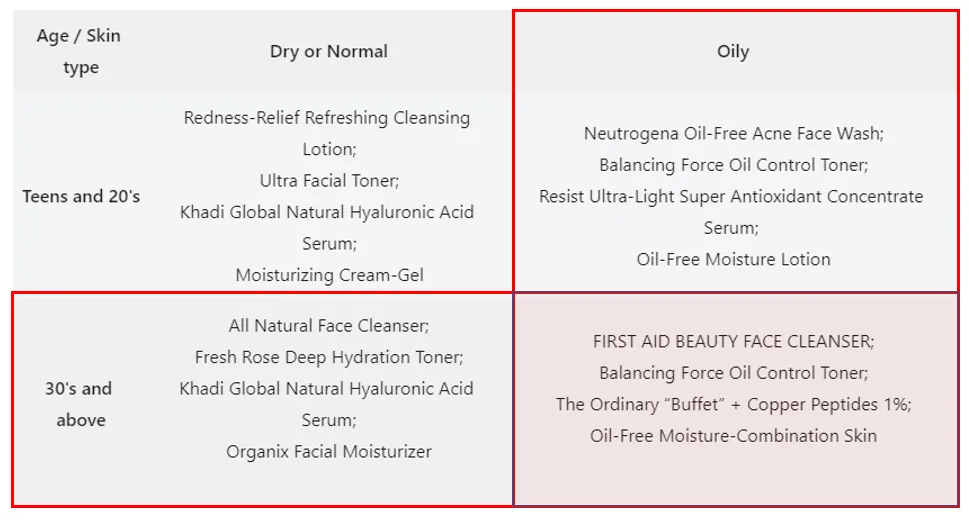
Fig. 11 Matrix recommendation criteria. Combine two answer dimensions (e.g. age and skin type) and link the matching collection to the cell so the right products vote on the right path.
Subscription products (ReCharge)
ReCharge integrates via Connect > ReCharge > Connect, followed by a catalogue sync. Subscription items then appear in the Link Products tab alongside regular products. The Results Page > Basic > Checkout Settings lets you route to cart, to the product page, or to a direct subscription flow.
If you use a non-ReCharge subscription app, create one-time-purchase versions of the subscription SKUs, link those to the quiz, and route checkout to the product page where shoppers pick the subscription option. For the full per-platform breakdown (Built for Shopify native, Shopify Legacy via Connect, WooCommerce auto-sync, the multi-platform Link-to-Product workaround) and three subscription-quiz patterns that convert, see product quiz subscriptions.
Always-on products
Two ways to guarantee a product appears on the results page:
- Link it to every choice in one question. The product will accumulate at least one vote from any path, so it will always rank.
- Put it in a dedicated slot. A standalone Product Slot, filled by a tag or collection that contains only that product, will always show it without affecting the voted recommendations elsewhere.
Use this sparingly. A results page packed with “always-on” items dilutes the personalisation the quiz is meant to deliver, and platform data shows that quizzes with more focused result sets convert better.
Explaining why a product was recommended
The app doesn’t auto-generate explanations, but three patterns work well:
- Information recalls. Pull the answer back into the results-page copy: “You said dry skin, so we picked this hydrating serum.” Light touch, no logic needed.
- Block logic. Show or hide explanation blocks based on which choice the shopper selected. Different blocks for different answer paths.
- Custom JavaScript. When you need fully dynamic, per-product reasoning. See the custom CSS and JavaScript guide.
Choosing well
Three rules-of-thumb after building hundreds of quizzes:
- Default to the Voting System. It scales with the catalogue, adapts to answers, and needs almost no rule maintenance. Drop down to Fixed only when the catalogue is tiny; step up to Display Logic only when the rules are genuinely uncodifiable as votes.
- Use slots only when the result is a bundle. If you’re not actually recommending a kit or routine, a single Product Block is cleaner and converts better.
- Reach for scoring when answers are weighted, not just counted. “Three picks of A makes you a Vata” is Most Voted Variable. “How bold do you like your wine, on a 0-40 scale” is Score + Variable.
The wrong system isn’t a hard failure; most quizzes can be made to work with any of them. But the right system collapses days of rule-maintenance into a single configuration. To estimate the lift on your own store, use our quiz ROI calculator.
FAQ
Which system should a new Shopify merchant start with?
The Voting System (Funnel Quiz). It’s the default for a reason: it adapts to answers, scales with the catalogue, and requires almost no rule maintenance. Switch to slots if you’re recommending a routine; switch to scoring only if the answer pattern genuinely calls for it (personality types or weighted scoring).
Can I combine systems in one quiz?
Yes, within limits. A Voting System quiz can use slots for one section of the results page and a regular Product Block for another. A Score + Variable system uses display logic, which can also gate Fixed Recommendations sections. You can’t run two voting algorithms in parallel, though; the choice is one or the other.
What’s the difference between Most Voted Variable and Score + Variable?
Most Voted Variable counts hits (each answer adds 1 to a variable; the winner is the variable with the most hits). Score + Variable adds weighted points (an answer might add 3 to boldness and 1 to fruitiness), and display logic then evaluates the numeric totals. Use Most Voted for “what type are you” outcomes, Score + Variable when answers should count by more than one.
Can the quiz recommend Shopify collections directly?
On Built for Shopify, yes: set the block’s Recommendations Type to Collections. On Shopify Legacy, WooCommerce, Magento, BigCommerce, and Standalone, the quiz recommends product variants or main products only; you can use collections internally to organise linking, but the output on the results page will be products.
How do I make sure new products show up in recommendations after a catalogue change?
For voting-based systems, link the new product to every relevant choice and run a catalogue sync under the Connect tab. For Fixed Recommendations or Fixed + Display Logic systems, you need to manually edit the results page and add the new product to the right section.
Next steps
- New to product quizzes? Start with how to build a successful ecommerce quiz, or step up to the broader category and the 5 quiz types for the umbrella view.
- For the strategy pillars behind this whole approach: why popups are walls and quizzes are doors and quiz funnels vs collection pages.
- For the scoring-specific technical reference: scoring and personality-type quiz setup.
- For the subscription-specific reference: product quiz subscriptions.
- For first-party revenue attribution across Built for Shopify and Legacy: Shopify quiz revenue tracking and first-party Shopify quiz analytics.
- For 11 funnel patterns in production: ecommerce sales funnel examples.
- Use customer answers to drive personalisation post-quiz: customer tags in product quizzes.
- Avoid the design traps that kill conversion: product quiz mistakes ranked by industry data.
- Send quiz answers downstream: HubSpot, Klaviyo, Shopify Flows.
- Track post-launch with the right metrics: product quiz metrics.
- Reward completion to lift email capture and conversion: product quiz discounts.
- For the full strategy this all fits into: build a sales funnel on a Shopify store.
- Estimate the lift on your own store: quiz ROI calculator.
Free tools & data
Put these benchmarks to work on your own store.
Free tool
Quiz ROI calculator
Estimate the extra revenue and ROI a product recommendation quiz could add to your store. Built on real data, no email required.
Calculate your ROIFree report
Ecommerce quiz benchmark report
How product recommendation quizzes really perform: conversion by category, AOV uplift, and completion, from 45M+ real quiz responses.
Read the report
Most shoppers leave because they can't find the right product