
Shopify quiz revenue tracking: native on Built for Shopify, manual on Legacy
How to track quiz-driven revenue on Shopify: native on Built for Shopify, the manual setup and same-session caveat on Legacy, GA4 for everywhere else.
The biggest difference between the Built for Shopify (BFS) version of RevenueHunt and the Shopify Legacy version is how they handle revenue attribution. On Built for Shopify, the app connects to Shopify Orders automatically the moment it’s installed; quiz-attributed orders, total order value and average order value land in the Analytics tab with zero configuration. On Shopify Legacy, the same data requires a multi-step setup and a same-session attribution caveat that’s easy to miss until your numbers come up flat. On WooCommerce, Magento, BigCommerce and Standalone, the revenue layer is GA4-only.
This guide covers what’s automatic on BFS, what to configure on Legacy (including the caveat), and where GA4 fits for everyone else.
What you'll learn
- →Why Built for Shopify gives you quiz revenue out of the box and Legacy requires explicit setup.
- →The same-session attribution caveat on Shopify Legacy and how to configure around it.
- →Where quiz answers appear inside the Shopify Orders tab, and how to use the tags for segmented marketing.
- →How the GA4 integration covers the platforms without native Shopify tracking.
- →Where this data lives in the rest of the analytics stack, and which downstream tools turn it into action.
Platform support at a glance
Built for Shopify: revenue tracking is automatic
On the Built for Shopify version, RevenueHunt connects to Shopify Orders the moment you install. There’s no Connect tab toggle, no consent flow, no Order Notes prerequisite. Open the Analytics tab, pick the quiz and time window, and the orders + revenue numbers are there.
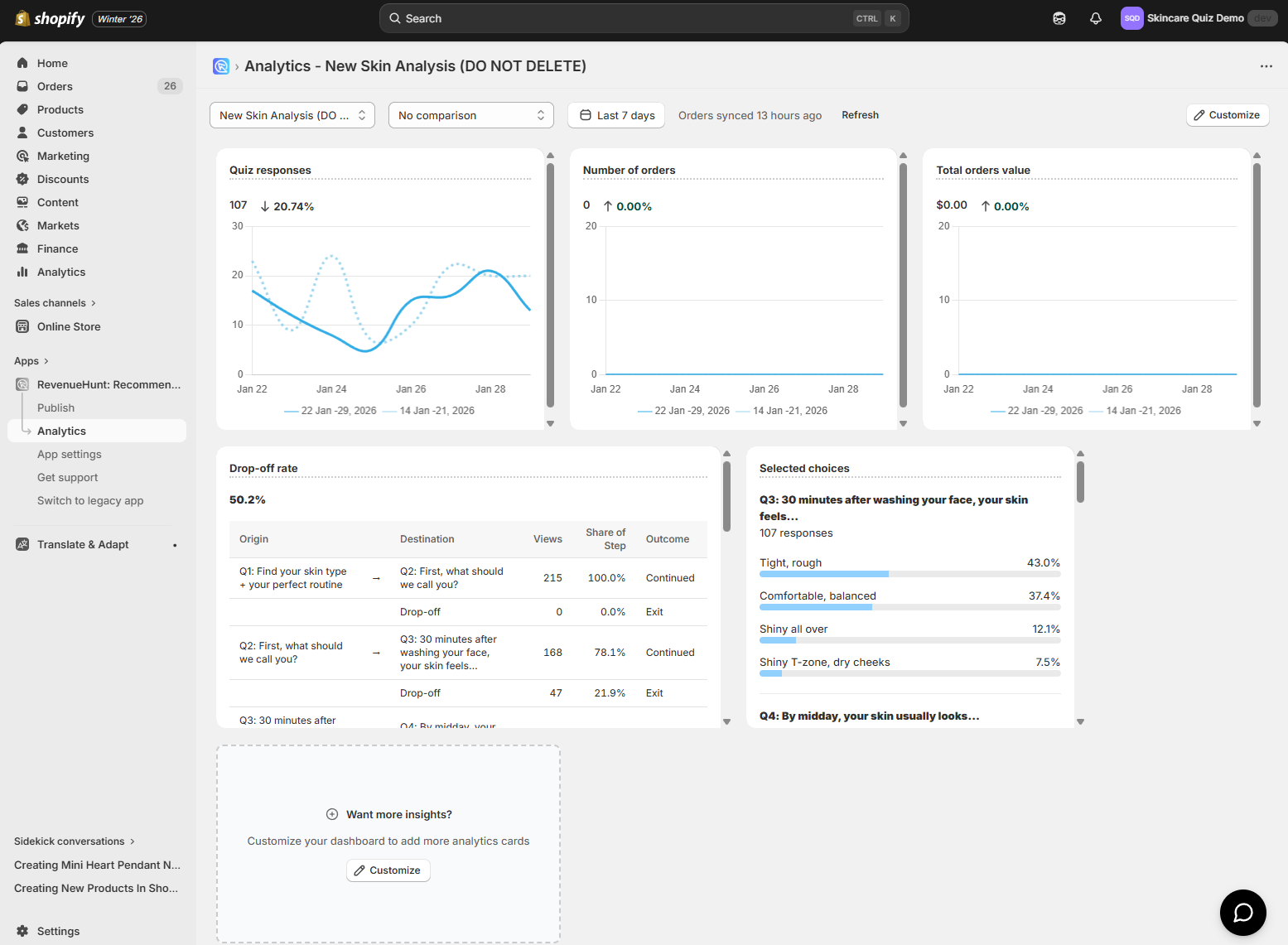
The Analytics tab surfaces by default:
- Total quiz responses for the chosen quiz and period
- Number of orders attributed to the quiz
- Total value of those orders
You can customise the dashboard to add Average Order Value, Number of Carts, and other secondary metrics.
Quiz answers in the Shopify Orders tab
Every order that came through a quiz is automatically marked in your Shopify Orders tab. Open any of them and the quiz answers appear on the order record, so support, fulfilment and marketing can all see the customer’s stated preferences without leaving Shopify.
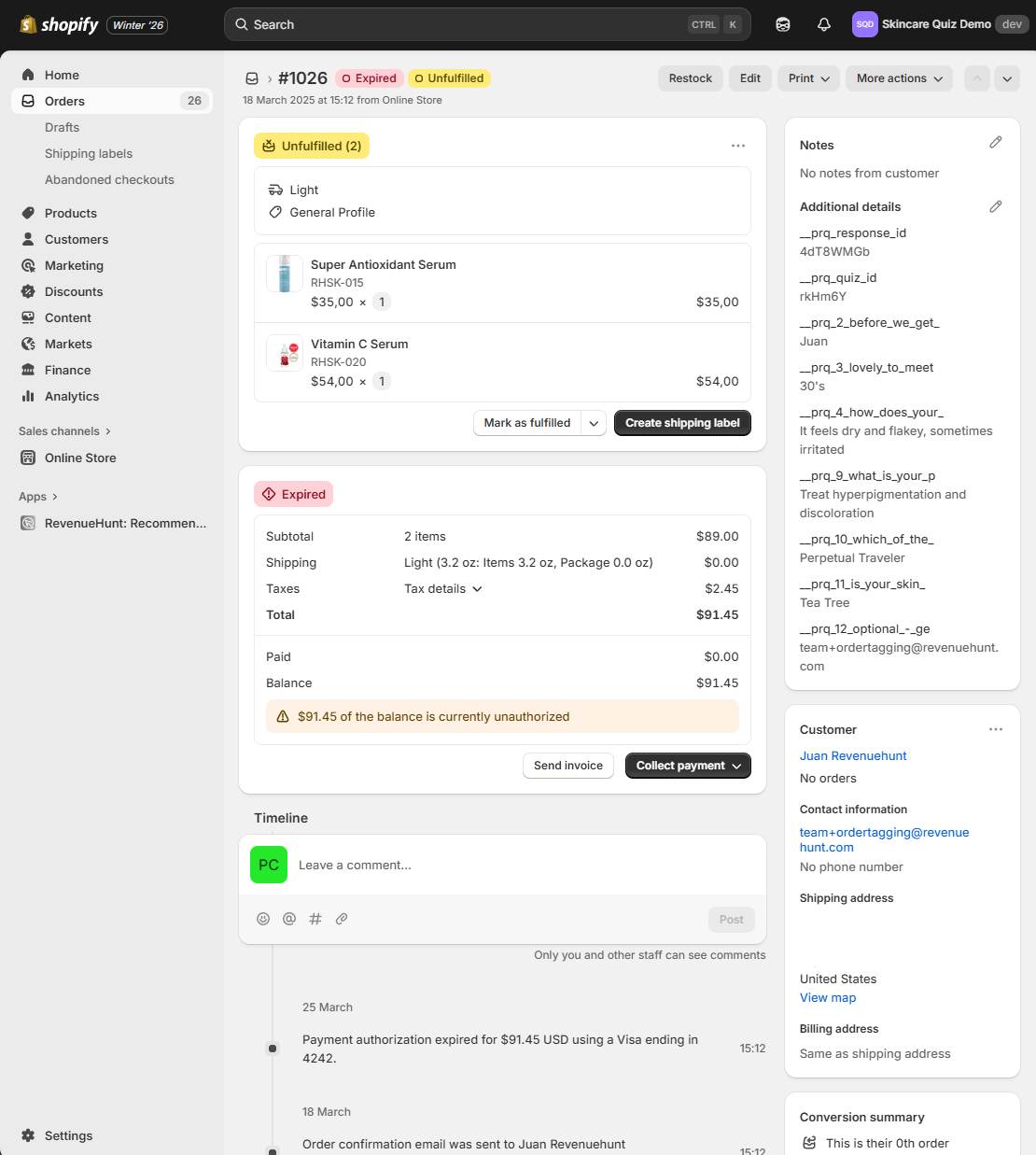
This is the data that powers downstream segmentation. Pipe the same answers to Klaviyo, HubSpot or Omnisend and your post-purchase flows can address the actual stated concern, not just “thanks for your order.” For a worked example of this exact setup driving $691K in 90 days on cold Meta traffic (verified through this revenue-tracking layer), see the anti-ageing device case study. For the broader strategy on zero-party data as a category, and why interrupt-style popups don’t produce segmentable lists, see why popups are walls and quizzes are doors.
Shopify Legacy: manual setup, plus the same-session caveat
On the Legacy app, revenue attribution is opt-in and has a behavioural constraint that’s easy to overlook. Read the warning below before the setup, not after.
Critical caveat
On Shopify Legacy, Shopify Revenue Tracking and Orders Tagging only attribute a purchase to the quiz if the customer (a) adds products to cart directly from the quiz results page, (b) proceeds immediately to cart after the quiz, and (c) completes the purchase in the same session. Delayed purchases (next day, after an email, after re-engagement) will not be attributed. Your Results Page Checkout setting must be proceed to cart, not proceed to checkout or link to product. If most of your sales close on a later visit, you'll see a much smaller revenue figure than the quiz actually deserves; route the delayed-attribution case through GA4 (below) instead.
Setup on Legacy
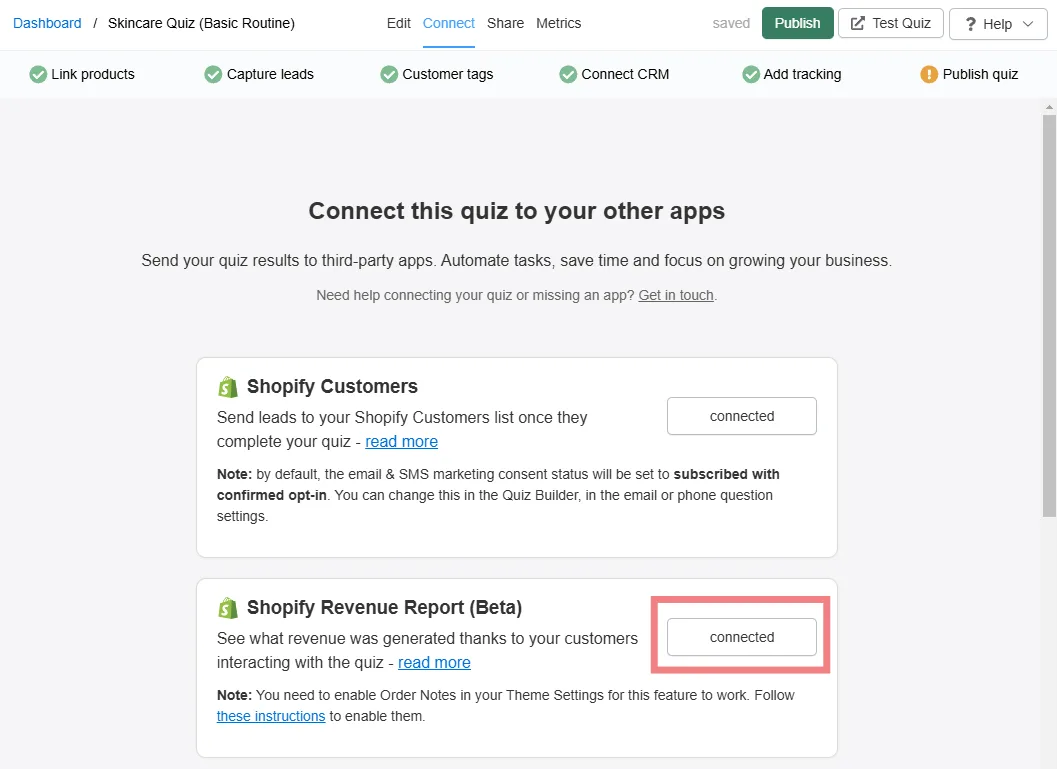
- Enable Order Notes in your Shopify Theme Settings (the integration uses Order Notes as the data carrier). Follow Shopify’s instructions or ask your theme developer.
- In the RevenueHunt app, open the Connect tab and find Shopify Revenue Report. Click Connect.
- Grant consent when prompted. This authorises the app to read your order data.
- Click Publish in the top-right to apply the changes.
View the data
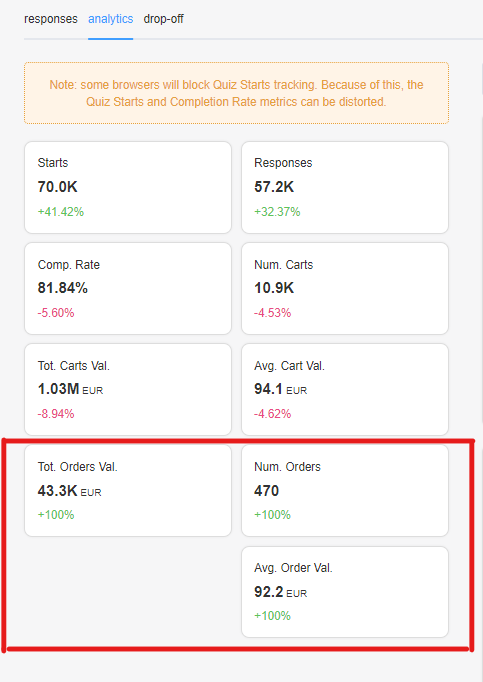
Once connected, Metrics > Analytics in the RevenueHunt app shows:
- Number of Orders: orders placed after a quiz completion (subject to the same-session caveat)
- Total Orders Value: cumulative revenue from those orders
- Avg. Order Value: average value of post-quiz orders
Show quiz answers in Shopify Orders on Legacy
Legacy also supports surfacing quiz answers on the Shopify order record, but it’s a separate toggle in the Connect tab (look for Shopify Orders Tagging). The mechanic is the same as BFS once enabled. See the docs page on showing quiz answers in orders for the per-platform walkthrough.
WooCommerce, Magento, BigCommerce, Standalone: GA4 only
No native Shopify-style revenue integration exists on these platforms. The supported path is Google Analytics 4, which works identically across every RevenueHunt version, doesn’t have the Legacy same-session caveat, and gives you attribution back as far as your GA4 reporting window allows.
GA4 integration: the cross-platform option
Even on BFS, GA4 is worth adding once revenue starts to matter. The native Shopify integration is good for “did the quiz produce a sale today?” GA4 answers the harder questions: which traffic source drove the highest-value quiz takers, which question is the biggest drop-off point, and what does the path to purchase look like for someone who took the quiz two weeks ago.
Setup
- In the RevenueHunt app, open the Connect tab and find Google Analytics.
- In GA4, open Admin > Data Streams and copy your Measurement ID (format
G-XXXXXXX). - Paste the Measurement ID into RevenueHunt and save.
- Publish the quiz to activate tracking.
What you get in GA4
- Quiz starts, question views, completion rates
- Choices selected and products recommended
- Add-to-cart actions and checkouts
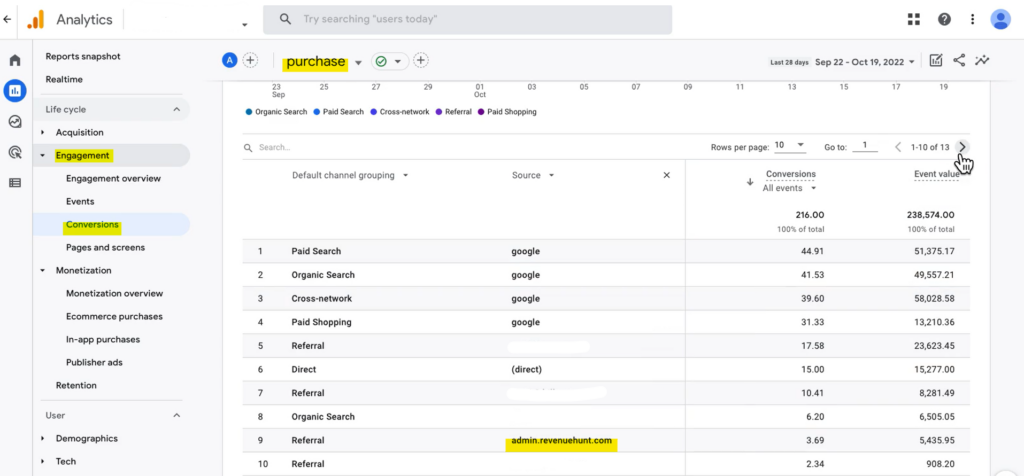
- Revenue from quiz-driven sales (Engagement > Conversions > Purchase, filter
source = revenuehunt)
For advanced custom events, embed the prqQuizCallback function in your theme to fire your own gtag calls for specific choices or answer combinations.
What the data is for
What the typical quiz-driven Shopify store looks like
5.5%
of shoppers who finish a quiz place an order, about 1 in 18, 2.75x a typical 2% store (RevenueHunt benchmark, 45M+ responses)
+11-15%
within-store AOV uplift on quiz orders vs non-quiz orders, holding in roughly 7 in 10 stores
1 in 5
quiz-attributed orders land more than 30 days later, so use GA4 alongside native Shopify tracking to capture the long tail
The numbers in the Analytics tab give you the headline. What makes them act on you is the downstream activation:
- Identify the high-converting answer paths. Sort responses by which choices correlate with the best average order value and double down on those paths in your quiz design.
- Tag every quiz answer for customer segmentation in email and ads. The Shopify order tags + Klaviyo / HubSpot custom properties are the activation surface. See customer tags in product quizzes.
- Retarget the shoppers who took the quiz but didn’t buy. Build a Meta audience on
Leadevent but notPurchase. The Meta Pixel quiz integration guide covers the full setup. - Watch the metrics that diagnose what to fix next. Use product quiz metrics: what to track to convert better as the troubleshooting playbook when a number lands below benchmark.
FAQ
Do I need to set anything up to see quiz revenue on Built for Shopify?
No. The Built for Shopify version connects to Shopify Orders automatically when installed. Open Analytics, pick the quiz, set the time window, and the orders + revenue numbers are there. Customise the dashboard if you want secondary metrics like AOV or carts.
Why is my Shopify Legacy revenue tracking showing low numbers?
The same-session attribution rule. On Legacy, only purchases made in the same session as the quiz completion get attributed. If most of your buyers complete the purchase later (after an email, after a re-engagement ad), GA4 is the right tool. Add it via the Connect tab and use the GA4 Purchase event filtered by source = revenuehunt for the full picture.
Can I see which Shopify order came from which quiz answer?
Yes, on both Built for Shopify and Shopify Legacy. On BFS the quiz answers appear on the Shopify order record by default. On Legacy you enable Shopify Orders Tagging in the Connect tab and the answers attach the same way. Support and fulfilment can read the stated preferences without leaving Shopify.
Does any of this work on WooCommerce, Magento, BigCommerce or Standalone?
No native Shopify-style revenue layer exists on those platforms, but the GA4 integration works on all of them. Set the Measurement ID in the Connect tab and revenue lands under Engagement > Conversions > Purchase in GA4, filtered by source = revenuehunt.
Should I run native Shopify tracking AND GA4?
On Built for Shopify, often yes. The native Shopify integration is the daily “did the quiz work today” check; GA4 handles delayed attribution, traffic-source attribution, and cohort analysis that the Shopify Analytics tab doesn’t cover. On Legacy with the same-session caveat, treating GA4 as the source-of-truth is usually safer.
Next steps
- For the metrics to diagnose against once revenue is flowing: product quiz metrics: what to track to convert better.
- For the ad-side audiences this data unlocks: Meta Pixel quiz integration.
- For the segmentation layer downstream: customer tags in product quizzes and Klaviyo zero-party data.
- For the recommendation logic that determines what shoppers see: product quiz recommendation systems.
- For the full strategy this attribution layer fits into: build a sales funnel on a Shopify store.
- Estimate the revenue lift on your own store: quiz ROI calculator.
- The benchmark report behind every stat: the state of product recommendation quizzes.
Free tools & data
Put these benchmarks to work on your own store.
Free tool
Quiz ROI calculator
Estimate the extra revenue and ROI a product recommendation quiz could add to your store. Built on real data, no email required.
Calculate your ROIFree report
Ecommerce quiz benchmark report
How product recommendation quizzes really perform: conversion by category, AOV uplift, and completion, from 45M+ real quiz responses.
Read the report
Most shoppers leave because they can't find the right product