
Shopify customer-data tools: 8 picks for a 2026 stack
The Shopify apps that pay back when you use them as a stack: zero-party data, behaviour, reviews, support, lead capture, and Shopify's native analytics.
Customer data is the difference between a Shopify store that broadcasts and a Shopify store that converts. The merchants who win in competitive niches treat data as a stack: declared preferences feed customer segmentation, behaviour feeds UX fixes, transactions feed retention, reviews feed trust, support tickets feed roadmap. No single tool covers all of that. This guide picks the eight apps we think every serious Shopify store should stand up, and shows how the data they collect connects.
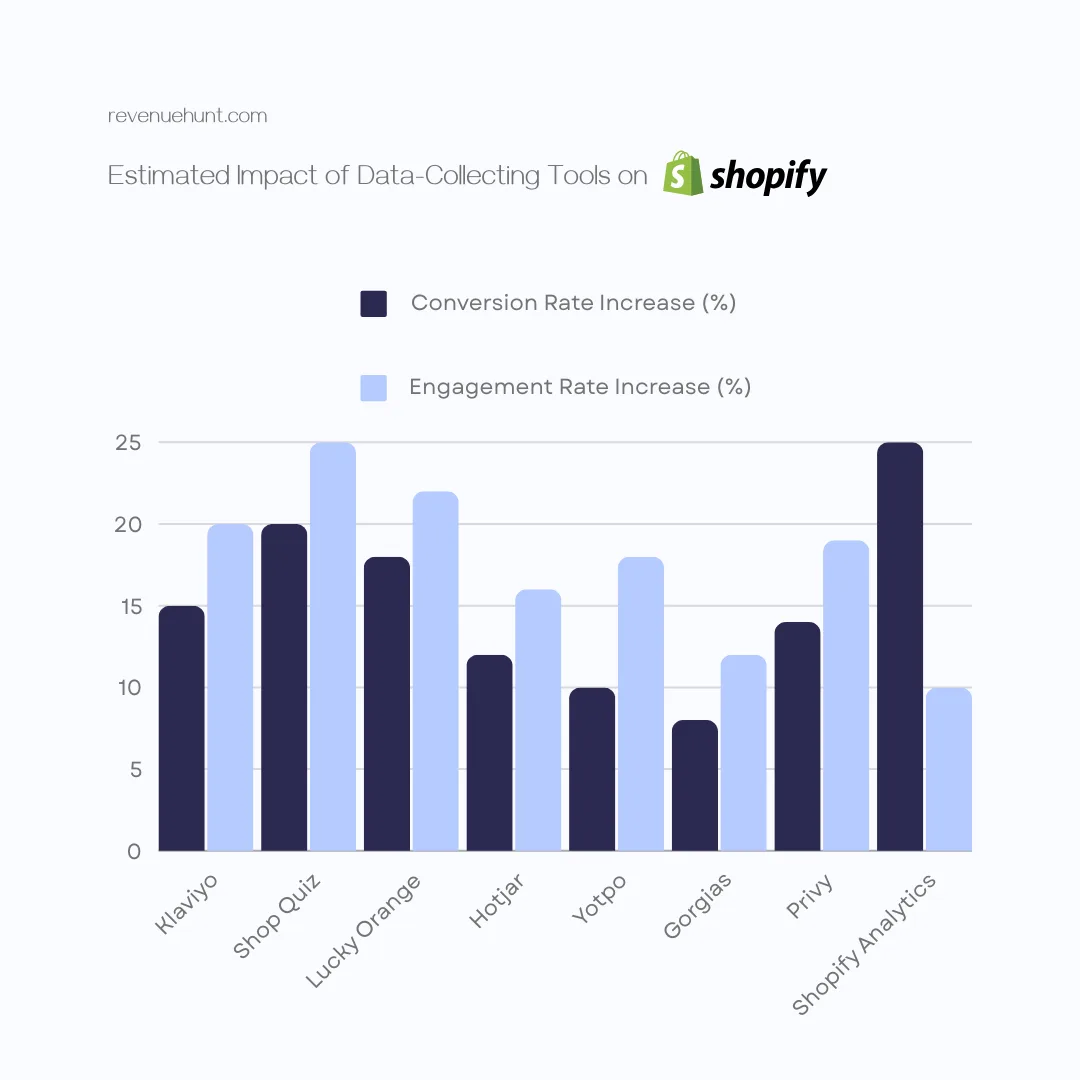
Fig. 01 Customer data on Shopify is captured in layers (zero-party, first-party behavioural, transactional, engagement, social proof, service, and lead capture), each owned by a different app in the stack.
What you'll learn
- →The data hierarchy: which categories to capture first, and which tool owns each layer.
- →Eight Shopify apps that cover zero-party data, behaviour, transactions, engagement, reviews, support, lead capture, and native analytics.
- →How the stack connects so the same customer data drives email, ads, on-site personalisation, and merchandising.
- →An at-a-glance comparison so you can pick what to install first when your budget is finite.
Why customer-data tools earn their keep
The personalisation revenue gap
71%
of consumers expect personalised interactions, and 76% get frustrated when they don't (McKinsey, Next in Personalization 2021)
40%
more revenue generated by companies that excel at personalisation versus average players (McKinsey, 2021)
80%
of consumers are more likely to buy from brands offering personalised experiences (Epsilon, 2018)
The headline figures are old enough that “personalisation lifts revenue” has stopped being a debate. The interesting question on Shopify in 2026 is how you actually capture the data that makes personalisation possible, given that third-party cookies, iOS privacy changes, and rising CAC have all closed off the cheap inference shortcuts. The eight tools below are the practical answer.
The data hierarchy
Before tools, the data categories themselves, in roughly the order most stores should capture them:
| Layer | What it is | Tool that owns it |
|---|---|---|
| Zero-party | Stated preferences, goals, constraints (declared in a quiz) | RevenueHunt |
| First-party (behavioural) | Browsing, scroll depth, click patterns, friction points | Hotjar, Lucky Orange |
| Transactional | Orders, AOV, repeat rate, product affinity | Shopify Analytics |
| Engagement | Email opens, clicks, SMS responses, segment movement | Klaviyo |
| Social proof | Reviews, ratings, photo and video UGC | Yotpo |
| Service / voice-of-customer | Tickets, complaints, FAQs, resolution time | Gorgias |
| Lead capture | Email opt-ins, exit-intent, top-of-funnel | Privy |
The eight tools
1. RevenueHunt: Recommender Quiz for Shopify
A product recommendation quiz for Shopify is the cleanest way to collect zero-party data: stated preferences a customer hands you in exchange for a relevant recommendation. Skin type, goals, gift recipient, budget band, ingredient sensitivities. The same answers then power personalised results, segmented email flows, retargeting audiences, and merchandising. RevenueHunt’s Built for Shopify version connects to Shopify Orders automatically for revenue attribution; the Klaviyo zero-party data activation playbook walks the next-step segmented flows.
The data backs this up. Across 20,000+ stores and 45M+ quiz responses on the platform: 5.5% of shoppers who finish a quiz place an order (about 1 in 18, 2.75x a typical 2% store), 69% of starters reach the results page, and within-store AOV runs 11-15% higher on quiz orders than non-quiz orders (2026 benchmark report). Segmented Klaviyo campaigns earn over 3x the revenue per recipient of generic sends, and quiz answers are the data that makes that segmentation possible. The platform has tracked over $370M in merchant revenue. For a worked example on cold Meta traffic, see the anti-ageing device case study (9.8% quiz-to-purchase CVR, +42.64% AOV lift, $691,128 in 90 days).

RevenueHunt: Recommender Quiz for Shopify
Zero-party-data quiz funnels that convert and feed every other tool in the stack.
Launch a quiz on Shopify →2. Klaviyo
Klaviyo is the de-facto email and SMS platform on Shopify because of how cleanly it ingests customer events, behaviours, and properties from the storefront and from other apps. Quiz answers, browsing events, order history, and engagement signals all live on a single customer profile, which means segmentation can compose across them.
Klaviyo’s own 2024 benchmark report puts average email order rates for ecommerce at around 0.1% per send for promotional campaigns and substantially higher for behaviour-triggered flows. Stores running quiz-driven flows (welcome series segmented by quiz answer) typically see 3-5x the conversion rate of generic welcome series.

Klaviyo: Email Marketing
Email + SMS marketing with deep Shopify and zero-party-data integration.
Add app →3. Hotjar
Hotjar collects qualitative behavioural data that conversion analytics can’t see: where shoppers move their cursor, how far they scroll, where they hesitate, what their on-page surveys say in their own words. The case studies on Hotjar’s own site show conversion lifts ranging from 15% to 400% from changes informed by heatmap and recording analysis, which is wide but directionally clear: when you can see exactly where users abandon, the fix is usually cheap.
For Shopify specifically, the value is highest on the product page and checkout. Heatmaps show whether shoppers see the “add to cart” button without scrolling on mobile; recordings show exactly where they bail on the shipping step.

4. Lucky Orange
Lucky Orange covers the same behavioural data layer as Hotjar but leans more on live tools: live visitor view, live chat, and form analytics. Where Hotjar feels research-heavy, Lucky Orange feels operations-heavy. For a smaller team that wants to react in real time to a sales event, the live cursor view and chat-when-stuck pattern can recover sessions that would otherwise bail.
It’s a useful alternative or complement to Hotjar; many stores end up running one and dropping the other after the first month, depending on which matches the team’s working style.

5. Yotpo
Yotpo collects the data that prospective customers actually look for before they buy: reviews, ratings, photo and video UGC. The shopper-side numbers are striking. The BrightLocal 2026 review survey found that 97% of consumers read reviews for local businesses before buying, and 49% trust strangers online as much as people they know in person.
For Shopify merchants the value compounds twice: reviews lift conversion on the product page, and the review text itself becomes a voice-of-customer dataset for everything from ad copy to roadmap. Yotpo’s review-request automations, photo prompts, and Q&A widgets handle the collection; its review syndication pushes the same content to Google Shopping and search results.

6. Gorgias
Gorgias treats every customer-service interaction as data. Tickets are tagged, channels are unified (email, chat, social, SMS), and patterns surface across volume: “shipping ETA” is the top question, or “fit” returns spiking after a launch. The dataset becomes a brief for the rest of the business: roadmap signal, FAQ content, refund-policy adjustments, product-page copy.
The conversion lever is automation: Gorgias claims around 30% of common queries can be deflected with self-service flows, freeing the team to handle the ones that genuinely need a human. For Shopify specifically the deep integration means agents see order history, cart, and refund options without leaving the ticket.

7. Privy
Privy fills the lead-capture layer for anonymous visitors who aren’t going to take a full quiz on a first visit. Exit-intent popups, banners, spin-to-win, sticky forms. The capture is shallower than a quiz (just an email, sometimes a coupon code) but the audience is larger, because not every visitor will engage with anything heavier than a 5-second offer.
Used well it complements RevenueHunt rather than competing with it: Privy catches the casual visitor at the edge of the funnel; the quiz captures structured zero-party data from shoppers who’ve signalled higher intent. Both feed Klaviyo as new contacts. For the broader argument on when entry-popup capture works and when it doesn’t (and why the popup-captured list rarely segments cleanly on its own), see why popups are walls and quizzes are doors.

8. Shopify Analytics
The native option. Free, already turned on, and the canonical source for transactional and storefront performance data. Sessions, conversion rate, AOV, repeat-customer rate, top products, top referrers. The depth varies by Shopify plan: ShopifyPlus exposes custom reports and cohort tools that lower tiers don’t get, but every plan ships enough to ground every other tool in the stack against revenue.
Treat Shopify Analytics as the truth layer: any conversion claim from a third-party app should reconcile against the Shopify orders view, not the app’s own dashboard. For the deeper argument on why Pixel and GA4 under-report quiz revenue and how to anchor every claim against Shopify Orders, see first-party Shopify quiz analytics.

Shopify Analytics
Native Shopify reporting on traffic, conversion, AOV, repeat rate, and cohort behaviour.
Visit site →At-a-glance comparison
| Tool | Data type | Install priority | Free tier? |
|---|---|---|---|
| Shopify Analytics | Transactional | Day 1 (native) | Included |
| Klaviyo | Engagement + behavioural | First | Yes (250 contacts) |
| RevenueHunt | Zero-party | First | Yes (100 completions/mo) |
| Yotpo | Social proof | Second | Yes (50 emails/mo) |
| Privy | Lead capture | Second | Yes (100 contacts) |
| Hotjar | Behavioural (qualitative) | Third | Yes (35 sessions/day) |
| Lucky Orange | Behavioural (live) | Third (alt to Hotjar) | Yes (100 sessions/mo) |
| Gorgias | Service / voice-of-customer | Once ticket volume justifies | 7-day trial |
Where to start when budget is finite
The economically efficient stack for a Shopify store under $1M ARR is three apps plus the native analytics:
- Shopify Analytics is free and already on. Use it as the truth layer.
- Klaviyo earns its keep faster than any single other paid tool, especially when paired with a quiz feeding zero-party data into custom properties.
- RevenueHunt captures the data that makes Klaviyo’s segmentation worth doing.
- Yotpo or Privy as the next paid tool depending on whether your bottleneck is conversion (reviews) or top-of-funnel (lead capture).
Behavioural analytics (Hotjar or Lucky Orange) and support tooling (Gorgias) tend to pay back at higher volume, when the cost of unseen friction or unanswered tickets has scaled past the cost of the tool.
FAQ
Which tool should I install first if I’m just starting out?
If you only do one thing this month, set up RevenueHunt and connect it to Klaviyo. That gives you zero-party data, an email list, and the segmentation hooks to act on what shoppers tell you. Shopify Analytics is free and already on, so it counts as zero effort.
Do I really need eight apps?
No. Most stores run four to five of these comfortably. The hierarchy in this guide is the right order to add them: start with native analytics, layer Klaviyo and a quiz, add reviews and lead capture, then behavioural and support tools when the volume justifies them.
Free plans vs paid: where’s the tipping point?
Free plans are genuine for the apps in this list, but they each cap usage at the point where revenue would be paying for itself. Klaviyo’s free tier maxes at 250 contacts; you’ll outgrow it around your first thousand email subscribers. RevenueHunt’s free plan handles 100 quiz completions a month, fine while you’re testing, tight when the quiz lands. The tipping point in practice is when the free-tier cap throttles the lever, not before.
How do these tools handle GDPR and CCPA?
Each of the tools in this list ships GDPR-aware consent flows, but compliance is yours, not theirs. The key controls are: explicit consent for marketing (email, SMS), declared purpose for each data collection point, retention limits set explicitly, and an easy withdrawal mechanism. For quizzes specifically, see our guide on asking for marketing consent inside a quiz.
Is Shopify Analytics enough on its own?
For early-stage stores under $100k revenue, yes. Shopify Analytics tells you what’s selling and where the traffic comes from, which is enough to make merchandising and marketing decisions. The other tools earn their place once you need to know why customers behave the way they do, not just what they bought, and once segmentation, reviews, or support volume become bottlenecks.
Next steps
- For the zero-party-data layer in depth: zero-party data guide and Klaviyo zero-party data flows.
- To pick the right recommendation logic when you stand the quiz up: product quiz recommendation systems.
- For consent collection inside the quiz: marketing consent in your quiz.
- To choose the right metrics for the funnel: product quiz metrics.
- Avoid the design traps that nullify the data: product quiz mistakes ranked by industry data.
- For the strategy this stack fits into: build a sales funnel on a Shopify store and 11 ecommerce sales funnel examples.
- For a worked stack-in-production example with disclosed quiz metrics: Extreme Kids World case study.
- New to the playbook? Start with how to build a successful ecommerce quiz.
Free tools & data
Put these benchmarks to work on your own store.
Free tool
Quiz ROI calculator
Estimate the extra revenue and ROI a product recommendation quiz could add to your store. Built on real data, no email required.
Calculate your ROIFree report
Ecommerce quiz benchmark report
How product recommendation quizzes really perform: conversion by category, AOV uplift, and completion, from 45M+ real quiz responses.
Read the report
Most shoppers leave because they can't find the right product